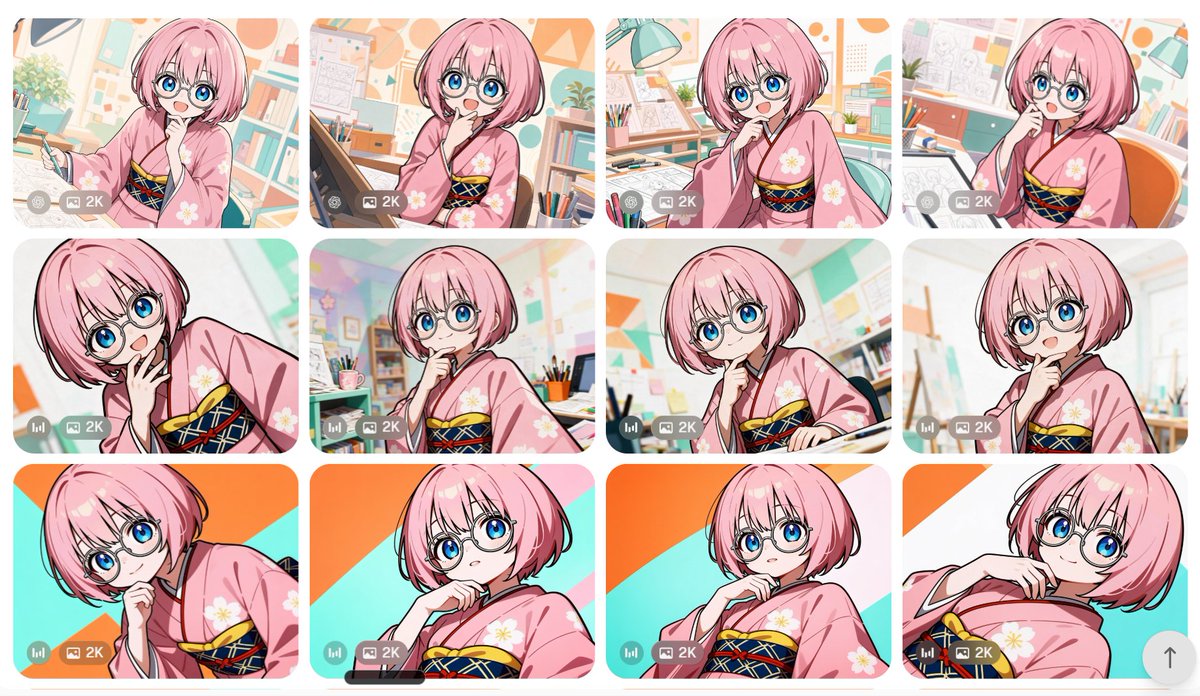
Anime Girl Generation Grid
Creates a 12-card comparison gallery of a pink-haired anime girl in kimono variations for showcasing image-generation outputs.
Dette er et tilfelle av en GPT Image 2 -ledetekst for Anime og spill . Bruk den kopieringsklare ledeteksten nedenfor for å generere lignende visuelle elementer, og gjennomgå Awesome GPT Image 2 Prompts -attribusjonen pluss kommersielle bruksrettigheter før gjenbruk.
Trenger du hele settet med ledetekster? Bruk Anime og spill emnehub for flere relaterte eksempler, eller åpne GPT Image 2 rask katalog for den fullstendige eksempelindeksen, gjenbrukbare strukturer og kildeattribusjon.
Free 1K preview
Generate one preview image instantly, no sign-up required.
3096/4000
Spørsmål
Klar til kopiering
Goal: Create a contact-sheet style comparison grid of anime image generations featuring the same character in multiple variations.

Canvas: Wide landscape canvas, approximately 16:9, with a clean off-white page background and generous margins. Arrange exactly 12 rounded-rectangle image cards in a 4-column by 3-row grid with narrow white gutters between cards.

Subject details: Each card shows the same cute anime girl, {argument name="character name" default="a pink-haired manga artist girl"}, with a short fluffy bob haircut, large bright blue eyes, round wire-frame glasses, pale skin, and a cheerful curious expression. She wears a soft pink kimono with white flower motifs and a dark navy obi decorated with red and yellow crisscross cords. Her poses vary slightly but keep a consistent thoughtful gesture: hand near chin, cheek, mouth, or collar, with occasional leaning or tilted framing.

Card count and visible variations: Include exactly 12 generated-image thumbnails. Row 1 has 4 cards: 1) girl holding a drawing pen in a bright studio, 2) girl at a drafting tablet with hand near mouth, 3) girl leaning forward in an art room with desk lamp, 4) girl seated beside an orange chair with sketch papers behind her. Row 2 has 4 cards: 5) close-up tilted pose with hand near mouth, 6) centered pose in a colorful classroom-like studio, 7) thoughtful pose beside a drawing desk, 8) bright close-up with a softly blurred art-room background. Row 3 has 4 cards: 9) dramatic diagonal close-up against orange and turquoise graphic background, 10) low-angle portrait with hand at chin, 11) centered portrait against the same orange/turquoise diagonal background, 12) reclining tilted portrait with hand near collar.

Backgrounds: Use a cheerful manga studio or art classroom setting in most cards: bookshelves, pencils in cups, drafting tables, sketch sheets, lamps, bulletin boards, pastel geometric wall decorations, plants, and warm daylight. For the bottom row, use a flatter bold graphic backdrop with turquoise and orange diagonal shapes in at least three cards.

Visual style: Polished modern anime illustration, crisp black line art, glossy eyes, soft cel shading, pastel color palette, clean high-resolution look, bright and friendly. Make each thumbnail feel like a separate generation with small differences in crop, pose, and background, while maintaining character consistency.

Interface overlays: On every card, add a small semi-transparent gray control strip near the lower-left corner. The strip contains tiny round utility icons and a visible label reading {argument name="quality label" default="2K"}. Some cards may include a small bar-chart style icon at the far left of the strip. Add a subtle rounded up-arrow floating button near the lower-right edge of the overall canvas.

Constraints: Preserve the exact 4 by 3 grid and exactly 12 cards. Do not add extra characters. Avoid text other than the repeated small {argument name="quality label" default="2K"} overlay. Keep rounded corners, consistent spacing, and the feel of a screenshot from an image-generation gallery.
Promptvariabler
Redigerbare argumentplassholdere funnet i ledeteksten, med standardverdiene.
Variabel
character name
Misligholde
a pink-haired manga artist girl
Variabel
quality label
Misligholde
2K
Best for
- - Anime og spill visual exploration
- - Image generation and reference-image edits
- - Reusable briefs that keep source attribution visible
Change these parts
- - Subject, product, character, or scene
- - Aspect ratio, camera, lighting, and background
- - Brand, text, color, and output constraints
Recommended model and settings
- - Model: gpt-image-2
- - Input mode: Tekst til bilde
- - Aspect ratio: source
- - Commercial status: review original source
How to use this prompt
- 1. Copy the prompt and preserve its structure for the first test.
- 2. Replace the subject, context, and publishing channel.
- 3. Change one camera, lighting, or style variable per iteration.
- 4. Inspect the output, source, text, and rights before reuse.
Limitations, source, and reuse cautions
- - Generated output is an editable draft, not factual, legal, or rights evidence.
- - Review the linked source, people, brands, logos, text, and third-party media before commercial use.
Importert fra Awesome GPT Image 2 Prompts . Attribusjon kreves. Status for kommersiell bruk er allowed ; sjekk kilderettighetene før betalt bruk.
Flere saker i denne kategorien
Prioritert etter kategori, kompatibilitet med inndatamodus, kvalitet og lavere risiko.






Gjenbruk og kildenotater
Bruk denne ledeteksten på en trygg måte etter at du har forhåndsvist saken.
- 1.Kopier ledeteksten eller åpne den direkte i Dovoo med genereringsknappen.
- 2.Juster variabler, sideforhold og referansebilder for ditt eget brukstilfelle.
- 3.Før publisering eller betalt bruk, kontroller kilderettigheter, krav til kreditering og risikoer knyttet til merkevare eller likhet.