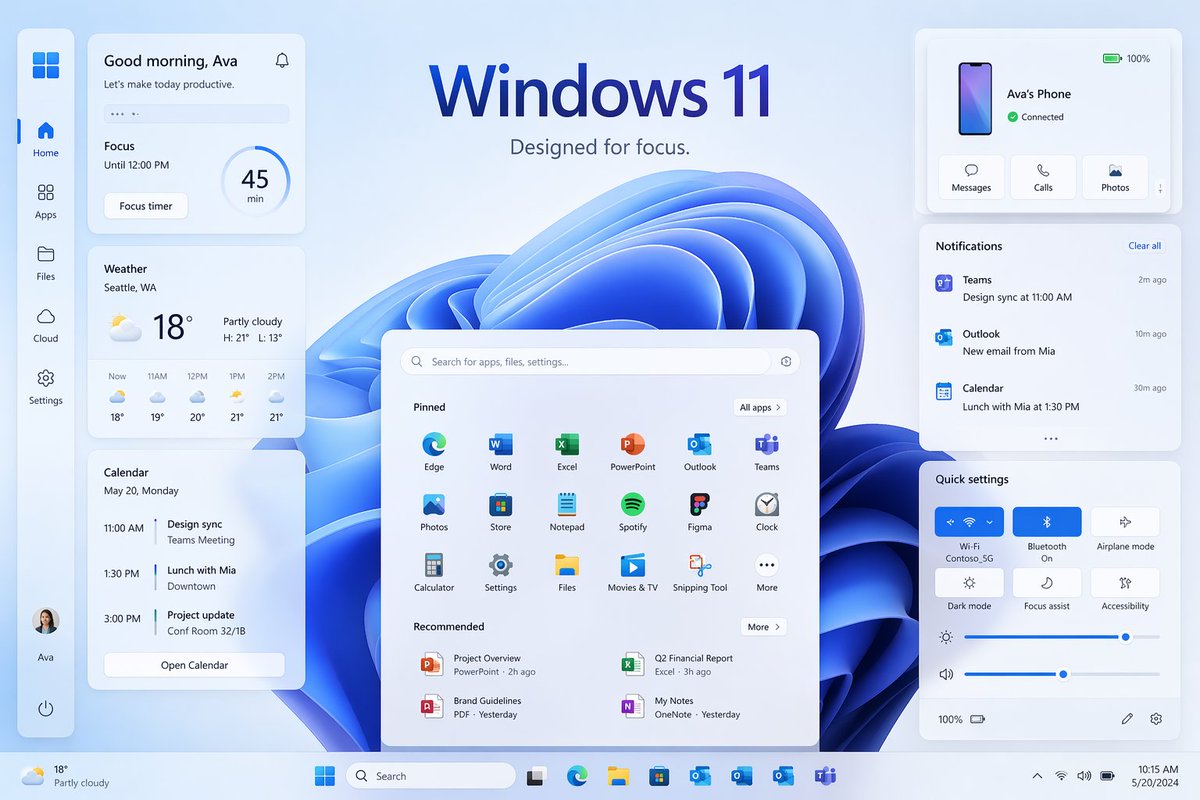
윈도우 11 포커스 UI 쇼케이스
다양한 위젯과 패널을 갖춘 세련된 Windows 11 스타일의 홍보용 데스크톱 목업으로, 최신 운영 체제 마케팅 시각 자료를 재현하는 데 이상적입니다.
이것은 제품 및 상업 에 대한 GPT Image 2 프롬프트 사례입니다. 아래의 복사 가능한 프롬프트를 사용하여 유사한 시각 자료를 생성하고, 재사용하기 전에 Awesome GPT Image 2 Prompts 의 저작자 표시 및 상업적 사용 권한을 검토하십시오.
전체 프롬프트 세트가 필요하신가요? 다음을 사용하세요. 제품 및 상업 더 많은 관련 예시를 보려면 주제 허브를 열거나 다음을 열어보세요. GPT Image 2 프롬프트 카탈로그 전체 예제 색인, 재사용 가능한 구조 및 출처 표기는 다음을 참조하십시오.
Free 1K preview
Generate one preview image instantly, no sign-up required.
4000/4000
프롬프트
복사 준비 프롬프트
{
  "type": "Windows 11 promotional UI mockup",
  "style": "clean modern product marketing render, soft glassmorphism cards, subtle shadows, rounded corners, light blue and white palette, crisp vector-like interface, polished presentation slide aesthetic",
  "scene": {
    "background": "pale icy blue gradient background with a large abstract Windows 11 blue ribbon swirl wallpaper centered behind the interface",
    "headline": {
      "text": "{argument name=\"headline text\" default=\"Windows 11\"}",
      "subtext": "{argument name=\"tagline\" default=\"Designed for focus.\"}",
      "position": "top center"
    }
  },
  "layout": {
    "type": "desktop UI showcase",
    "sections": [
      {
        "title": "left sidebar",
        "position": "far left vertical dock",
        "count": 8,
        "labels": [
          "Windows logo",
          "Home",
          "Apps",
          "Files",
          "Cloud",
          "Settings",
          "Ava profile",
          "Power"
        ]
      },
      {
        "title": "productivity widgets",
        "position": "left column cards",
        "count": 3,
        "labels": [
          "Good morning, Ava",
          "Weather",
          "Calendar"
        ]
      },
      {
        "title": "center start menu",
        "position": "lower center",
        "count": 3,
        "labels": [
          "Search bar",
          "Pinned",
          "Recommended"
        ]
      },
      {
        "title": "right column cards",
        "position": "upper and middle and lower right",
        "count": 3,
        "labels": [
          "Ava's Phone",
          "Notifications",
          "Quick settings"
        ]
      },
      {
        "title": "taskbar",
        "position": "bottom full width",
        "count": 10,
        "labels": [
          "Weather summary",
          "Start",
          "Search",
          "Task View",
          "Microsoft Edge",
          "File Explorer",
          "Microsoft Store",
          "Outlook",
          "OneDrive",
          "Teams"
        ]
      }
    ],
    "centerpiece": "large Windows 11 Start menu floating in front of the blue abstract wallpaper"
  },
  "widgets": {
    "greeting_card": {
      "title": "Good morning, Ava",
      "subtitle": "Let's make today productive.",
      "focus_block": {
        "label": "Focus",
        "time": "Until 12:00 PM",
        "timer": "45 min",
        "button": "Focus timer"
      }
    },
    "weather_card": {
      "location": "{argument name=\"weather location\" default=\"Seattle, WA\"}",
      "temperature": "18°",
      "condition": "Partly cloudy",
      "range": "H: 21°  L: 13°",
      "forecast_count": 5,
      "forecast_labels": [
        "Now 18°",
        "11AM 19°",
        "12PM 20°",
        "1PM 21°",
        "2PM 21°"
      ]
    },
    "calendar_card": {
      "date": "May 20, Monday",
      "events_count": 3,
      "event_labels": [
        "11:00 AM Design sync, Teams Meeting",
        "1:30 PM Lunch with Mia, Downtown",
        "3:00 PM Project update, Conf Room 32/1B"
      ],
      "button": "Open Calendar"
    },
    "phone_card": {
      "device_name": "{argument name=\"device name\" default=\"Ava's Phone\"}",
      "status": "Connected",
      "actions_count": 3,
      "action_labels": [
        "Messages",
        "Calls",
        "Photos"
      ],
      "battery": "100%"
    },
    "notifications_card": {
      "title": "Notifications",
      "action": "Clear all",
      "items_count": 3,
      "item_labels": [
        "Teams — Design sync at 11:00 AM — 2m ago",
        "Outlook — New email from Mia — 10m ago",
        "Calendar — Lunch with Mia at 1:30 PM — 30m ago"
      ]
    },
    "quick_settings_card": {
      "title": "Quick settings",
      "toggles_count": 6,
      "toggle_labels": [
        "Wi‑Fi",
        "Bluetooth",
        "Airplane mode",
        "Dark mode",
        "Focus assist",
        "Accessibility"
      ],
      "active_toggles": [
        "Wi‑Fi",
        "Bluetooth"
      ],
      "sliders_count": 2,
      "slider_labels": [
        "Brightness",
        "Volume"
      ],
      "wifi_network": "Contoso_5G"
    },
    "start_menu": {
      "search_placeholder": "Search for apps, files, settings...",
      "pinned_count": 18,
      "pinned_labels": [
        "Edge",
        "Word",
        "Excel",
        "PowerPoint",
        "Outlook",
        "Teams",
        "Photos",
        "Store",
        "Notepad",
        "Spotify",
        "Figma",
        "Clock",
        "Calculator",
        "Settings",
        "Files",
        "Movies & TV",
        "Snipping Tool",
        "More"
      ],
      "recommended_count": 4,
      "recommended_labels": [
        "Project Overview",
        "Q2 Financial Report",
        "Brand Guidelines",
        "My Notes"
      ]
    }
  },
  "composition": "symmetrical product showcase with the Start menu centered, three stacked cards on the left, three cards on the right, generous spacing, all elements floating slightly above the background, bottom taskbar spanning edge to edge",
  "rendering": "high-resolution UI concept art for a desktop operating system launch page, immaculate typography, Microsoft-inspired iconography without extra branding clutter"
}
프롬프트 변수
프롬프트에 있는 편집 가능한 인수 자리 표시자와 해당 기본값입니다.
변하기 쉬운
headline text
기본
Windows 11
변하기 쉬운
tagline
기본
Designed for focus.
변하기 쉬운
weather location
기본
Seattle, WA
변하기 쉬운
device name
기본
Ava's Phone
Best for
- - 제품 및 상업 visual exploration
- - Image generation and reference-image edits
- - Reusable briefs that keep source attribution visible
Change these parts
- - Subject, product, character, or scene
- - Aspect ratio, camera, lighting, and background
- - Brand, text, color, and output constraints
Recommended model and settings
- - Model: gpt-image-2
- - Input mode: 텍스트 to 이미지
- - Aspect ratio: source
- - Commercial status: review original source
How to use this prompt
- 1. Copy the prompt and preserve its structure for the first test.
- 2. Replace the subject, context, and publishing channel.
- 3. Change one camera, lighting, or style variable per iteration.
- 4. Inspect the output, source, text, and rights before reuse.
Limitations, source, and reuse cautions
- - Generated output is an editable draft, not factual, legal, or rights evidence.
- - Review the linked source, people, brands, logos, text, and third-party media before commercial use.
Awesome GPT Image 2 Prompts 에서 가져왔습니다. 출처 표기가 필요합니다. 상업적 이용 가능 여부는 allowed 입니다. 유료 사용 전에 원저작권 정보를 확인하세요.
이 범주에 속하는 더 많은 사례
범주, 입력 방식 호환성, 품질 및 위험도에 따라 우선순위가 정해집니다.






재사용 및 출처 참고 사항
사례를 미리 확인한 후 이 안내 메시지를 안전하게 사용하십시오.
- 1.프롬프트를 복사하거나 Dovoo의 생성 버튼을 사용하여 직접 엽니다.
- 2.사용 사례에 맞게 변수, 화면 비율 및 참조 이미지를 조정하십시오.
- 3.출판 또는 유료 사용 전에 저작권, 출처 표기 요건 및 브랜드 또는 초상권 관련 위험을 확인하십시오.