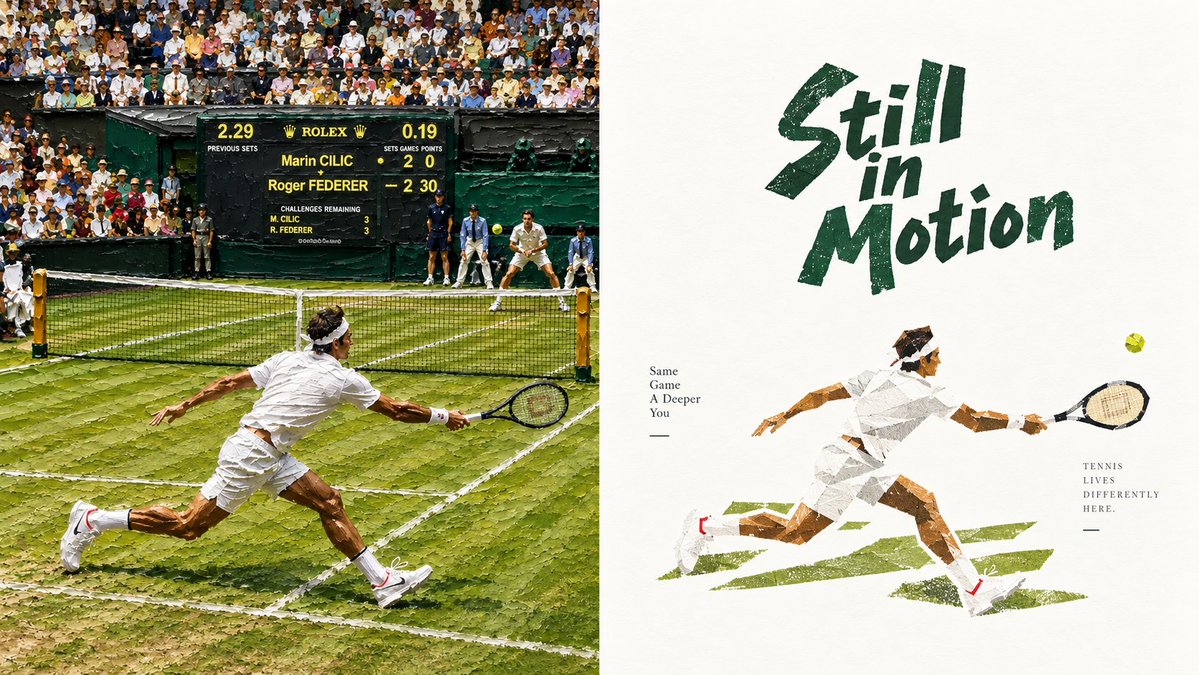
Wimbledon Motion Diptych Poster
Generates a split-screen tennis artwork combining a realistic Wimbledon rally with a distressed editorial poster illustration.
이것은 그래픽 및 포스터 에 대한 GPT Image 2 프롬프트 사례입니다. 아래의 복사 가능한 프롬프트를 사용하여 유사한 시각 자료를 생성하고, 재사용하기 전에 Awesome GPT Image 2 Prompts 의 저작자 표시 및 상업적 사용 권한을 검토하십시오.
전체 프롬프트 세트가 필요하신가요? 다음을 사용하세요. 그래픽 및 포스터 더 많은 관련 예시를 보려면 주제 허브를 열거나 다음을 열어보세요. GPT Image 2 프롬프트 카탈로그 전체 예제 색인, 재사용 가능한 구조 및 출처 표기는 다음을 참조하십시오.
Free 1K preview
Generate one preview image instantly, no sign-up required.
2977/4000
프롬프트
복사 준비 프롬프트
Objective: Create a wide-format sports diptych about the Wimbledon tennis tournament, with a realistic match scene on the left and a rough cut-paper style illustration poster on the right.

Canvas: 16:9 landscape composition, precisely divided into 2 equal vertical panels. The left panel is a crowded outdoor grass tennis court in bright sunlight; the right panel is a textured off-white poster page with ample negative space.

Left Panel: Showcase a realistic, slightly oil-painting-esque photographic-style Wimbledon grass tennis rally. The scene contains 2 visible tennis players: 1 player in the foreground wearing all-white sportswear, sprinting and diving towards the right net, racket extended; and 1 opponent in the background wearing white sportswear, waiting near the far baseline. Include a black net spanning the lower-middle of the frame, worn green grass with white court lines, dark green court walls, ball boys and a referee in dark uniforms, and a dense crowd of spectators in the stands. Add a central dark green scoreboard with the Rolex brand logo and readable match details: “Marin CILIC” above “Roger FEDERER”, with the score showing Cilic 2 0 and Federer 2 30, and a smaller row of match data. Keep the foreground player dynamic, with a low center of gravity, wearing a white headband, white shirt and shorts, white socks and shoes with small red accents.

Right Panel: Create a minimalist retro tennis poster on textured cream paper. In the upper-right center, place a huge, rough brushstroke font {argument name="headline text" default="Still in Motion"} in deep forest green, with a slant and hand-drawn distressed edges. Below, draw a single-sided collage-style white tennis player sprinting to the right, body stretched horizontally, one arm back, and the racket arm extended towards a small yellow tennis ball. Use angular torn paper shapes, visible paper texture, sepia-toned skin fragments, gray shadows, and deep green grass brushstrokes underfoot. Add 2 small typography blocks: to the left of the illustrated player, stack the text {argument name="left small text" default="Same\nGame\nA Deeper\nYou"} below a short dash; to the right of the illustrated player, stack the text {argument name="right small text" default="TENNIS\nLIVES\nDIFFERENTLY\nHERE."} below a short dash.

Visual Style: The left side contrasts with detailed documentary tennis photography, while the right side adopts a rugged illustration aesthetic. Use Wimbledon color schemes: deep green, grass green, white, cream, soft yellow, sepia, and black. Emphasize motion, competitive tension, textured grass, distressed paper, imperfect brushstroke typography, and collage-like geometry.

Constraints: The realistic left panel must contain 2 main tennis players, and the right panel must contain 1 illustrated tennis player. Maintain a clear split-screen layout, no additional logos except for the Rolex-style scoreboard on the left, no watermarks, and no modern UI elements.
프롬프트 변수
프롬프트에 있는 편집 가능한 인수 자리 표시자와 해당 기본값입니다.
변하기 쉬운
headline text
기본
Still in Motion
변하기 쉬운
left small text
기본
Same\nGame\nA Deeper\nYou
변하기 쉬운
right small text
기본
TENNIS\nLIVES\nDIFFERENTLY\nHERE.
Best for
- - 그래픽 및 포스터 visual exploration
- - Image generation and reference-image edits
- - Reusable briefs that keep source attribution visible
Change these parts
- - Subject, product, character, or scene
- - Aspect ratio, camera, lighting, and background
- - Brand, text, color, and output constraints
Recommended model and settings
- - Model: gpt-image-2
- - Input mode: 텍스트 to 이미지
- - Aspect ratio: source
- - Commercial status: review original source
How to use this prompt
- 1. Copy the prompt and preserve its structure for the first test.
- 2. Replace the subject, context, and publishing channel.
- 3. Change one camera, lighting, or style variable per iteration.
- 4. Inspect the output, source, text, and rights before reuse.
Limitations, source, and reuse cautions
- - Generated output is an editable draft, not factual, legal, or rights evidence.
- - Review the linked source, people, brands, logos, text, and third-party media before commercial use.
Awesome GPT Image 2 Prompts 에서 가져왔습니다. 출처 표기가 필요합니다. 상업적 이용 가능 여부는 allowed 입니다. 유료 사용 전에 원저작권 정보를 확인하세요.
이 범주에 속하는 더 많은 사례
범주, 입력 방식 호환성, 품질 및 위험도에 따라 우선순위가 정해집니다.






재사용 및 출처 참고 사항
사례를 미리 확인한 후 이 안내 메시지를 안전하게 사용하십시오.
- 1.프롬프트를 복사하거나 Dovoo의 생성 버튼을 사용하여 직접 엽니다.
- 2.사용 사례에 맞게 변수, 화면 비율 및 참조 이미지를 조정하십시오.
- 3.출판 또는 유료 사용 전에 저작권, 출처 표기 요건 및 브랜드 또는 초상권 관련 위험을 확인하십시오.