Weather Vending Machine Comparison
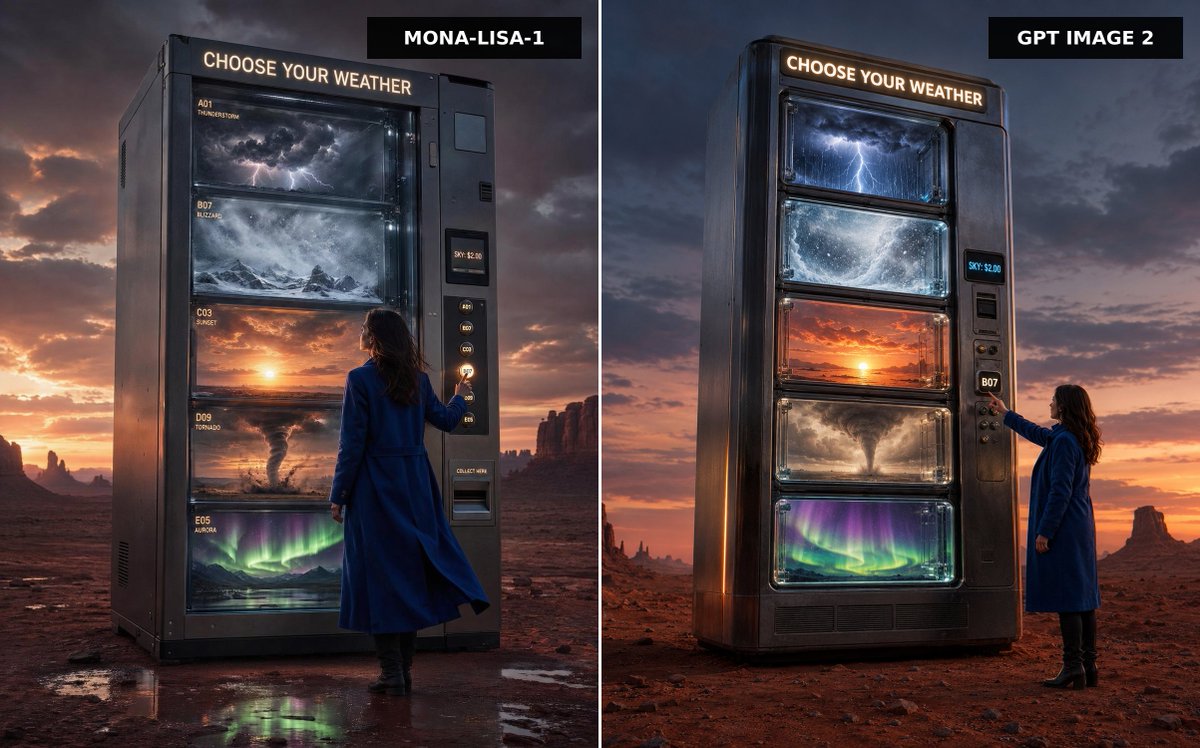
A cinematic split-screen desert advertisement comparing two versions of a colossal vending machine that dispenses different kinds of weather.
이것은 제품 및 상업 에 대한 GPT Image 2 프롬프트 사례입니다. 아래의 복사 가능한 프롬프트를 사용하여 유사한 시각 자료를 생성하고, 재사용하기 전에 Awesome GPT Image 2 Prompts 의 저작자 표시 및 상업적 사용 권한을 검토하십시오.
전체 프롬프트 세트가 필요하신가요? 다음을 사용하세요. 제품 및 상업 더 많은 관련 예시를 보려면 주제 허브를 열거나 다음을 열어보세요. GPT Image 2 프롬프트 카탈로그 전체 예제 색인, 재사용 가능한 구조 및 출처 표기는 다음을 참조하십시오.
Free 1K preview
Generate one preview image instantly, no sign-up required.
1876/4000
프롬프트
복사 준비 프롬프트
Create a split-screen comparison image showing two premium cinematic advertising photographs side by side, separated by a thin vertical white divider. The scene is a vast red desert at dusk with dramatic storm clouds, orange sunset glow on the horizon, distant mesas and rock spires, and wet reflective patches on the desert floor. In both panels, place a colossal dark metallic vending machine standing alone, labeled at the top with glowing warm-white text: “CHOOSE YOUR WEATHER”. The machine sells weather instead of snacks, with exactly five large glass display shelves containing: 1) a miniature thunderstorm with dark clouds and lightning, 2) a swirling blizzard over snowy mountains, 3) a glowing sunset sky, 4) a tornado over dusty plains, and 5) green-purple aurora lights over a night landscape. Include a woman in a long cobalt-blue coat and black boots standing beside the vending machine, seen from behind or side-back, reaching toward the selection buttons. The vending machine has a side payment/control panel with small glowing code buttons, a digital price display reading “SKY: $2.00”, and a collection slot. Add black rectangular title tags at the top of each panel: left tag reads {argument name="left model label" default="MONA-LISA-1"}, right tag reads {argument name="right model label" default="GPT IMAGE 2"}. Make the left panel slightly closer and more imposing, with readable small shelf labels such as A01 THUNDERSTORM, B07 BLIZZARD, C03 SUNSET, D09 TORNADO, and E05 AURORA; make the right panel a cleaner vertical machine design with the same five weather windows. Use ultra-realistic photography, cinematic lighting, high contrast, glossy glass reflections, moody atmosphere, premium sci-fi advertising style, sharp detail, 16:9 landscape composition, no extra text beyond the vending machine signage, shelf labels, price display, and model tags.프롬프트 변수
프롬프트에 있는 편집 가능한 인수 자리 표시자와 해당 기본값입니다.
변하기 쉬운
left model label
기본
MONA-LISA-1
변하기 쉬운
right model label
기본
GPT IMAGE 2
Best for
- - 제품 및 상업 visual exploration
- - Image generation and reference-image edits
- - Reusable briefs that keep source attribution visible
Change these parts
- - Subject, product, character, or scene
- - Aspect ratio, camera, lighting, and background
- - Brand, text, color, and output constraints
Recommended model and settings
- - Model: gpt-image-2
- - Input mode: 텍스트 to 이미지
- - Aspect ratio: source
- - Commercial status: review original source
How to use this prompt
- 1. Copy the prompt and preserve its structure for the first test.
- 2. Replace the subject, context, and publishing channel.
- 3. Change one camera, lighting, or style variable per iteration.
- 4. Inspect the output, source, text, and rights before reuse.
Limitations, source, and reuse cautions
- - Generated output is an editable draft, not factual, legal, or rights evidence.
- - Review the linked source, people, brands, logos, text, and third-party media before commercial use.
Awesome GPT Image 2 Prompts 에서 가져왔습니다. 출처 표기가 필요합니다. 상업적 이용 가능 여부는 allowed 입니다. 유료 사용 전에 원저작권 정보를 확인하세요.
이 범주에 속하는 더 많은 사례
범주, 입력 방식 호환성, 품질 및 위험도에 따라 우선순위가 정해집니다.






재사용 및 출처 참고 사항
사례를 미리 확인한 후 이 안내 메시지를 안전하게 사용하십시오.
- 1.프롬프트를 복사하거나 Dovoo의 생성 버튼을 사용하여 직접 엽니다.
- 2.사용 사례에 맞게 변수, 화면 비율 및 참조 이미지를 조정하십시오.
- 3.출판 또는 유료 사용 전에 저작권, 출처 표기 요건 및 브랜드 또는 초상권 관련 위험을 확인하십시오.