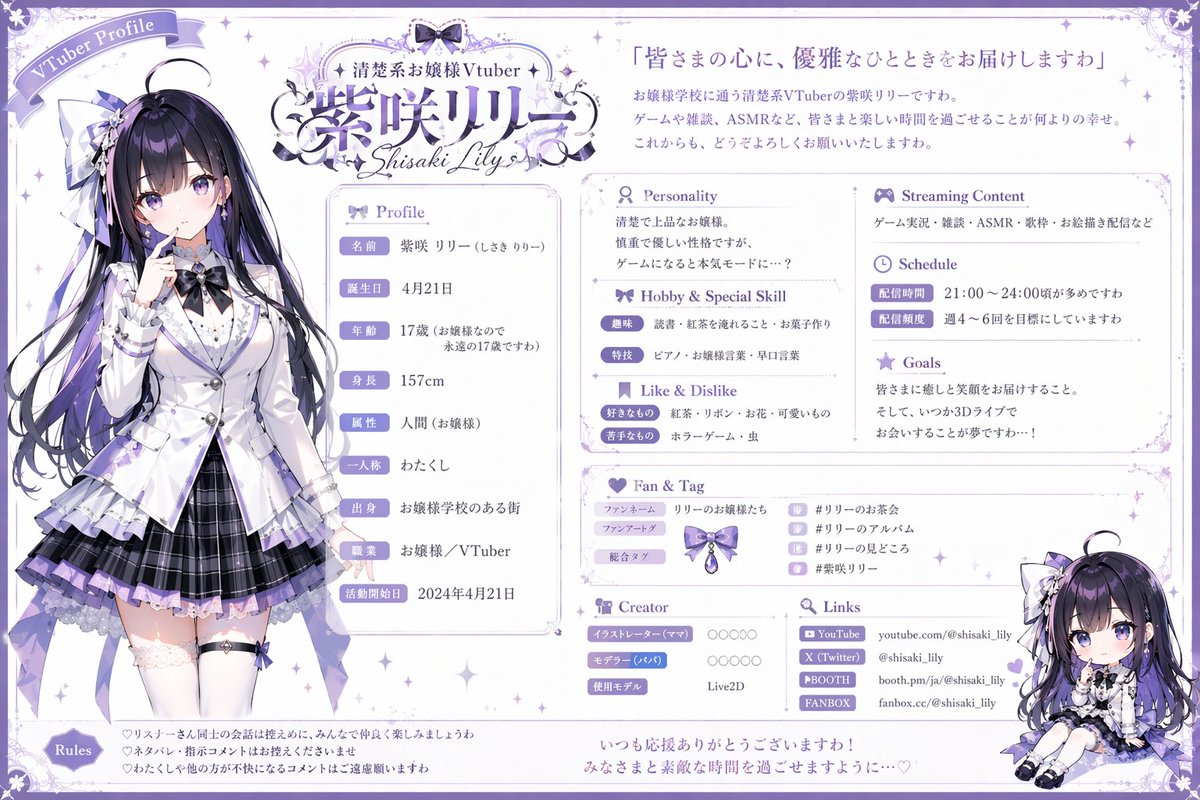
VTuber 프로필 시트 생성기
전신 초상화, 치비 일러스트, 스트리밍 관련 사용자 지정 데이터 필드를 포함한 매우 상세한 다중 섹션 VTuber 프로필 시트를 생성합니다.
이것은 애니메이션 & 게임 에 대한 GPT Image 2 프롬프트 사례입니다. 아래의 복사 가능한 프롬프트를 사용하여 유사한 시각 자료를 생성하고, 재사용하기 전에 Awesome GPT Image 2 Prompts 의 저작자 표시 및 상업적 사용 권한을 검토하십시오.
전체 프롬프트 세트가 필요하신가요? 다음을 사용하세요. 애니메이션 & 게임 더 많은 관련 예시를 보려면 주제 허브를 열거나 다음을 열어보세요. GPT Image 2 프롬프트 카탈로그 전체 예제 색인, 재사용 가능한 구조 및 출처 표기는 다음을 참조하십시오.
Free 1K preview
Generate one preview image instantly, no sign-up required.
2206/4000
프롬프트
복사 준비 프롬프트
{ "type": "VTuber profile sheet", "theme": "{argument name="color theme" default="purple and white"}, elegant, lace, ribbon motifs", "character": { "name": "{argument name="character name" default="紫咲リリー"}", "archetype": "{argument name="character archetype" default="elegant ojousama"}", "appearance": "anime girl, long black hair with purple highlights, purple eyes, wearing a white blazer, purple pleated skirt, thigh-highs, ribbons", "pose": "standing, finger to lips, looking slightly to the side" }, "chibi_character": { "appearance": "same character in chibi form", "pose": "sitting down, smiling" }, "layout": { "header": { "top_left": "Ribbon banner reading 'VTuber Profile'", "top_center": "Logo with text '{argument name="vtuber type" default="清楚系お嬢様Vtuber"}' and '{argument name="character name" default="紫咲リリー"}' and 'Shisaki Lily'", "top_right": "Quote '{argument name="catchphrase" default="皆さまの心に、優雅なひとときをお届けしますわ"}' followed by a 3-line introductory paragraph" }, "columns": [ { "position": "left", "content": "Full-body character portrait" }, { "position": "center", "sections": [ { "title": "Profile", "count": 9, "labels": ["名前", "誕生日", "年齢", "身長", "属性", "一人称", "出身", "職業", "活動開始日"] }, { "title": "Personality", "content": "2-line text block" }, { "title": "Hobby & Special Skill", "count": 2, "labels": ["趣味", "特技"] }, { "title": "Like & Dislike", "count": 2, "labels": ["好きなもの", "苦手なもの"] } ] }, { "position": "right", "sections": [ { "title": "Streaming Content", "content": "1-line text block" }, { "title": "Schedule", "count": 2, "labels": ["配信時間", "配信頻度"] }, { "title": "Goals", "content": "3-line text block" }, { "title": "Fan & Tag", "count": 3, "labels": ["ファンネーム", "ファンアートタグ", "総合タグ"], "extra": "4 hashtag rows with small icons" }, { "title": "Creator", "count": 3, "labels": ["イラストレーター (ママ)", "モデラー (パパ)", "使用モデル"] }, { "title": "Links", "count": 4, "labels": ["YouTube", "X (Twitter)", "BOOTH", "FANBOX"] }, { "content": "Chibi character illustration placed at the bottom right corner" } ] } ], "footer": { "sections": [ { "title": "Rules", "count": 3, "description": "3 bullet points with heart icons" }, { "content": "2-line closing message at the bottom center" } ] } } }프롬프트 변수
프롬프트에 있는 편집 가능한 인수 자리 표시자와 해당 기본값입니다.
변하기 쉬운
color theme
기본
purple and white
변하기 쉬운
character name
기본
紫咲リリー
변하기 쉬운
character archetype
기본
elegant ojousama
변하기 쉬운
vtuber type
기본
清楚系お嬢様Vtuber
변하기 쉬운
catchphrase
기본
皆さまの心に、優雅なひとときをお届けしますわ
Best for
- - 애니메이션 & 게임 visual exploration
- - Image generation and reference-image edits
- - Reusable briefs that keep source attribution visible
Change these parts
- - Subject, product, character, or scene
- - Aspect ratio, camera, lighting, and background
- - Brand, text, color, and output constraints
Recommended model and settings
- - Model: gpt-image-2
- - Input mode: 텍스트 to 이미지
- - Aspect ratio: source
- - Commercial status: review original source
How to use this prompt
- 1. Copy the prompt and preserve its structure for the first test.
- 2. Replace the subject, context, and publishing channel.
- 3. Change one camera, lighting, or style variable per iteration.
- 4. Inspect the output, source, text, and rights before reuse.
Limitations, source, and reuse cautions
- - Generated output is an editable draft, not factual, legal, or rights evidence.
- - Review the linked source, people, brands, logos, text, and third-party media before commercial use.
Awesome GPT Image 2 Prompts 에서 가져왔습니다. 출처 표기가 필요합니다. 상업적 이용 가능 여부는 allowed 입니다. 유료 사용 전에 원저작권 정보를 확인하세요.
이 범주에 속하는 더 많은 사례
범주, 입력 방식 호환성, 품질 및 위험도에 따라 우선순위가 정해집니다.






재사용 및 출처 참고 사항
사례를 미리 확인한 후 이 안내 메시지를 안전하게 사용하십시오.
- 1.프롬프트를 복사하거나 Dovoo의 생성 버튼을 사용하여 직접 엽니다.
- 2.사용 사례에 맞게 변수, 화면 비율 및 참조 이미지를 조정하십시오.
- 3.출판 또는 유료 사용 전에 저작권, 출처 표기 요건 및 브랜드 또는 초상권 관련 위험을 확인하십시오.