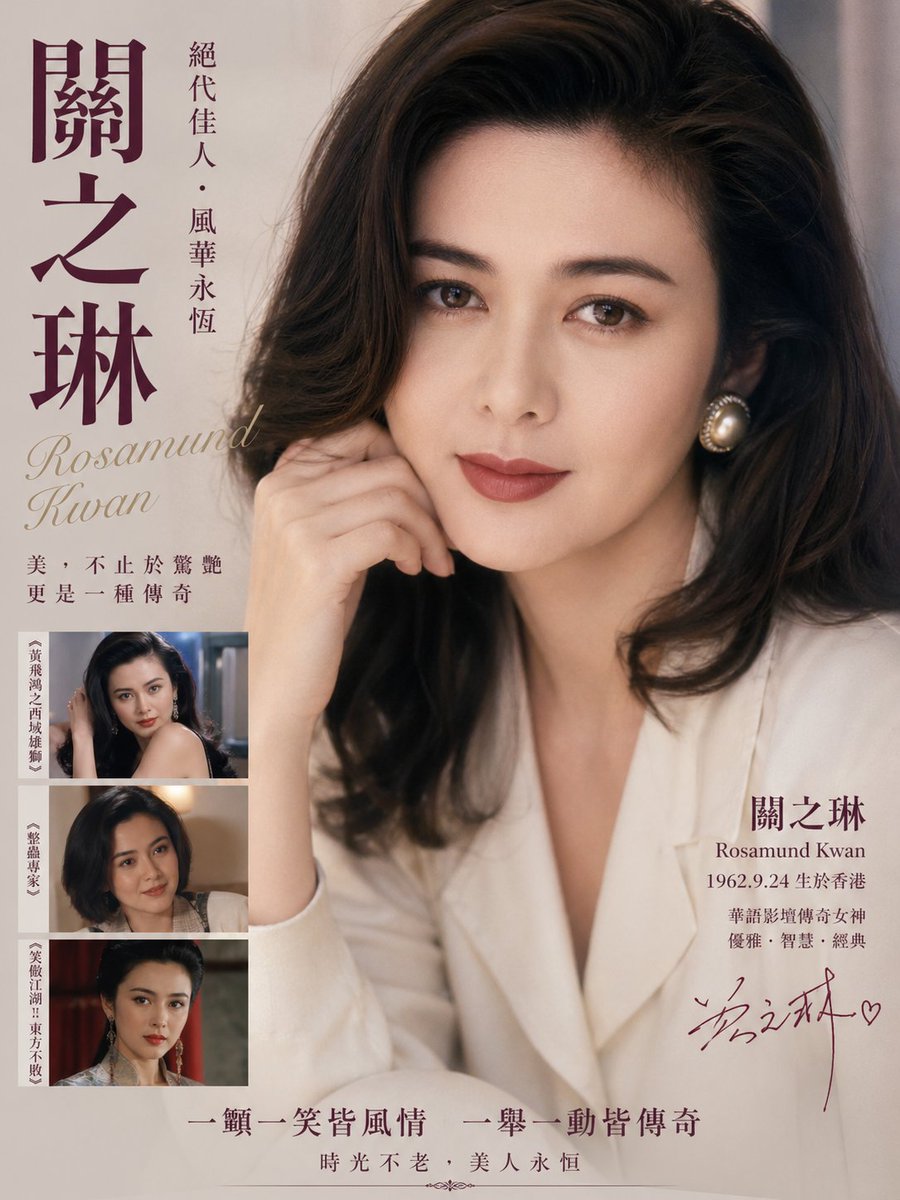
빈티지 홍콩 여배우 헌정 포스터
이 프롬프트는 홍콩 고전 영화 스타를 기리는 향수를 불러일으키는 편집 스타일의 포스터를 생성합니다. 영화 관련 예술 작품, 잡지 표지 또는 복고풍 유명인 기념 디자인에 이상적입니다.
이것은 그래픽 및 포스터 에 대한 GPT Image 2 프롬프트 사례입니다. 아래의 복사 가능한 프롬프트를 사용하여 유사한 시각 자료를 생성하고, 재사용하기 전에 Awesome GPT Image 2 Prompts 의 저작자 표시 및 상업적 사용 권한을 검토하십시오.
전체 프롬프트 세트가 필요하신가요? 다음을 사용하세요. 그래픽 및 포스터 더 많은 관련 예시를 보려면 주제 허브를 열거나 다음을 열어보세요. GPT Image 2 프롬프트 카탈로그 전체 예제 색인, 재사용 가능한 구조 및 출처 표기는 다음을 참조하십시오.
Free 1K preview
Generate one preview image instantly, no sign-up required.
2084/4000
프롬프트
복사 준비 프롬프트
A vintage Hong Kong cinema tribute poster in elegant 1980s–1990s magazine style, featuring a glamorous close-up half-body portrait of {argument name="celebrity name" default="Rosamund Kwan"} seated indoors against a soft neutral beige background. She has voluminous dark brown wavy shoulder-length hair with a side part, luminous skin, a poised gentle expression, one hand raised lightly near her cheek, and wears a creamy white blazer with large round pearl earrings. Use warm diffused studio lighting, soft focus, refined film-like texture, subtle grain, and luxurious nostalgic color grading in beige, ivory, sepia, and deep plum. Design the composition like a memorial or star-profile poster with typography integrated around the portrait: on the far left, very large vertical Chinese calligraphy-style name text in deep plum reading {argument name="main Chinese name" default="Rosamund Kwan"}; to its right, a slim vertical line of smaller Chinese text reading {argument name="vertical tagline" default="絕代佳人・風華永恆"}. Below the large title on the left, place the English name in elegant italic serif script reading {argument name="English name" default="Rosamund Kwan"}. Under that, add a two-line Chinese quote in smaller serif text. In the lower left corner, include exactly 3 stacked rectangular film still thumbnails with thin borders, each showing the same actress in different roles; each thumbnail has a narrow vertical Chinese caption strip on its left edge. On the lower right beside the portrait, place a text block with the large Chinese surname and given name split across two lines, the English name beneath, then a birth line and 2 more lines of Chinese descriptive text. Add a handwritten autograph-style signature in dark plum near the bottom right. Along the bottom center, add 2 lines of Chinese slogan text in classic serif style, separated from the main layout with ample negative space. Overall look: classy, sentimental, high-end editorial poster, authentic retro Hong Kong actress homage, balanced typography, premium print design, portrait-dominant layout.프롬프트 변수
프롬프트에 있는 편집 가능한 인수 자리 표시자와 해당 기본값입니다.
변하기 쉬운
celebrity name
기본
Rosamund Kwan
변하기 쉬운
main Chinese name
기본
Rosamund Kwan
변하기 쉬운
vertical tagline
기본
絕代佳人・風華永恆
변하기 쉬운
English name
기본
Rosamund Kwan
Best for
- - 그래픽 및 포스터 visual exploration
- - Image generation and reference-image edits
- - Reusable briefs that keep source attribution visible
Change these parts
- - Subject, product, character, or scene
- - Aspect ratio, camera, lighting, and background
- - Brand, text, color, and output constraints
Recommended model and settings
- - Model: gpt-image-2
- - Input mode: 텍스트 to 이미지
- - Aspect ratio: source
- - Commercial status: review original source
How to use this prompt
- 1. Copy the prompt and preserve its structure for the first test.
- 2. Replace the subject, context, and publishing channel.
- 3. Change one camera, lighting, or style variable per iteration.
- 4. Inspect the output, source, text, and rights before reuse.
Limitations, source, and reuse cautions
- - Generated output is an editable draft, not factual, legal, or rights evidence.
- - Review the linked source, people, brands, logos, text, and third-party media before commercial use.
Awesome GPT Image 2 Prompts 에서 가져왔습니다. 출처 표기가 필요합니다. 상업적 이용 가능 여부는 allowed 입니다. 유료 사용 전에 원저작권 정보를 확인하세요.
이 범주에 속하는 더 많은 사례
범주, 입력 방식 호환성, 품질 및 위험도에 따라 우선순위가 정해집니다.






재사용 및 출처 참고 사항
사례를 미리 확인한 후 이 안내 메시지를 안전하게 사용하십시오.
- 1.프롬프트를 복사하거나 Dovoo의 생성 버튼을 사용하여 직접 엽니다.
- 2.사용 사례에 맞게 변수, 화면 비율 및 참조 이미지를 조정하십시오.
- 3.출판 또는 유료 사용 전에 저작권, 출처 표기 요건 및 브랜드 또는 초상권 관련 위험을 확인하십시오.