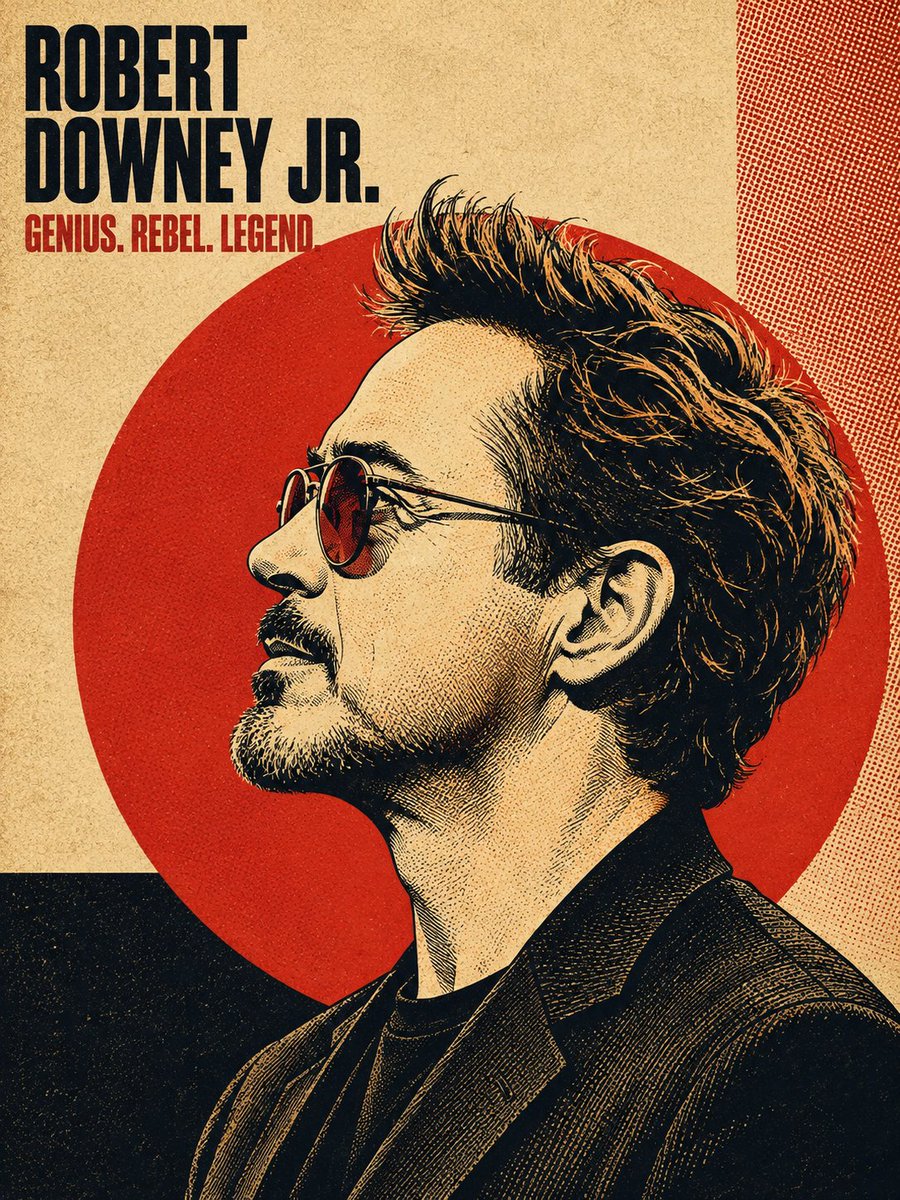
Vintage Halftone Portrait Poster
A complex 'smart prompt' structured in JSON for generating vintage 1960s-70s inspired halftone poster art with bold linework and offset print textures.
이것은 그래픽 및 포스터 에 대한 GPT Image 2 프롬프트 사례입니다. 아래의 복사 가능한 프롬프트를 사용하여 유사한 시각 자료를 생성하고, 재사용하기 전에 Awesome GPT Image 2 Prompts 의 저작자 표시 및 상업적 사용 권한을 검토하십시오.
전체 프롬프트 세트가 필요하신가요? 다음을 사용하세요. 그래픽 및 포스터 더 많은 관련 예시를 보려면 주제 허브를 열거나 다음을 열어보세요. GPT Image 2 프롬프트 카탈로그 전체 예제 색인, 재사용 가능한 구조 및 출처 표기는 다음을 참조하십시오.
Free 1K preview
Generate one preview image instantly, no sign-up required.
Free text preview doesn’t preserve reference-image consistency.
4000/4000
프롬프트
복사 준비 프롬프트
{
  "task": "Convert the uploaded reference photo (or a well-known likeness of the named person) into a vintage halftone bold poster-art style portrait illustration.",
  "input": {
    "subject_name": "{{PERSON_NAME}}",
    "reference_image": "{{UPLOADED_PHOTO_OR_NULL}}",
    "note": "Only the subject's name or an uploaded photo should be required from the user. All other parameters below are fixed art-direction rules."
  },
  "output_exclusions": [
    "Do NOT include a small circular/rounded-corner inset photo of the real reference image in the corner of the poster — the final output is the illustration ONLY, full-bleed, no reference thumbnail overlay."
  ],
  "art_style": {
    "medium": "digital illustration mimicking screen-printed / offset-lithograph poster art",
    "influences": [
      "1960s-70s bold political/protest poster art",
      "Shepard Fairey-style bold stencil illustration",
      "risograph print texture",
      "vintage magazine cover design",
      "retro concert/album poster art"
    ],
    "line_work": "high-contrast ink linework with fine cross-hatching and stippling for shading, visible pen/brush strokes in hair strands",
    "rendering": "flat color blocking combined with engraving-style fine line shading — NOT photorealistic, NOT airbrushed, NOT smooth gradient shading"
  },
  "composition": {
    "pose": "subject's head and upper shoulders/chest in a strict 90-degree side profile (facing left), eyes looking straight ahead in profile, chin slightly lifted, neutral/confident expression",
    "framing": "portrait orientation (4:5 or 3:4 aspect ratio), subject fills roughly 70-85% of vertical frame, cropped at mid-chest/shoulder",
    "focal_backdrop": "a large solid-color circle (sun/halo motif) centered behind the subject's head, circle diameter roughly 60-70% of canvas width, subject's hair and shoulders slightly overlap and break the circle's edge",
    "hair_treatment": "hair rendered as one of the most detailed elements — individual flowing strands, wind-swept or voluminous movement, strong directional lighting creating highlight streaks within the dark mass of hair"
  },
  "background": {
    "base_texture": "coarse woven linen/canvas paper texture overlaid across the entire composition at low opacity",
    "layout": "asymmetric geometric color-block panels behind/around the circle — e.g. a solid dark rectangle in one lower corner, a contrasting stripe or panel along one edge, sometimes a fine halftone dot-pattern or crosshatch pattern filling one quadrant",
    "halftone_overlay": "visible CMYK-style halftone dot pattern subtly overlaid on background panels and occasionally bleeding into the portrait's shadow areas",
    "grain": "fine analog print grain/noise across the whole image for an aged, screen-printed look"
  },
  "color_palette": {
    "instruction": "Select ONE cohesive limited palette (2-4 colors max) per poster, high contrast, no photographic gradients. Choose based on mood/subject or default to the classic scheme.",
    "classic_scheme": {
      "background_base": "warm cream / aged paper beige (#e8dcc4-ish)",
      "accent_circle": "bold poster red (#c1272d-ish)",
      "linework_shadow": "near-black ink (#1a1512-ish)",
      "highlight": "same cream as background used for lit skin/hair areas"
    },
    "alt_scheme_dark": {
      "background_base": "black or deep charcoal",
      "accent_circle": "poster red or burnt orange",
      "linework_shadow": "black ink",
      "highlight": "warm cream/tan"
    },
    "alt_scheme_cool": {
      "background_base": "deep navy blue",
      "accent_circle": "muted brick-red/orange",
      "linework_shadow": "navy/black ink",
      "highlight": "warm cream, with the subject's true eye color kept naturally visible as the one full-color accent"
    },
    "duotone_option": "for a graphic pop-art variant, render the entire subject in a single duotone (e.g. mustard-yellow and black, or gold and black) instead of cream/red/black"
  },
  "typography": {
    "headline": {
      "content": "subject's name (first name, or first+last stacked on two lines)",
      "placement": "top-left corner of the poster, inset from edges",
      "font_style": "extra-bold condensed slab-serif or grotesque sans-serif, all caps, tightly kerned, stacked on 1-2 lines, large scale (dominant typographic element)",
      "color": "matches the linework/shadow ink color, occasionally with a subtle drop shadow or outline for depth"
    },
    "subheadline": {
      "content": "a short 2-4 word tagline/epithet related to the subject (e.g. an evocative title, nickname, or descriptor)",
      "placement": "directly below the headline, smaller scale",
      "font_style": "bold condensed sans-serif or slab-serif, all caps, single line",
      "color": "the poster's accent color (matches the circle color)"
    }
  },
  "clothing_and_accessories": {
    "styling": "simple, era-appropriate or modern minimal clothing rendered in flat color with the same halftone/linework shading as the rest of the piece — collared shirts, blazers, off-shoulder tops, or textured jackets with visible fabric-fold linework",
    "accessories": "keep minimal — small jewelry (earrings, necklace) can be included if present in reference, rendered as simple line-art shapes"
  },
  "lighting": {
    "style": "single hard directional light source (as if raking across the side profile), creating strong graphic shadow shapes rather than realistic soft shading",
    "shadow_rendering": "shadows built from crosshatching, stippling, and halftone dot density rather than smooth gradients"
  },
  "quality_and_fidelity": {
    "likeness": "preserve accurate, recognizable facial proportions and features of the subject from the reference photo/name, translated into the illustrated line-art style — the illustration must be clearly identifiable as that specific person",
    "resolution": "crisp, poster-print-ready quality, sharp linework, no blur, no photographic artifacts",
    "consistency": "maintain identical composition, palette rules, and typography placement described above regardless of subject, so the whole set reads as one unified poster series"
  }
}
Best for
- - 그래픽 및 포스터 visual exploration
- - Image generation and reference-image edits
- - Reusable briefs that keep source attribution visible
Change these parts
- - Subject, product, character, or scene
- - Aspect ratio, camera, lighting, and background
- - Brand, text, color, and output constraints
Recommended model and settings
- - Model: gpt-image-2
- - Input mode: 이미지 to 이미지
- - Aspect ratio: source
- - Commercial status: review original source
How to use this prompt
- 1. Copy the prompt and preserve its structure for the first test.
- 2. Replace the subject, context, and publishing channel.
- 3. Change one camera, lighting, or style variable per iteration.
- 4. Inspect the output, source, text, and rights before reuse.
Limitations, source, and reuse cautions
- - Generated output is an editable draft, not factual, legal, or rights evidence.
- - Review the linked source, people, brands, logos, text, and third-party media before commercial use.
Awesome GPT Image 2 Prompts 에서 가져왔습니다. 출처 표기가 필요합니다. 상업적 이용 가능 여부는 allowed 입니다. 유료 사용 전에 원저작권 정보를 확인하세요.
이 범주에 속하는 더 많은 사례
범주, 입력 방식 호환성, 품질 및 위험도에 따라 우선순위가 정해집니다.




재사용 및 출처 참고 사항
사례를 미리 확인한 후 이 안내 메시지를 안전하게 사용하십시오.
- 1.프롬프트를 복사하거나 Dovoo의 생성 버튼을 사용하여 직접 엽니다.
- 2.사용 사례에 맞게 변수, 화면 비율 및 참조 이미지를 조정하십시오.
- 3.출판 또는 유료 사용 전에 저작권, 출처 표기 요건 및 브랜드 또는 초상권 관련 위험을 확인하십시오.