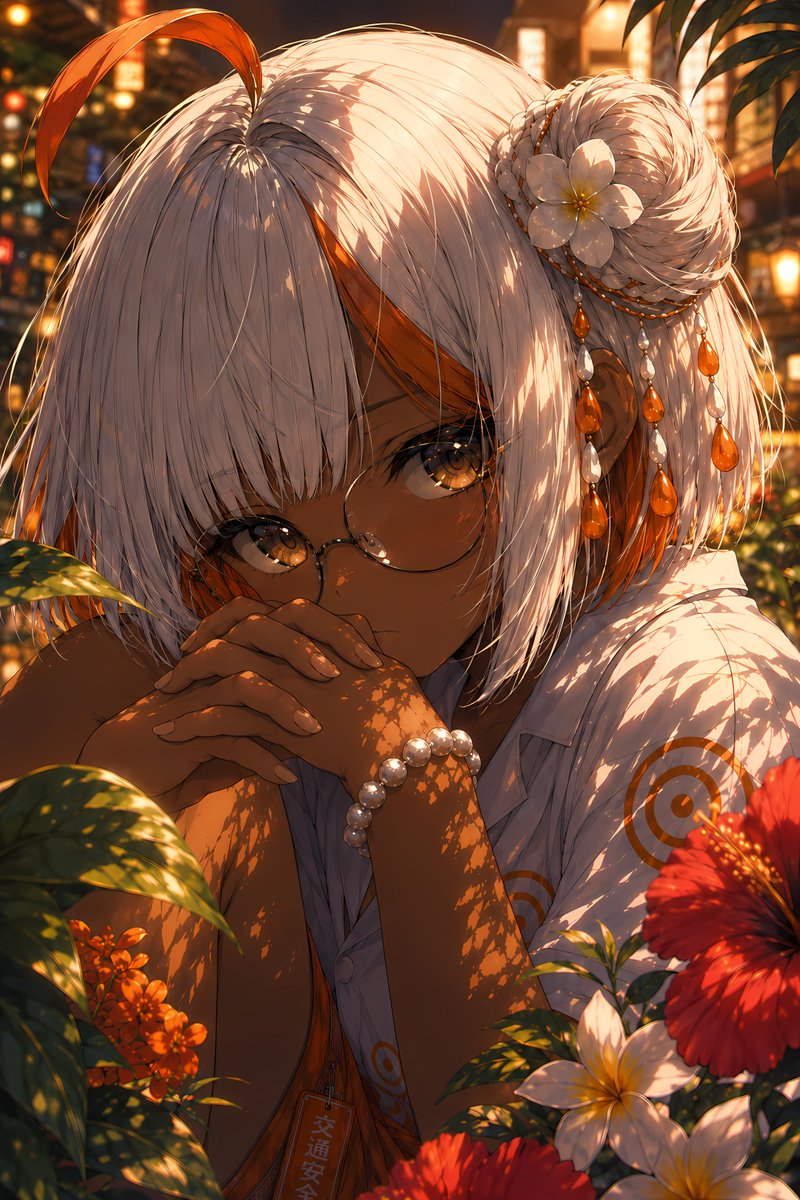
Vermilion Summer Garden Portrait
Generates a cinematic anime close-up of a tan, white-haired girl in a glowing tropical summer garden for polished character art.
이것은 애니메이션 & 게임 에 대한 GPT Image 2 프롬프트 사례입니다. 아래의 복사 가능한 프롬프트를 사용하여 유사한 시각 자료를 생성하고, 재사용하기 전에 Awesome GPT Image 2 Prompts 의 저작자 표시 및 상업적 사용 권한을 검토하십시오.
전체 프롬프트 세트가 필요하신가요? 다음을 사용하세요. 애니메이션 & 게임 더 많은 관련 예시를 보려면 주제 허브를 열거나 다음을 열어보세요. GPT Image 2 프롬프트 카탈로그 전체 예제 색인, 재사용 가능한 구조 및 출처 표기는 다음을 참조하십시오.
Free 1K preview
Generate one preview image instantly, no sign-up required.
2074/4000
프롬프트
복사 준비 프롬프트
Create a highly detailed vertical anime portrait titled in mood as {argument name="art title" default="Vermilion Summer, Radiant Garden"}: a close-up of a dark-tan skinned young woman with luminous amber eyes, round thin wire-frame glasses, and a quiet, introspective gaze, leaning forward with both hands clasped in front of her mouth. She has short silvery-white bobbed hair with heavy bangs, a single long orange ahoge strand rising and curling from the crown, orange underlayers near the ears, and a braided side bun on the viewer's right. Her hair ornament set contains exactly 1 white plumeria flower, exactly 3 dangling bead strands, and multiple orange teardrop gems mixed with pearl-like beads. She wears a loose white short-sleeve shirt with subtle orange circular target motifs, an orange inner garment partly visible, a pearl bracelet on one wrist, and a small vertical tag hanging at her chest with Japanese-style lettering. Surround her with a lush tropical garden at golden hour: foreground leaves casting intricate dappled shadows across her face, arms, hair, and shirt; visible flowers include exactly 1 large red hibiscus at lower right, exactly 2 white plumeria blossoms at lower right, a cluster of small orange flowers at lower left, and blurred warm lanterns and summer street lights in the background. Use rich vermilion, amber, gold, white, and deep green colors, cinematic backlighting, glowing bokeh, shallow depth of field, delicate hair strands, glossy eyes, soft skin shading, and ultra-polished Japanese illustration quality. The atmosphere should feel like a hot radiant summer evening in a hidden garden, intimate and serene. Customize the subject as {argument name="character name" default="unnamed summer garden girl"}, with {argument name="hair color" default="silvery white with orange accents"}, {argument name="eye color" default="amber gold"}, and {argument name="skin tone" default="deep warm brown"}. Avoid text overlays, borders, watermarks, extra characters, distorted hands, or additional flowers beyond the specified composition.프롬프트 변수
프롬프트에 있는 편집 가능한 인수 자리 표시자와 해당 기본값입니다.
변하기 쉬운
art title
기본
Vermilion Summer, Radiant Garden
변하기 쉬운
character name
기본
unnamed summer garden girl
변하기 쉬운
hair color
기본
silvery white with orange accents
변하기 쉬운
eye color
기본
amber gold
변하기 쉬운
skin tone
기본
deep warm brown
Best for
- - 애니메이션 & 게임 visual exploration
- - Image generation and reference-image edits
- - Reusable briefs that keep source attribution visible
Change these parts
- - Subject, product, character, or scene
- - Aspect ratio, camera, lighting, and background
- - Brand, text, color, and output constraints
Recommended model and settings
- - Model: gpt-image-2
- - Input mode: 텍스트 to 이미지
- - Aspect ratio: source
- - Commercial status: review original source
How to use this prompt
- 1. Copy the prompt and preserve its structure for the first test.
- 2. Replace the subject, context, and publishing channel.
- 3. Change one camera, lighting, or style variable per iteration.
- 4. Inspect the output, source, text, and rights before reuse.
Limitations, source, and reuse cautions
- - Generated output is an editable draft, not factual, legal, or rights evidence.
- - Review the linked source, people, brands, logos, text, and third-party media before commercial use.
Awesome GPT Image 2 Prompts 에서 가져왔습니다. 출처 표기가 필요합니다. 상업적 이용 가능 여부는 allowed 입니다. 유료 사용 전에 원저작권 정보를 확인하세요.
이 범주에 속하는 더 많은 사례
범주, 입력 방식 호환성, 품질 및 위험도에 따라 우선순위가 정해집니다.




재사용 및 출처 참고 사항
사례를 미리 확인한 후 이 안내 메시지를 안전하게 사용하십시오.
- 1.프롬프트를 복사하거나 Dovoo의 생성 버튼을 사용하여 직접 엽니다.
- 2.사용 사례에 맞게 변수, 화면 비율 및 참조 이미지를 조정하십시오.
- 3.출판 또는 유료 사용 전에 저작권, 출처 표기 요건 및 브랜드 또는 초상권 관련 위험을 확인하십시오.