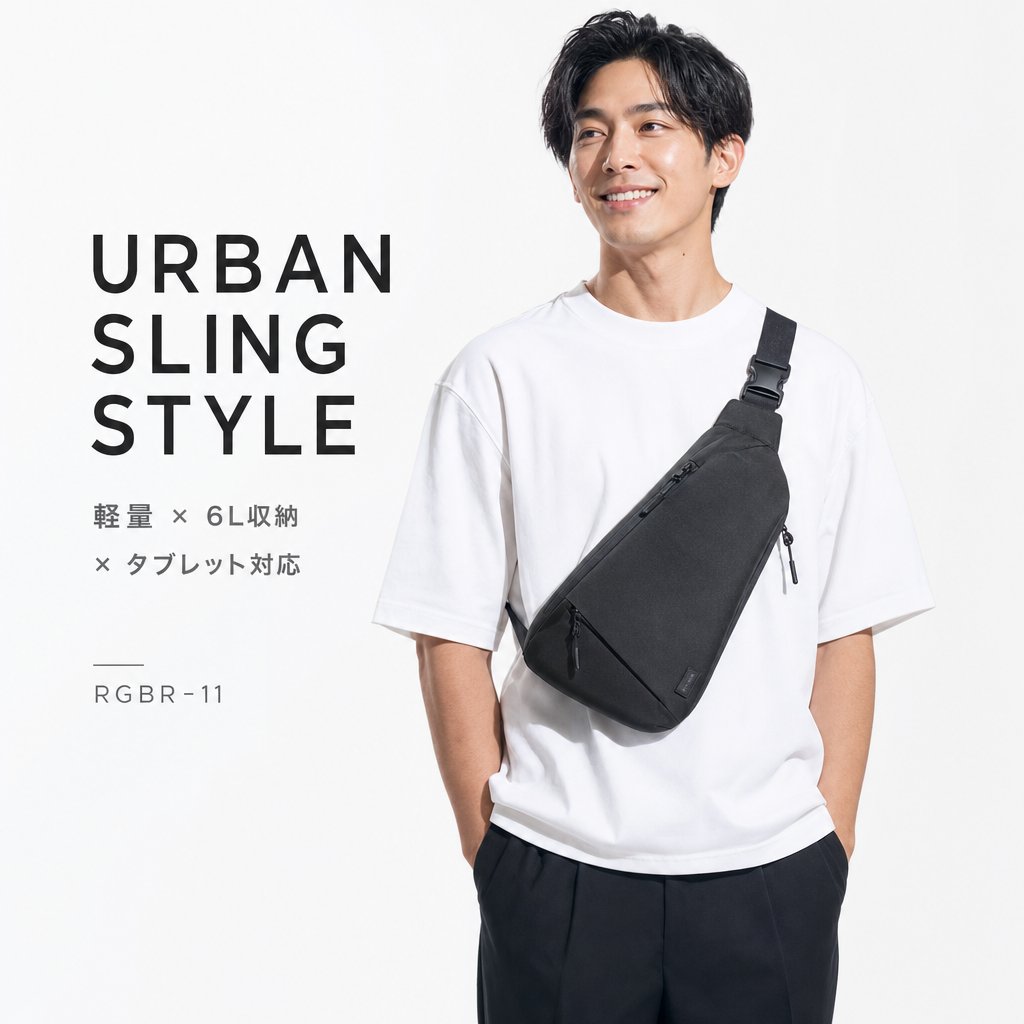
어반 슬링 백 카탈로그 광고
일본어로 된 제품 설명과 함께 검은색 도시형 슬링백을 든 남성 모델이 등장하는 미니멀한 정사각형 패션 카탈로그 광고.
이것은 제품 및 상업 에 대한 GPT Image 2 프롬프트 사례입니다. 아래의 복사 가능한 프롬프트를 사용하여 유사한 시각 자료를 생성하고, 재사용하기 전에 Awesome GPT Image 2 Prompts 의 저작자 표시 및 상업적 사용 권한을 검토하십시오.
전체 프롬프트 세트가 필요하신가요? 다음을 사용하세요. 제품 및 상업 더 많은 관련 예시를 보려면 주제 허브를 열거나 다음을 열어보세요. GPT Image 2 프롬프트 카탈로그 전체 예제 색인, 재사용 가능한 구조 및 출처 표기는 다음을 참조하십시오.
Free 1K preview
Generate one preview image instantly, no sign-up required.
2207/4000
프롬프트
복사 준비 프롬프트
Goal: Create a clean square fashion product advertisement for an urban sling bag, using a minimalist Japanese e-commerce/catalog aesthetic.

Canvas: 1:1 square image, bright white to very light gray studio background, high-key lighting, sharp commercial photography, no borders or watermark.

Layout: Split composition with large typography on the left third and a male model on the right two-thirds. The model is cropped from upper thighs to just above the hair, standing relaxed with both hands in pants pockets. Leave generous negative space around the left text.

Subject details: A young adult East Asian male model with short slightly wavy black hair, Show every face clearly with natural, detailed facial features. He wears an oversized plain {argument name="shirt color" default="white"} crew-neck T-shirt and loose dark trousers. Across his torso is a {argument name="bag color" default="black"} triangular urban sling bag worn diagonally from his right shoulder to his left waist. The sling bag has a wide black shoulder strap with buckle hardware, a clean matte fabric texture, one diagonal front zipper with a black pull cord, a small side zipper pull, and a tiny rectangular brand tag near the lower right edge. The bag should be the visual focus.

Text content: On the left, include exactly 4 text groups: 1) a large stacked uppercase headline reading {argument name="headline text" default="URBAN\nSLING\nSTYLE"}, set in bold modern sans-serif with wide letter spacing; 2) a smaller two-line Japanese feature statement reading {argument name="feature text" default="軽量 × 6L収納\n× タブレット対応"}; 3) a short thin horizontal divider line; 4) a small product code reading {argument name="product code" default="RGBR-11"}. Keep the text dark charcoal, aligned left, and spaced like a premium catalog poster.

Visual style: Photorealistic studio product photography, crisp fabric detail, soft shadows, monochrome black-and-white styling, modern Japanese streetwear catalog design, premium minimalism.

Constraints: Use exactly one model, one sling bag, one T-shirt, one pair of trousers, and four text groups. Do not add extra accessories, logos, scenery, props, decorative graphics, or additional text.
프롬프트 변수
프롬프트에 있는 편집 가능한 인수 자리 표시자와 해당 기본값입니다.
변하기 쉬운
shirt color
기본
white
변하기 쉬운
bag color
기본
black
변하기 쉬운
headline text
기본
URBAN\nSLING\nSTYLE
변하기 쉬운
feature text
기본
軽量 × 6L収納\n× タブレット対応
변하기 쉬운
product code
기본
RGBR-11
Best for
- - 제품 및 상업 visual exploration
- - Image generation and reference-image edits
- - Reusable briefs that keep source attribution visible
Change these parts
- - Subject, product, character, or scene
- - Aspect ratio, camera, lighting, and background
- - Brand, text, color, and output constraints
Recommended model and settings
- - Model: gpt-image-2
- - Input mode: 텍스트 to 이미지
- - Aspect ratio: source
- - Commercial status: review original source
How to use this prompt
- 1. Copy the prompt and preserve its structure for the first test.
- 2. Replace the subject, context, and publishing channel.
- 3. Change one camera, lighting, or style variable per iteration.
- 4. Inspect the output, source, text, and rights before reuse.
Limitations, source, and reuse cautions
- - Generated output is an editable draft, not factual, legal, or rights evidence.
- - Review the linked source, people, brands, logos, text, and third-party media before commercial use.
Awesome GPT Image 2 Prompts 에서 가져왔습니다. 출처 표기가 필요합니다. 상업적 이용 가능 여부는 allowed 입니다. 유료 사용 전에 원저작권 정보를 확인하세요.
Related prompt packs
이 범주에 속하는 더 많은 사례
범주, 입력 방식 호환성, 품질 및 위험도에 따라 우선순위가 정해집니다.
재사용 및 출처 참고 사항
사례를 미리 확인한 후 이 안내 메시지를 안전하게 사용하십시오.
- 1.프롬프트를 복사하거나 Dovoo의 생성 버튼을 사용하여 직접 엽니다.
- 2.사용 사례에 맞게 변수, 화면 비율 및 참조 이미지를 조정하십시오.
- 3.출판 또는 유료 사용 전에 저작권, 출처 표기 요건 및 브랜드 또는 초상권 관련 위험을 확인하십시오.