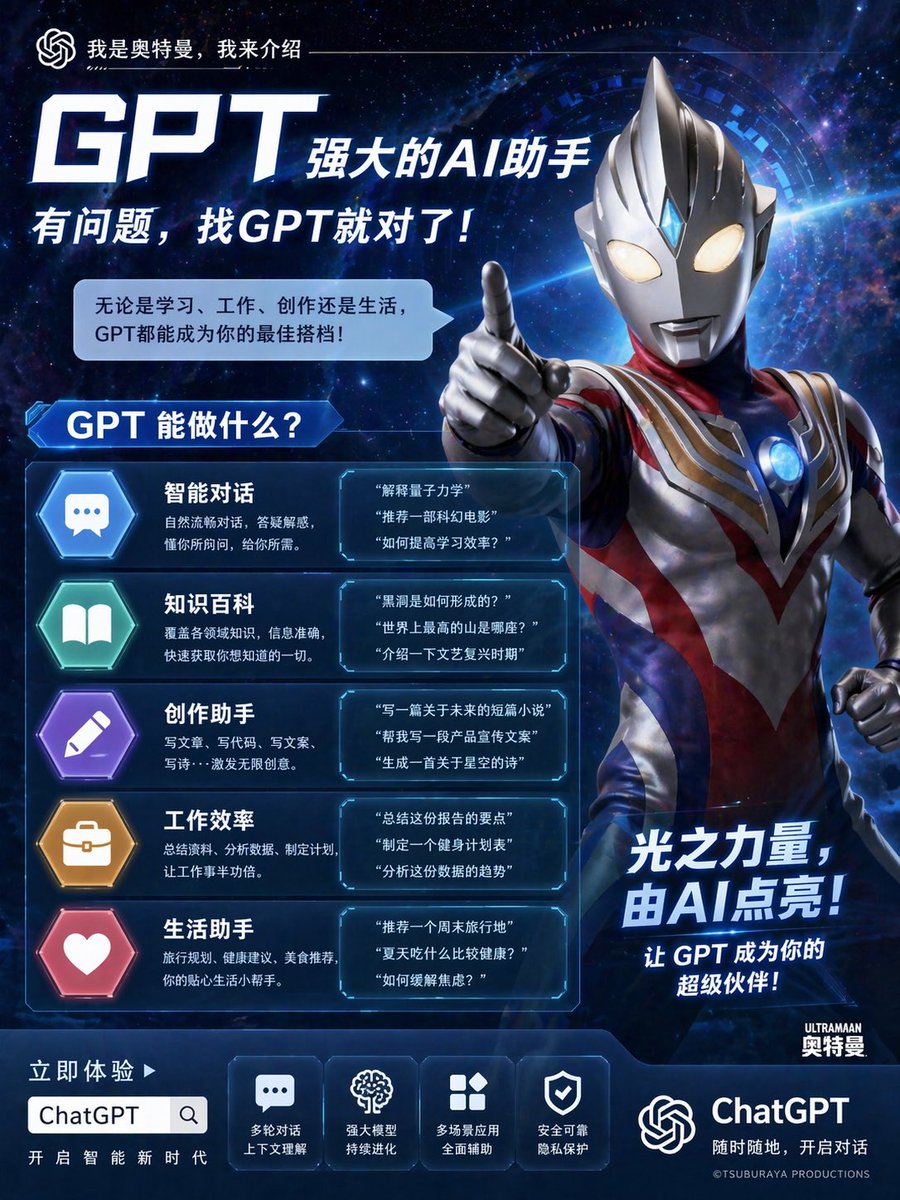
울트라맨 ChatGPT 프로모션 포스터
미래지향적인 중국 광고 포스터로, 울트라맨 스타일의 영웅이 ChatGPT를 홍보하는 모습을 담고 있어 강렬한 AI 제품 마케팅 영상 제작에 이상적입니다.
이것은 제품 및 상업 에 대한 GPT Image 2 프롬프트 사례입니다. 아래의 복사 가능한 프롬프트를 사용하여 유사한 시각 자료를 생성하고, 재사용하기 전에 Awesome GPT Image 2 Prompts 의 저작자 표시 및 상업적 사용 권한을 검토하십시오.
전체 프롬프트 세트가 필요하신가요? 다음을 사용하세요. 제품 및 상업 더 많은 관련 예시를 보려면 주제 허브를 열거나 다음을 열어보세요. GPT Image 2 프롬프트 카탈로그 전체 예제 색인, 재사용 가능한 구조 및 출처 표기는 다음을 참조하십시오.
Free 1K preview
Generate one preview image instantly, no sign-up required.
4000/4000
프롬프트
복사 준비 프롬프트
{
  "type": "promotional poster",
  "style": "high-end Chinese commercial advertising poster, futuristic sci-fi, glossy cinematic lighting, polished 3D character rendering, blue neon UI panels, premium tech-brand visual design",
  "subject": {
    "main figure": "Ultraman-style silver and red humanoid hero on the right side, half-body to thigh-up framing, facing forward, right arm extended toward camera with index finger pointing, glowing almond-shaped eyes, metallic silver helmet with central crest and blue forehead gem, muscular armored body suit with silver, red, navy, and gold accents, circular glowing chest core"
  },
  "background": {
    "scene": "deep outer space with stars, nebula clouds, faint galaxy swirl, bright blue light streaks, holographic circular interface halo behind the character, dark blue cosmic atmosphere"
  },
  "text": {
    "top tagline": "I am Ultraman, and I am here to introduce—",
    "main headline": "GPT is a powerful AI Agent",
    "subheadline": "If you have any questions, GPT is the right choice!",
    "speech bubble": "Whether it's for learning, work, creation, or life, GPT can be your best partner!",
    "section title": "What can GPT do?",
    "right slogan": "The power of light, illuminated by AI!",
    "right subtext": "Let GPT be your super partner!",
    "cta": "Experience now >",
    "product name": "ChatGPT",
    "footer small text": "Start a new era of intelligence",
    "brand mark": "ULTRAMAN Ultraman",
    "copyright": "©TSUBURAYA PRODUCTIONS"
  },
  "layout": {
    "sections": [
      {
        "title": "What can GPT do?",
        "position": "left-center",
        "count": 5,
        "items": [
          {
            "icon": "blue hexagon with chat bubble",
            "label": "Intelligent conversation",
            "description": "Natural and fluent conversation, answering questions, understanding what you ask, and giving you what you need.",
            "examples_count": 3,
            "examples": [
              "Explain quantum mechanics",
              "Recommend a science fiction movie",
              "How to improve learning efficiency?"
            ]
          },
          {
            "icon": "green hexagon with open book",
            "label": "Knowledge encyclopedia",
            "description": "Covers knowledge in various fields, provides accurate information, and allows you to quickly get everything you want to know.",
            "examples_count": 3,
            "examples": [
              "How are black holes formed?",
              "Where is the highest mountain in the world?",
              "Introduce the Renaissance period"
            ]
          },
          {
            "icon": "purple hexagon with pencil",
            "label": "Creative assistant",
            "description": "Write copy, write code, write manuscripts, write poetry... unleash infinite creativity.",
            "examples_count": 3,
            "examples": [
              "Write a short story about the future",
              "Help me write a product promotional copy",
              "Generate a poem about the starry sky"
            ]
          },
          {
            "icon": "orange hexagon with briefcase",
            "label": "Work efficiency",
            "description": "Summarize materials, analyze data, and develop plans to double the efficiency of your work.",
            "examples_count": 3,
            "examples": [
              "Summarize the key points of this report.",
              "Develop a fitness plan.",
              "Analyze the trends in this data."
            ]
          },
          {
            "icon": "pink hexagon with heart",
            "label": "Life assistant.",
            "description": "Travel planning, health advice, food recommendations – your considerate little life assistant.",
            "examples_count": 3,
            "examples": [
              "Recommend a weekend getaway.",
              "What's a healthy thing to eat in the summer?",
              "How to relieve anxiety?"
            ]
          }
        ]
      },
      {
        "title": "bottom feature icons",
        "position": "bottom center",
        "count": 4,
        "items": [
          {
            "icon": "chat bubble square",
            "label": "Multi-turn conversation.",
            "subtext": "Contextual understanding"
          },
          {
            "icon": "brain square",
            "label": "Powerful model",
            "subtext": "Continuous evolution"
          },
          {
            "icon": "grid square",
            "label": "Multi-scenario application",
            "subtext": "Comprehensive assistance"
          },
          {
            "icon": "shield square",
            "label": "Safe and reliable",
            "subtext": "Privacy Protection"
          }
        ]
      }
    ],
    "top_left_branding": {
      "count": 1,
      "item": "OpenAI-like knot logo beside intro text"
    },
    "bottom_left_cta_box": {
      "count": 1,
      "item": "rounded white search-style input box with ChatGPT text and magnifier icon"
    }
  },
  "composition": "portrait poster, character occupies right half, dense information blocks stacked vertically on left, bold oversized headline at upper left, angled glowing slogan near lower right, strong depth and contrast",
  "color_palette": {
    "primary": [
      "electric blue",
      "deep navy",
      "white"
    ],
    "accents": [
      "silver",
      "red",
      "cyan",
      "purple",
      "orange",
      "pink"
    ]
  },
  "rendering": {
    "quality": "ultra-detailed, sharp text, clean typography, high contrast, polished reflections, advertisement-ready print design"
  }
}
Best for
- - 제품 및 상업 visual exploration
- - Image generation and reference-image edits
- - Reusable briefs that keep source attribution visible
Change these parts
- - Subject, product, character, or scene
- - Aspect ratio, camera, lighting, and background
- - Brand, text, color, and output constraints
Recommended model and settings
- - Model: gpt-image-2
- - Input mode: 텍스트 to 이미지
- - Aspect ratio: source
- - Commercial status: review original source
How to use this prompt
- 1. Copy the prompt and preserve its structure for the first test.
- 2. Replace the subject, context, and publishing channel.
- 3. Change one camera, lighting, or style variable per iteration.
- 4. Inspect the output, source, text, and rights before reuse.
Limitations, source, and reuse cautions
- - Generated output is an editable draft, not factual, legal, or rights evidence.
- - Review the linked source, people, brands, logos, text, and third-party media before commercial use.
Awesome GPT Image 2 Prompts 에서 가져왔습니다. 출처 표기가 필요합니다. 상업적 이용 가능 여부는 allowed 입니다. 유료 사용 전에 원저작권 정보를 확인하세요.
이 범주에 속하는 더 많은 사례
범주, 입력 방식 호환성, 품질 및 위험도에 따라 우선순위가 정해집니다.






재사용 및 출처 참고 사항
사례를 미리 확인한 후 이 안내 메시지를 안전하게 사용하십시오.
- 1.프롬프트를 복사하거나 Dovoo의 생성 버튼을 사용하여 직접 엽니다.
- 2.사용 사례에 맞게 변수, 화면 비율 및 참조 이미지를 조정하십시오.
- 3.출판 또는 유료 사용 전에 저작권, 출처 표기 요건 및 브랜드 또는 초상권 관련 위험을 확인하십시오.