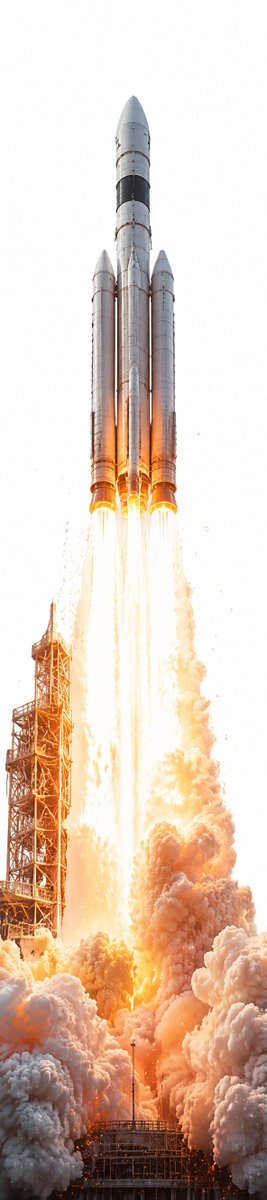
Ultra-Tall Rocket Launch
A photorealistic ultra-vertical rocket launch scene for testing extreme portrait compositions and cinematic aerospace visuals.
이것은 풍경과 자연 에 대한 GPT Image 2 프롬프트 사례입니다. 아래의 복사 가능한 프롬프트를 사용하여 유사한 시각 자료를 생성하고, 재사용하기 전에 Awesome GPT Image 2 Prompts 의 저작자 표시 및 상업적 사용 권한을 검토하십시오.
전체 프롬프트 세트가 필요하신가요? 다음을 사용하세요. 풍경과 자연 더 많은 관련 예시를 보려면 주제 허브를 열거나 다음을 열어보세요. GPT Image 2 프롬프트 카탈로그 전체 예제 색인, 재사용 가능한 구조 및 출처 표기는 다음을 참조하십시오.
Free 1K preview
Generate one preview image instantly, no sign-up required.
1252/4000
프롬프트
복사 준비 프롬프트
Create an ultra-tall vertical photorealistic image, about 1:4 aspect ratio, showing {argument name="rocket name" default="a massive silver heavy-lift rocket"} launching straight upward from a launch pad. Center the rocket perfectly against a nearly pure white overexposed sky, with the nose cone near the top and the base near the lower middle. The vehicle should have exactly 3 visible cylindrical rocket bodies: 1 taller central core and 2 slightly shorter side boosters, all metallic silver with dark black bands and subtle panel seams. Show exactly 4 bright engine flames beneath the rocket, forming long vertical white-hot orange exhaust streams. At the lower left, include one tall rust-orange steel launch tower with lattice scaffolding, partially engulfed by light and smoke. The bottom third of the frame should be filled with enormous rolling clouds of dense launch smoke and dust in white, gray, peach, and orange, lit intensely by the engines. Use dramatic high-key lighting, extreme brightness, realistic heat haze, sparks, debris specks, and a cinematic space-launch photography style. Keep the composition minimal and vertically stretched, emphasizing the rocket’s height and the towering plume; no text, no logos, no people, no borders.프롬프트 변수
프롬프트에 있는 편집 가능한 인수 자리 표시자와 해당 기본값입니다.
변하기 쉬운
rocket name
기본
a massive silver heavy-lift rocket
Best for
- - 풍경과 자연 visual exploration
- - Image generation and reference-image edits
- - Reusable briefs that keep source attribution visible
Change these parts
- - Subject, product, character, or scene
- - Aspect ratio, camera, lighting, and background
- - Brand, text, color, and output constraints
Recommended model and settings
- - Model: gpt-image-2
- - Input mode: 텍스트 to 이미지
- - Aspect ratio: source
- - Commercial status: review original source
How to use this prompt
- 1. Copy the prompt and preserve its structure for the first test.
- 2. Replace the subject, context, and publishing channel.
- 3. Change one camera, lighting, or style variable per iteration.
- 4. Inspect the output, source, text, and rights before reuse.
Limitations, source, and reuse cautions
- - Generated output is an editable draft, not factual, legal, or rights evidence.
- - Review the linked source, people, brands, logos, text, and third-party media before commercial use.
Awesome GPT Image 2 Prompts 에서 가져왔습니다. 출처 표기가 필요합니다. 상업적 이용 가능 여부는 allowed 입니다. 유료 사용 전에 원저작권 정보를 확인하세요.
이 범주에 속하는 더 많은 사례
범주, 입력 방식 호환성, 품질 및 위험도에 따라 우선순위가 정해집니다.






재사용 및 출처 참고 사항
사례를 미리 확인한 후 이 안내 메시지를 안전하게 사용하십시오.
- 1.프롬프트를 복사하거나 Dovoo의 생성 버튼을 사용하여 직접 엽니다.
- 2.사용 사례에 맞게 변수, 화면 비율 및 참조 이미지를 조정하십시오.
- 3.출판 또는 유료 사용 전에 저작권, 출처 표기 요건 및 브랜드 또는 초상권 관련 위험을 확인하십시오.