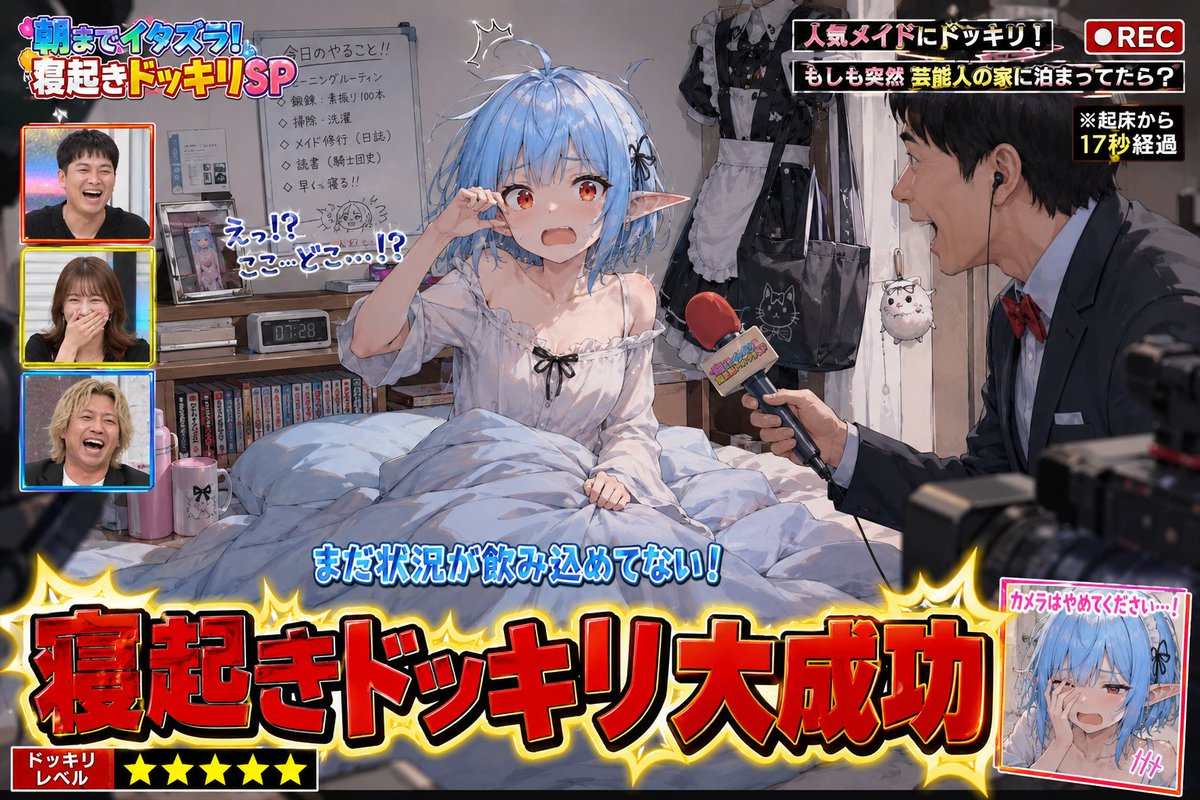
Variety Show Surprise Prank Anime Screenshot
A complex prompt for generating humorous anime screenshots of a TV 'wake-up prank,' including on-screen captions, reporters, and messy bedroom details.
이것은 애니메이션 & 게임 에 대한 GPT Image 2 프롬프트 사례입니다. 아래의 복사 가능한 프롬프트를 사용하여 유사한 시각 자료를 생성하고, 재사용하기 전에 Awesome GPT Image 2 Prompts 의 저작자 표시 및 상업적 사용 권한을 검토하십시오.
전체 프롬프트 세트가 필요하신가요? 다음을 사용하세요. 애니메이션 & 게임 더 많은 관련 예시를 보려면 주제 허브를 열거나 다음을 열어보세요. GPT Image 2 프롬프트 카탈로그 전체 예제 색인, 재사용 가능한 구조 및 출처 표기는 다음을 참조하십시오.
Free 1K preview
Generate one preview image instantly, no sign-up required.
Free text preview doesn’t preserve reference-image consistency.
2898/4000
프롬프트
복사 준비 프롬프트
Please use the provided image as a base reference for the character.

Depict a scene of "{argument name="prank scenario" default="a successful surprise wake-up prank on a popular variety show"}" with the character from the reference image as the main subject.

This is not a poster.
This is not a main visual.
This is a genuine screenshot of a prank video broadcast on a TV show.

The character must be in a just-woken-up state.
Naturally express surprise, confusion, sleepiness, embarrassment, and the reaction of not yet understanding the situation after being suddenly awakened.
Depict messy hair, disheveled bedding, a slumped posture, and a room full of life.
Do not tidy up pajamas or sleeping posture.
Naturally infer based on the reference character's personality, profession, worldview, daily attire, and lifestyle.
Make the scene look like a glimpse into the character's private life.

Place some personal items around the desk, shelves, bed, and bedside table that would be embarrassing if seen by others.
Naturally infer these items based on the reference character's personality, profession, hobbies, worldview, and lifestyle.
Do not limit yourself to typical otaku-related items.
Embarrassing personal items are elements that express the character's unique personality; do not repeatedly place only figure shelves or anime merchandise.
Add elements that will make the audience think, "Oh, he has this hobby" or "Oh, this is his private life."
Do not set the entire room as an otaku room.
Naturally infer the room itself based on the reference character's lifestyle.

Add TV show-style production effects to the scene.
Display "{argument name="caption content" default="Wake-up Prank Success!"}" in large subtitles.
Add decorations, subtitles (telop), onomatopoeic text, transition effects, station logos, and compositions showing the filming in progress that are unique to TV shows.
Include a prank reporter.
If there is only one reference image: generate an original TV reporter that fits the worldview.
If there are multiple reference images: use the first image as the prank target and the second image as the prank reporter.
The reporter should be holding a microphone, excitedly commentating or pointing the microphone at the target.
Production elements that suggest the presence of TV staff or a filming crew can be added.
Emphasize a comical and fun atmosphere in the expressions.
Describe it as a scene that looks like it is being broadcast live on TV.
Prioritize making the current situation understandable at a glance for viewers on social media.
{argument name="style" default="High-quality anime illustration"}.
Natural expression depiction.
Rich detail depiction.
Abundant TV show production effects.
A comical and fun atmosphere of a prank show.
Focus on depicting scenes that allow viewers to glimpse the character's unexpected side or private life and smile knowingly.
프롬프트 변수
프롬프트에 있는 편집 가능한 인수 자리 표시자와 해당 기본값입니다.
변하기 쉬운
prank scenario
기본
a successful surprise wake-up prank on a popular variety show
변하기 쉬운
caption content
기본
Wake-up Prank Success!
변하기 쉬운
style
기본
High-quality anime illustration
Best for
- - 애니메이션 & 게임 visual exploration
- - Image generation and reference-image edits
- - Reusable briefs that keep source attribution visible
Change these parts
- - Subject, product, character, or scene
- - Aspect ratio, camera, lighting, and background
- - Brand, text, color, and output constraints
Recommended model and settings
- - Model: gpt-image-2
- - Input mode: 이미지 to 이미지
- - Aspect ratio: source
- - Commercial status: review original source
How to use this prompt
- 1. Copy the prompt and preserve its structure for the first test.
- 2. Replace the subject, context, and publishing channel.
- 3. Change one camera, lighting, or style variable per iteration.
- 4. Inspect the output, source, text, and rights before reuse.
Limitations, source, and reuse cautions
- - Generated output is an editable draft, not factual, legal, or rights evidence.
- - Review the linked source, people, brands, logos, text, and third-party media before commercial use.
Awesome GPT Image 2 Prompts 에서 가져왔습니다. 출처 표기가 필요합니다. 상업적 이용 가능 여부는 allowed 입니다. 유료 사용 전에 원저작권 정보를 확인하세요.
이 범주에 속하는 더 많은 사례
범주, 입력 방식 호환성, 품질 및 위험도에 따라 우선순위가 정해집니다.






재사용 및 출처 참고 사항
사례를 미리 확인한 후 이 안내 메시지를 안전하게 사용하십시오.
- 1.프롬프트를 복사하거나 Dovoo의 생성 버튼을 사용하여 직접 엽니다.
- 2.사용 사례에 맞게 변수, 화면 비율 및 참조 이미지를 조정하십시오.
- 3.출판 또는 유료 사용 전에 저작권, 출처 표기 요건 및 브랜드 또는 초상권 관련 위험을 확인하십시오.