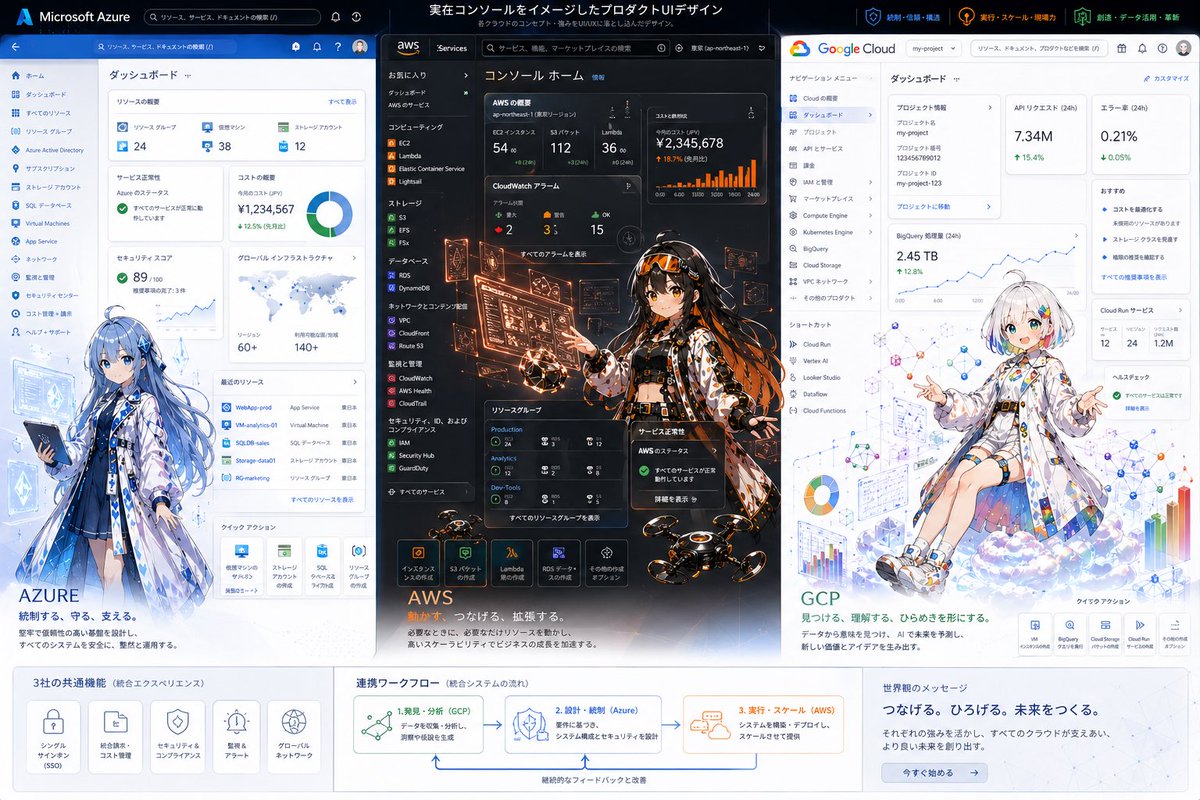
트라이 클라우드 UI 애니메이션 인포그래픽
Azure, AWS 및 Google Cloud를 사실적인 대시보드 UI 콘셉트와 개성 있는 애니메이션 마스코트를 결합하여 보여주는 세련된 대형 마케팅 이미지입니다. 기조연설 슬라이드, 소셜 미디어 게시물 및 제품 디자인 쇼케이스에 적합합니다.
이것은 그래픽 및 포스터 에 대한 GPT Image 2 프롬프트 사례입니다. 아래의 복사 가능한 프롬프트를 사용하여 유사한 시각 자료를 생성하고, 재사용하기 전에 Awesome GPT Image 2 Prompts 의 저작자 표시 및 상업적 사용 권한을 검토하십시오.
전체 프롬프트 세트가 필요하신가요? 다음을 사용하세요. 그래픽 및 포스터 더 많은 관련 예시를 보려면 주제 허브를 열거나 다음을 열어보세요. GPT Image 2 프롬프트 카탈로그 전체 예제 색인, 재사용 가능한 구조 및 출처 표기는 다음을 참조하십시오.
Free 1K preview
Generate one preview image instantly, no sign-up required.
4000/4000
프롬프트
복사 준비 프롬프트
{
  "type": "tri-cloud platform hero infographic illustration",
  "style": "high-end product UI concept art combining real dashboard interfaces with anime character illustrations, clean corporate tech presentation, crisp vector-like UI mixed with detailed painterly characters, polished marketing key visual",
  "canvas": {
    "aspect_ratio": "16:9",
    "background": "light gray presentation board with three vertical product panels and a bottom information band"
  },
  "headline": {
    "text": "実在コンソールをイメージしたプロダクトUIデザイン",
    "subtext": "各クラウドのコンセプト・思想をUI体験に落とし込んだイメージデザイン"
  },
  "layout": {
    "columns": 3,
    "sections": [
      {
        "title": "Microsoft Azure",
        "position": "left panel",
        "count": 1,
        "labels": [
          "ダッシュボード"
        ]
      },
      {
        "title": "aws",
        "position": "center panel",
        "count": 1,
        "labels": [
          "コンソール ホーム"
        ]
      },
      {
        "title": "Google Cloud",
        "position": "right panel",
        "count": 1,
        "labels": [
          "ダッシュボード"
        ]
      },
      {
        "title": "3社の共通機能",
        "position": "bottom left band",
        "count": 5,
        "labels": [
          "シングルサインオン (SSO)",
          "統合請求・コスト管理",
          "セキュリティ&コンプライアンス",
          "監視&アラート",
          "グローバルネットワーク"
        ]
      },
      {
        "title": "連携ワークフロー",
        "position": "bottom center band",
        "count": 3,
        "labels": [
          "1. 発見・分析(GCP)",
          "2. 設計・統制(Azure)",
          "3. 実行・スケール(AWS)"
        ]
      },
      {
        "title": "世界へのメッセージ",
        "position": "bottom right band",
        "count": 1,
        "labels": [
          "つなげる。ひろげる。未来をつくる。"
        ]
      }
    ],
    "panel_order": [
      "Azure",
      "AWS",
      "GCP"
    ]
  },
  "panels": {
    "left": {
      "brand": "{argument name=\"left cloud brand\" default=\"Azure\"}",
      "theme_color": "blue and white",
      "ui": "a realistic cloud management dashboard screenshot style interface with a top blue bar, a left navigation rail, and 8 analytics cards visible: resource overview, service health, cost summary, donut chart, security risk score, global infrastructure map, recent resources table, quick actions; small icons, Japanese labels, dense enterprise admin layout",
      "character": "full-body anime girl standing in front of the lower-left area of the dashboard, long flowing blue hair, white and blue translucent coat over a dark outfit, holding a tablet, calm and protective posture, futuristic cloud-admin mage vibe",
      "tagline": "AZURE",
      "subline": "統制する、守る、支える。"
    },
    "center": {
      "brand": "{argument name=\"center cloud brand\" default=\"AWS\"}",
      "theme_color": "black and orange",
      "ui": "a dark realistic cloud console home screen with left sidebar navigation, top search bar, and 7 prominent monitoring cards showing KPIs, bar charts, alarms, status widgets, resource groups, and service launch icons; high-density console layout with Japanese labels",
      "character": "centered anime girl in a dynamic standing pose, long dark hair with orange accents, black futuristic outfit under a patterned coat, surrounded by glowing orange holographic admin panels and floating monitoring screens, hands interacting with the UI, energetic operations-engineer vibe",
      "effects": "orange holograms, sparks, illuminated data overlays, several small hovering drones near the bottom foreground",
      "tagline": "AWS",
      "subline": "計算力で、つなげる、拡張する。"
    },
    "right": {
      "brand": "{argument name=\"right cloud brand\" default=\"GCP\"}",
      "theme_color": "white with Google accent colors",
      "ui": "a realistic cloud dashboard with a white top bar, left navigation menu, and 8 cards visible: project information, API requests, error rate, BigQuery metrics, trend line chart, recommendations, Cloud Run services, help/health check; clean minimalist enterprise UI with Japanese labels",
      "character": "anime girl seated on a soft cloud near the lower-right area, short white bob haircut with subtle rainbow-colored streak accents, oversized white tech coat decorated with colorful geometric symbols, relaxed open-arm pose, bright analytical and playful mood",
      "background_graphics": "floating charts, network diagrams, colorful nodes, bar graphs, pie chart, schematic data visualizations integrated around the character",
      "tagline": "GCP",
      "subline": "見つける、理解する、ひらめきを形にする。"
    }
  },
  "bottom_band": {
    "style": "white information strip with subtle gray separators",
    "left_block": "five rounded icon cards for shared features",
    "center_block": "workflow diagram with arrows connecting GCP to Azure to AWS and a loop-back improvement arrow",
    "right_block": "message area with a blue call-to-action button reading 今すぐ始める"
  },
  "branding": {
    "top_right_badges": 3,
    "badge_labels": [
      "統制・信頼・構築",
      "実行・スケール・現場力",
      "創造・データ活用・革新"
    ]
  },
  "rendering_notes": "keep all three panels vertically aligned and equal width, with the AWS center panel slightly more visually intense and darker; preserve readable Japanese-style UI typography without requiring exact legibility; emphasize the contrast between each cloud provider through color palette, interface language, and character design; corporate presentation quality, highly detailed, sharp, elegant, meaningful integration of data structure and illustration"
}
프롬프트 변수
프롬프트에 있는 편집 가능한 인수 자리 표시자와 해당 기본값입니다.
변하기 쉬운
left cloud brand
기본
Azure
변하기 쉬운
center cloud brand
기본
AWS
변하기 쉬운
right cloud brand
기본
GCP
Best for
- - 그래픽 및 포스터 visual exploration
- - Image generation and reference-image edits
- - Reusable briefs that keep source attribution visible
Change these parts
- - Subject, product, character, or scene
- - Aspect ratio, camera, lighting, and background
- - Brand, text, color, and output constraints
Recommended model and settings
- - Model: gpt-image-2
- - Input mode: 텍스트 to 이미지
- - Aspect ratio: source
- - Commercial status: review original source
How to use this prompt
- 1. Copy the prompt and preserve its structure for the first test.
- 2. Replace the subject, context, and publishing channel.
- 3. Change one camera, lighting, or style variable per iteration.
- 4. Inspect the output, source, text, and rights before reuse.
Limitations, source, and reuse cautions
- - Generated output is an editable draft, not factual, legal, or rights evidence.
- - Review the linked source, people, brands, logos, text, and third-party media before commercial use.
Awesome GPT Image 2 Prompts 에서 가져왔습니다. 출처 표기가 필요합니다. 상업적 이용 가능 여부는 allowed 입니다. 유료 사용 전에 원저작권 정보를 확인하세요.
이 범주에 속하는 더 많은 사례
범주, 입력 방식 호환성, 품질 및 위험도에 따라 우선순위가 정해집니다.






재사용 및 출처 참고 사항
사례를 미리 확인한 후 이 안내 메시지를 안전하게 사용하십시오.
- 1.프롬프트를 복사하거나 Dovoo의 생성 버튼을 사용하여 직접 엽니다.
- 2.사용 사례에 맞게 변수, 화면 비율 및 참조 이미지를 조정하십시오.
- 3.출판 또는 유료 사용 전에 저작권, 출처 표기 요건 및 브랜드 또는 초상권 관련 위험을 확인하십시오.