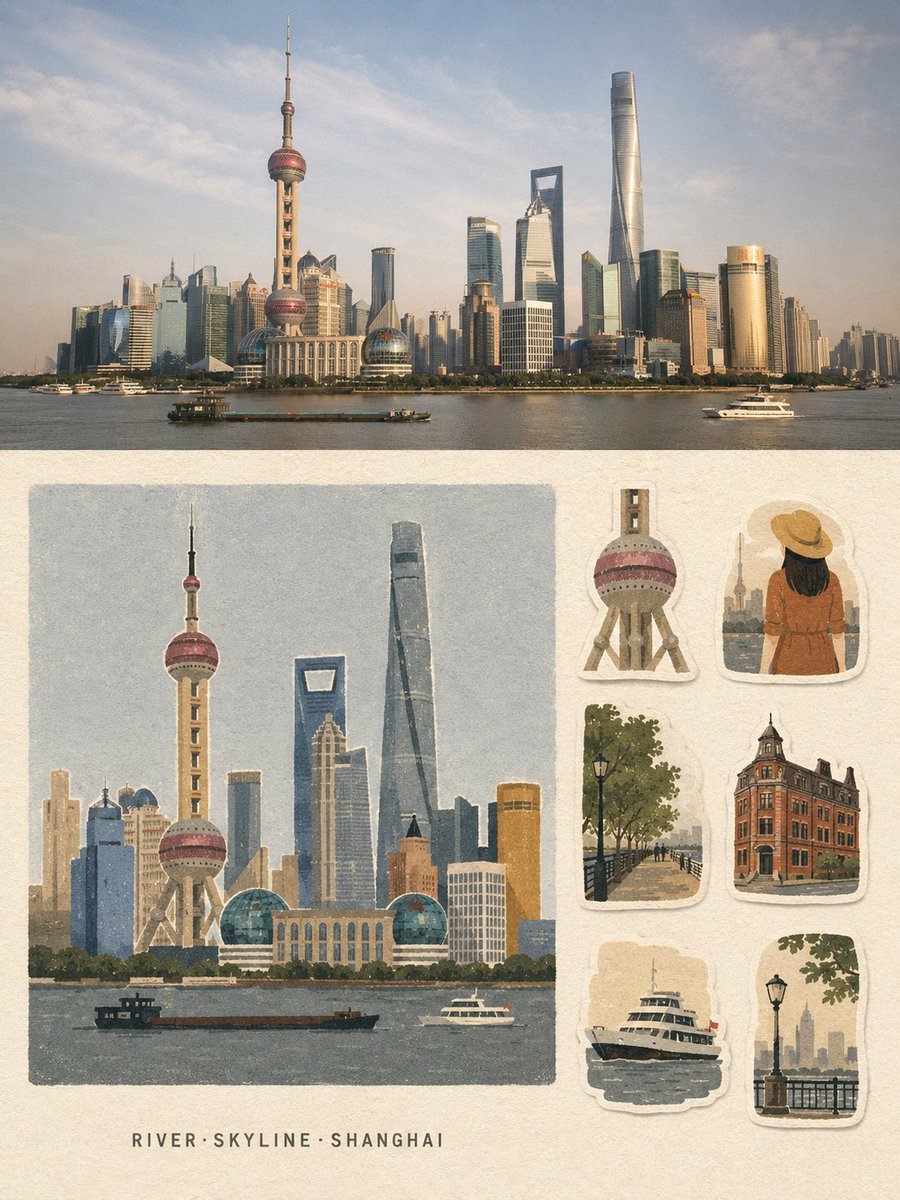
Vintage Travel Memory Poster
Generates a dual-layout travel poster combining a cinematic photograph with a handmade journal-style sticker sheet illustration.
이것은 그래픽 및 포스터 에 대한 GPT Image 2 프롬프트 사례입니다. 아래의 복사 가능한 프롬프트를 사용하여 유사한 시각 자료를 생성하고, 재사용하기 전에 Awesome GPT Image 2 Prompts 의 저작자 표시 및 상업적 사용 권한을 검토하십시오.
전체 프롬프트 세트가 필요하신가요? 다음을 사용하세요. 그래픽 및 포스터 더 많은 관련 예시를 보려면 주제 허브를 열거나 다음을 열어보세요. GPT Image 2 프롬프트 카탈로그 전체 예제 색인, 재사용 가능한 구조 및 출처 표기는 다음을 참조하십시오.
Free 1K preview
Generate one preview image instantly, no sign-up required.
2432/4000
프롬프트
복사 준비 프롬프트
Create a strict 3:4 vertical travel-memory collage poster based entirely on the written description of {argument name="location" default="[LOCATION]"}.

Divide the poster into two horizontal halves.

TOP HALF - ~50%: Create a premium travel photograph-style scene of {argument name="location" default="[LOCATION]"}, showing its most recognizable landmark, environment, atmosphere, architecture, and local character. Make the scene realistic, cinematic, naturally composed, and geographically recognizable.

BOTTOM HALF — ~50%: Create a handmade travel-memory illustration of the same location on warm off-white uncoated paper, with a continuous 4–5% blank margin. On the left 66–68%, place one large, near-square, borderless illustration featuring the main recognizable landmark or subject. Below it, leave a pale paper strip and center exactly 3 short English keywords in the format “Keyword1·Keyword2·Keyword3”.

On the right 30–32%, arrange exactly 6 separate travel-journal stickers inspired by authentic visual elements of {argument name="location" default="[LOCATION]"}: landmark detail, person/animal variation, environment, architecture/structure, functional object, and atmosphere/scale element. Give each sticker a slightly irregular warm-white hand-cut border and subtle paper shadow.

Use a unified {argument name="aesthetic style" default="matte gouache + cut-paper + risograph/screen-print"} aesthetic with coarse grain, slightly rough edges, subtle print-registration shifts, generous negative space, and only 5–8 low-saturation colors. Reduce the scene into large clean shapes, calm color fields, grouped vegetation, flat architectural forms, and simple faceless silhouettes.

Keep the most recognizable landmark of {argument name="location" default="[LOCATION]"} as the Identification Anchor, preserving its distinctive silhouette, proportions, and signature colors. Fully redraw everything in the same flat, grainy medium.

Include only the 3 keywords and, if essential, one landmark word. No other readable text, titles, dates, captions, addresses, prices, watermarks, or signatures.

Avoid gradients, 3D effects, anime, polished vector art, clip-art, watercolor bloom, wet-marker texture, photographic rendering in the illustration half, or unrelated elements.

The final design should feel quiet, restrained, vintage, handmade, tactile, and premium - a travel postcard combined with a collectible sticker sheet.
프롬프트 변수
프롬프트에 있는 편집 가능한 인수 자리 표시자와 해당 기본값입니다.
변하기 쉬운
location
기본
[LOCATION]
변하기 쉬운
aesthetic style
기본
matte gouache + cut-paper + risograph/screen-print
Best for
- - 그래픽 및 포스터 visual exploration
- - Image generation and reference-image edits
- - Reusable briefs that keep source attribution visible
Change these parts
- - Subject, product, character, or scene
- - Aspect ratio, camera, lighting, and background
- - Brand, text, color, and output constraints
Recommended model and settings
- - Model: gpt-image-2
- - Input mode: 텍스트 to 이미지
- - Aspect ratio: source
- - Commercial status: review original source
How to use this prompt
- 1. Copy the prompt and preserve its structure for the first test.
- 2. Replace the subject, context, and publishing channel.
- 3. Change one camera, lighting, or style variable per iteration.
- 4. Inspect the output, source, text, and rights before reuse.
Limitations, source, and reuse cautions
- - Generated output is an editable draft, not factual, legal, or rights evidence.
- - Review the linked source, people, brands, logos, text, and third-party media before commercial use.
Awesome GPT Image 2 Prompts 에서 가져왔습니다. 출처 표기가 필요합니다. 상업적 이용 가능 여부는 allowed 입니다. 유료 사용 전에 원저작권 정보를 확인하세요.
이 범주에 속하는 더 많은 사례
범주, 입력 방식 호환성, 품질 및 위험도에 따라 우선순위가 정해집니다.






재사용 및 출처 참고 사항
사례를 미리 확인한 후 이 안내 메시지를 안전하게 사용하십시오.
- 1.프롬프트를 복사하거나 Dovoo의 생성 버튼을 사용하여 직접 엽니다.
- 2.사용 사례에 맞게 변수, 화면 비율 및 참조 이미지를 조정하십시오.
- 3.출판 또는 유료 사용 전에 저작권, 출처 표기 요건 및 브랜드 또는 초상권 관련 위험을 확인하십시오.