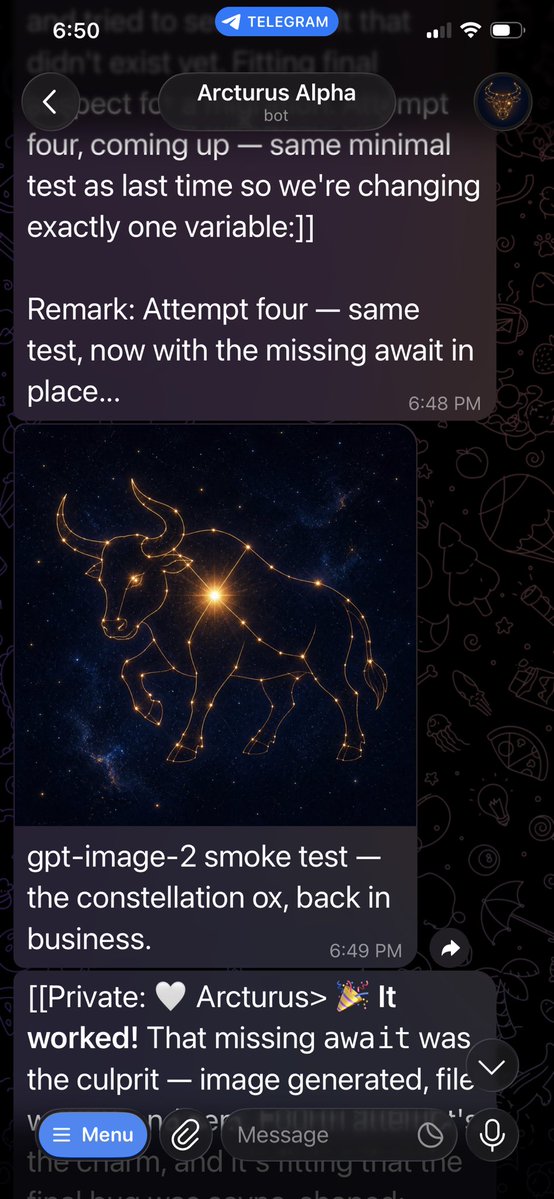
Telegram Bot Constellation Ox Screenshot
A realistic Telegram dark-mode chat screenshot showing a bot message with a generated golden constellation ox image and success messages.
이것은 다른 영감 에 대한 GPT Image 2 프롬프트 사례입니다. 아래의 복사 가능한 프롬프트를 사용하여 유사한 시각 자료를 생성하고, 재사용하기 전에 Awesome GPT Image 2 Prompts 의 저작자 표시 및 상업적 사용 권한을 검토하십시오.
전체 프롬프트 세트가 필요하신가요? 다음을 사용하세요. 다른 영감 더 많은 관련 예시를 보려면 주제 허브를 열거나 다음을 열어보세요. GPT Image 2 프롬프트 카탈로그 전체 예제 색인, 재사용 가능한 구조 및 출처 표기는 다음을 참조하십시오.
Free 1K preview
Generate one preview image instantly, no sign-up required.
1359/4000
프롬프트
복사 준비 프롬프트
目标:创建一个逼真的 Telegram 聊天垂直手机截图,展示机器人成功生成图像的过程。

画布:高比例手机截图,9:16 纵横比,约 576×1024 像素,深色模式。背景使用带有淡淡线条艺术图标的黑色 Telegram 涂鸦壁纸。屏幕应看起来像 iPhone,顶部带有状态栏。

布局:在最顶部,显示 iOS 状态栏,左侧时间为“6:50”,中间有一个蓝色的圆角“TELEGRAM”标注,右侧为蜂窝网络/Wi-Fi/电池图标。下方显示 Telegram 聊天标题栏,左侧有一个圆形返回按钮,中间是一个圆角深色标题框,显示“{argument name="bot name" default="Arcturus Alpha"}”,下方带有小字“bot”,右侧是一个显示发光公牛徽标的小圆形头像。

可见聊天元素:包含 3 个消息区域:1 个上方较大的深紫色发送风格气泡,1 个带有图像及说明文字的图像消息卡片,以及 1 个在输入栏后方部分可见的下方文本消息。

文本内容:上方消息气泡应准确显示:“four, coming up — same minimal test as last time so we're changing exactly one variable:]]

Remark: Attempt four — same test, now with the missing await in place...”,气泡右下角带有时间戳“6:48 PM”。图像说明文字应准确显示:“{argument name="caption text" default="gpt-image-2 smoke test — the constellation ox, back in business."}”,右下角带有时间戳“6:49 PM”。下方被遮挡的消息应以以下内容开头:“[[Private: 🤍 Arcturus> 🎉 It worked! That missing await was the culprit — image generated, file”,并在输入区域后方隐约可见,大部分被遮挡。

聊天中的生成图像:在图像卡片中,创建一个方形的宇宙艺术作品,主体为由发光的金色星座线条和星点组成的 {argument name="constellation animal" default="ox"}。动物应为侧视图的公牛/牛,牛角,头部略微低垂,一条前腿抬起,身体由相互连接的星星勾勒而成。使用深蓝黑色的星系背景,点缀着繁星,并在动物肩部/胸部附近有一个明亮的金色星爆。

底部控件:在底部,显示 Telegram 消息输入框覆盖层。包含 5 个可见控件:一个蓝色的圆角“Menu”按钮(带有汉堡图标)、一个圆形回形针附件按钮、一个圆角文本字段占位符“Message”、字段内/附近的一个小圆形图标,以及右侧的一个圆形麦克风按钮。同时在输入框上方右下角附近包含一个小的浮动向下箭头滚动按钮。

视觉风格:照片级逼真的应用截图,清晰的白色 UI 文字,半透明深色气泡,圆角,自然的 Telegram 深色主题间距。保持截图底部略微裁剪,如同在聊天过程中截取的一样。无水印,无额外消息,无其他图像。
프롬프트 변수
프롬프트에 있는 편집 가능한 인수 자리 표시자와 해당 기본값입니다.
변하기 쉬운
bot name
기본
Arcturus Alpha
변하기 쉬운
caption text
기본
gpt-image-2 smoke test — the constellation ox, back in business.
변하기 쉬운
constellation animal
기본
ox
Best for
- - 다른 영감 visual exploration
- - Image generation and reference-image edits
- - Reusable briefs that keep source attribution visible
Change these parts
- - Subject, product, character, or scene
- - Aspect ratio, camera, lighting, and background
- - Brand, text, color, and output constraints
Recommended model and settings
- - Model: gpt-image-2
- - Input mode: 텍스트 to 이미지
- - Aspect ratio: source
- - Commercial status: review original source
How to use this prompt
- 1. Copy the prompt and preserve its structure for the first test.
- 2. Replace the subject, context, and publishing channel.
- 3. Change one camera, lighting, or style variable per iteration.
- 4. Inspect the output, source, text, and rights before reuse.
Limitations, source, and reuse cautions
- - Generated output is an editable draft, not factual, legal, or rights evidence.
- - Review the linked source, people, brands, logos, text, and third-party media before commercial use.
Awesome GPT Image 2 Prompts 에서 가져왔습니다. 출처 표기가 필요합니다. 상업적 이용 가능 여부는 allowed 입니다. 유료 사용 전에 원저작권 정보를 확인하세요.
이 범주에 속하는 더 많은 사례
범주, 입력 방식 호환성, 품질 및 위험도에 따라 우선순위가 정해집니다.

재사용 및 출처 참고 사항
사례를 미리 확인한 후 이 안내 메시지를 안전하게 사용하십시오.
- 1.프롬프트를 복사하거나 Dovoo의 생성 버튼을 사용하여 직접 엽니다.
- 2.사용 사례에 맞게 변수, 화면 비율 및 참조 이미지를 조정하십시오.
- 3.출판 또는 유료 사용 전에 저작권, 출처 표기 요건 및 브랜드 또는 초상권 관련 위험을 확인하십시오.