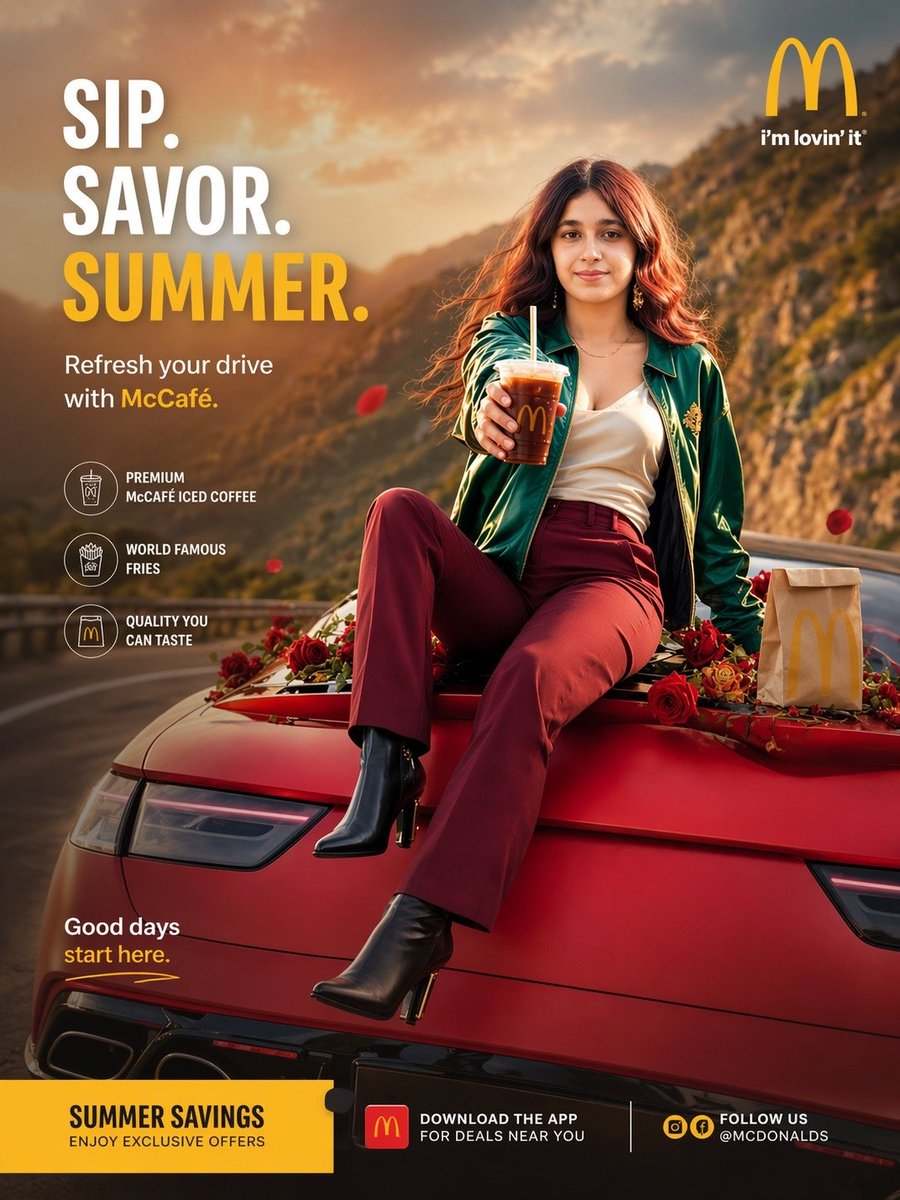
여름 맥카페 마운틴 로드 광고
세련된 여성이 빨간색 스포츠카에 앉아 아이스 커피를 들고 있는 모습을 담은, 패스트푸드 캠페인에 최적화된 세로형 이미지입니다. 레스토랑이나 음료 브랜드의 고급스러운 여름 모바일 광고 제작에 이상적입니다.
이것은 제품 및 상업 에 대한 GPT Image 2 프롬프트 사례입니다. 아래의 복사 가능한 프롬프트를 사용하여 유사한 시각 자료를 생성하고, 재사용하기 전에 Awesome GPT Image 2 Prompts 의 저작자 표시 및 상업적 사용 권한을 검토하십시오.
전체 프롬프트 세트가 필요하신가요? 다음을 사용하세요. 제품 및 상업 더 많은 관련 예시를 보려면 주제 허브를 열거나 다음을 열어보세요. GPT Image 2 프롬프트 카탈로그 전체 예제 색인, 재사용 가능한 구조 및 출처 표기는 다음을 참조하십시오.
Free 1K preview
Generate one preview image instantly, no sign-up required.
2368/4000
프롬프트
복사 준비 프롬프트
Create a premium vertical fast-food lifestyle advertisement in a polished commercial photography style, designed like a summer campaign poster for McDonald's and McCafé. Show a glamorous young woman with softly blurred, unidentifiable facial features sitting confidently on the hood of a sleek red sports car parked on a winding mountain road at golden hour. She has long wavy auburn hair glowing in warm sunset backlight, wears a dark green satin bomber jacket with gold detailing, a white camisole, high-waisted burgundy pants, and black ankle boots with heels. Her pose is relaxed and stylish, one leg bent and one extended forward, while she holds out a clear plastic cup of iced coffee with a straw and visible McDonald's golden arches branding toward the camera. Scatter red roses across the car hood around her, and place 1 McDonald's paper takeout bag on the right side of the hood. Use a dramatic canyon or hillside background with warm sunlight, soft haze, cinematic depth of field, and a luxurious aspirational road-trip mood. Include floating red flower petals in the air. Compose the layout as a high-end ad with the model centered slightly right and large promotional typography on the left. Add exactly 3 large headline lines in the upper left: "SIP.", "SAVOR.", and "{argument name="headline text" default="SUMMER."}" with the first 2 in bold white and the third in bold golden yellow. Below that, add the subheadline: "Refresh your drive with McCafé." with "McCafé" highlighted in yellow. Add exactly 3 circular feature icons stacked vertically on the left with short captions: "PREMIUM McCAFÉ ICED COFFEE", "WORLD FAMOUS FRIES", and "QUALITY YOU CAN TASTE". Place the McDonald's golden arches logo with the text "i'm lovin' it" in the top right. Add a small lower-left tagline reading "Good days start here." with "start here." in yellow. Create a bold yellow bottom banner spanning the width, divided into 3 content areas: left area reads "SUMMER SAVINGS" and "ENJOY EXCLUSIVE OFFERS"; center area includes a McDonald's app icon and the text "DOWNLOAD THE APP FOR DEALS NEAR YOU"; right area reads "FOLLOW US @MCDONALDS" with social icons. Use brand-accurate red and yellow accents, glossy product styling, realistic lighting, sharp editorial retouching, shallow depth of field, luxury commercial ad composition, and mobile-first poster proportions.프롬프트 변수
프롬프트에 있는 편집 가능한 인수 자리 표시자와 해당 기본값입니다.
변하기 쉬운
headline text
기본
SUMMER.
Best for
- - 제품 및 상업 visual exploration
- - Image generation and reference-image edits
- - Reusable briefs that keep source attribution visible
Change these parts
- - Subject, product, character, or scene
- - Aspect ratio, camera, lighting, and background
- - Brand, text, color, and output constraints
Recommended model and settings
- - Model: gpt-image-2
- - Input mode: 텍스트 to 이미지
- - Aspect ratio: source
- - Commercial status: review original source
How to use this prompt
- 1. Copy the prompt and preserve its structure for the first test.
- 2. Replace the subject, context, and publishing channel.
- 3. Change one camera, lighting, or style variable per iteration.
- 4. Inspect the output, source, text, and rights before reuse.
Limitations, source, and reuse cautions
- - Generated output is an editable draft, not factual, legal, or rights evidence.
- - Review the linked source, people, brands, logos, text, and third-party media before commercial use.
Awesome GPT Image 2 Prompts 에서 가져왔습니다. 출처 표기가 필요합니다. 상업적 이용 가능 여부는 allowed 입니다. 유료 사용 전에 원저작권 정보를 확인하세요.
이 범주에 속하는 더 많은 사례
범주, 입력 방식 호환성, 품질 및 위험도에 따라 우선순위가 정해집니다.






재사용 및 출처 참고 사항
사례를 미리 확인한 후 이 안내 메시지를 안전하게 사용하십시오.
- 1.프롬프트를 복사하거나 Dovoo의 생성 버튼을 사용하여 직접 엽니다.
- 2.사용 사례에 맞게 변수, 화면 비율 및 참조 이미지를 조정하십시오.
- 3.출판 또는 유료 사용 전에 저작권, 출처 표기 요건 및 브랜드 또는 초상권 관련 위험을 확인하십시오.