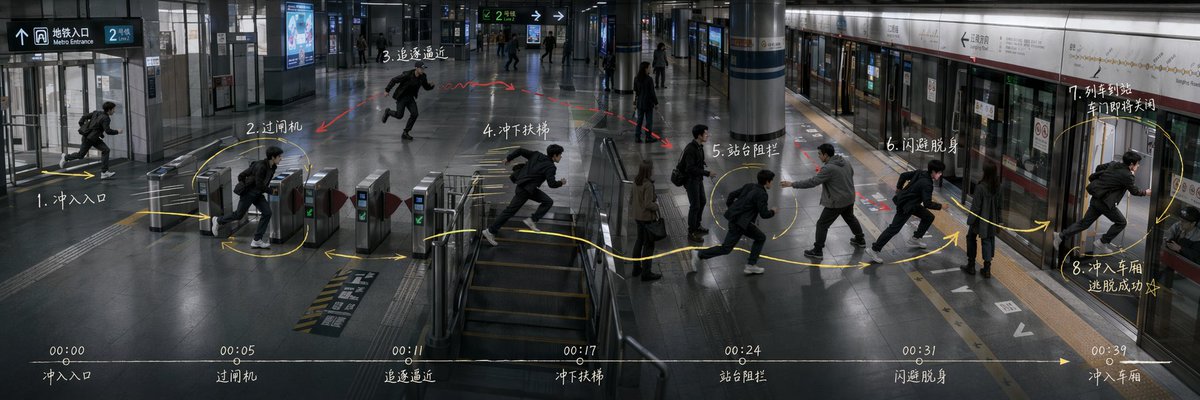
Subway Escape Storyboard Route
Generates an ultra-wide cinematic subway action storyboard with route arrows, numbered movement beats, and a bottom timeline for directing scene blocking.
이것은 일러스트레이션 및 미술 에 대한 GPT Image 2 프롬프트 사례입니다. 아래의 복사 가능한 프롬프트를 사용하여 유사한 시각 자료를 생성하고, 재사용하기 전에 Awesome GPT Image 2 Prompts 의 저작자 표시 및 상업적 사용 권한을 검토하십시오.
전체 프롬프트 세트가 필요하신가요? 다음을 사용하세요. 일러스트레이션 및 미술 더 많은 관련 예시를 보려면 주제 허브를 열거나 다음을 열어보세요. GPT Image 2 프롬프트 카탈로그 전체 예제 색인, 재사용 가능한 구조 및 출처 표기는 다음을 참조하십시오.
Free 1K preview
Generate one preview image instantly, no sign-up required.
2932/4000
프롬프트
복사 준비 프롬프트
Goal: Create an ultra-wide 3:1 cinematic story-routing board for an action sequence in a modern subway station, showing the same protagonist repeated across one continuous space as a movement plan for directing and blocking. The scene is {argument name="story scenario" default="Subway station escape"}.

Canvas: 1200×400 or similar 3:1 panoramic frame, realistic film still style, cool gray-blue lighting, high-detail interior architecture, glossy dark floor reflections, glass walls, metal ticket gates, central stair/escalator area, columns, platform screen doors, subway train on the right, overhead wayfinding signs. Use a slightly elevated wide-angle security-camera/cinematic perspective so the whole route is visible from entrance to platform.

Layout: One continuous station environment from left to right: entrance at far left, ticket gates left-center, stair/escalator area center, open concourse mid-right, platform and train doors on the right. Show the same male protagonist repeated at each action beat, wearing a black jacket, dark pants, white sneakers, and a backpack, running or dodging. Add a pursuing man in a gray jacket near the platform blocking him, plus a few bystanders as background silhouettes.

Action route annotations: Draw a bright hand-drawn yellow route line with arrows and loops across the floor, connecting exactly 8 numbered action nodes. Add small red arrows/scribbles for danger or pursuit. The 8 visible action nodes are: 1. rush into entrance; 2. pass ticket gate; 3. pursuit approaching; 4. rush down stairs; 5. platform blockage; 6. dodge and slip past; 7. train arriving and doors about to close; 8. rush into carriage, escape succeeds. Place these labels as white handwritten notes near the corresponding positions, using Chinese-style handwritten storyboard labeling if possible.

Timeline strip: Along the bottom edge, draw one thin horizontal white timeline with a yellow arrow pointing right. Include exactly 7 timestamp markers and captions: 00:00 entrance, 00:05 ticket gate, 00:11 pursuit approaching, 00:17 rush down stairs, 00:24 platform blockage, 00:31 dodge and slip past, 00:39 enter carriage. Keep the strip subtle but legible, like a director's action planning board.

Text and signage: Include realistic station signage such as Metro Entrance, platform direction arrows, route signs, and train line panels, but keep them secondary to the storyboard marks. Main handwritten annotations may use {argument name="annotation language" default="Chinese"}; keep the writing chalky white, slightly imperfect, and integrated into the image.

Visual style: Photorealistic, moody, cinematic, documentary-like, with motion-blurred runners, crisp architectural details, reflective floors, cool fluorescent lighting, and overlay graphics that look manually drawn on top of a still frame. Avoid cartoon styling, avoid split panels, avoid extra action nodes, avoid logos or watermarks.
프롬프트 변수
프롬프트에 있는 편집 가능한 인수 자리 표시자와 해당 기본값입니다.
변하기 쉬운
story scenario
기본
Subway station escape
변하기 쉬운
annotation language
기본
Chinese
Best for
- - 일러스트레이션 및 미술 visual exploration
- - Image generation and reference-image edits
- - Reusable briefs that keep source attribution visible
Change these parts
- - Subject, product, character, or scene
- - Aspect ratio, camera, lighting, and background
- - Brand, text, color, and output constraints
Recommended model and settings
- - Model: gpt-image-2
- - Input mode: 텍스트 to 이미지
- - Aspect ratio: source
- - Commercial status: review original source
How to use this prompt
- 1. Copy the prompt and preserve its structure for the first test.
- 2. Replace the subject, context, and publishing channel.
- 3. Change one camera, lighting, or style variable per iteration.
- 4. Inspect the output, source, text, and rights before reuse.
Limitations, source, and reuse cautions
- - Generated output is an editable draft, not factual, legal, or rights evidence.
- - Review the linked source, people, brands, logos, text, and third-party media before commercial use.
Awesome GPT Image 2 Prompts 에서 가져왔습니다. 출처 표기가 필요합니다. 상업적 이용 가능 여부는 allowed 입니다. 유료 사용 전에 원저작권 정보를 확인하세요.
이 범주에 속하는 더 많은 사례
범주, 입력 방식 호환성, 품질 및 위험도에 따라 우선순위가 정해집니다.






재사용 및 출처 참고 사항
사례를 미리 확인한 후 이 안내 메시지를 안전하게 사용하십시오.
- 1.프롬프트를 복사하거나 Dovoo의 생성 버튼을 사용하여 직접 엽니다.
- 2.사용 사례에 맞게 변수, 화면 비율 및 참조 이미지를 조정하십시오.
- 3.출판 또는 유료 사용 전에 저작권, 출처 표기 요건 및 브랜드 또는 초상권 관련 위험을 확인하십시오.