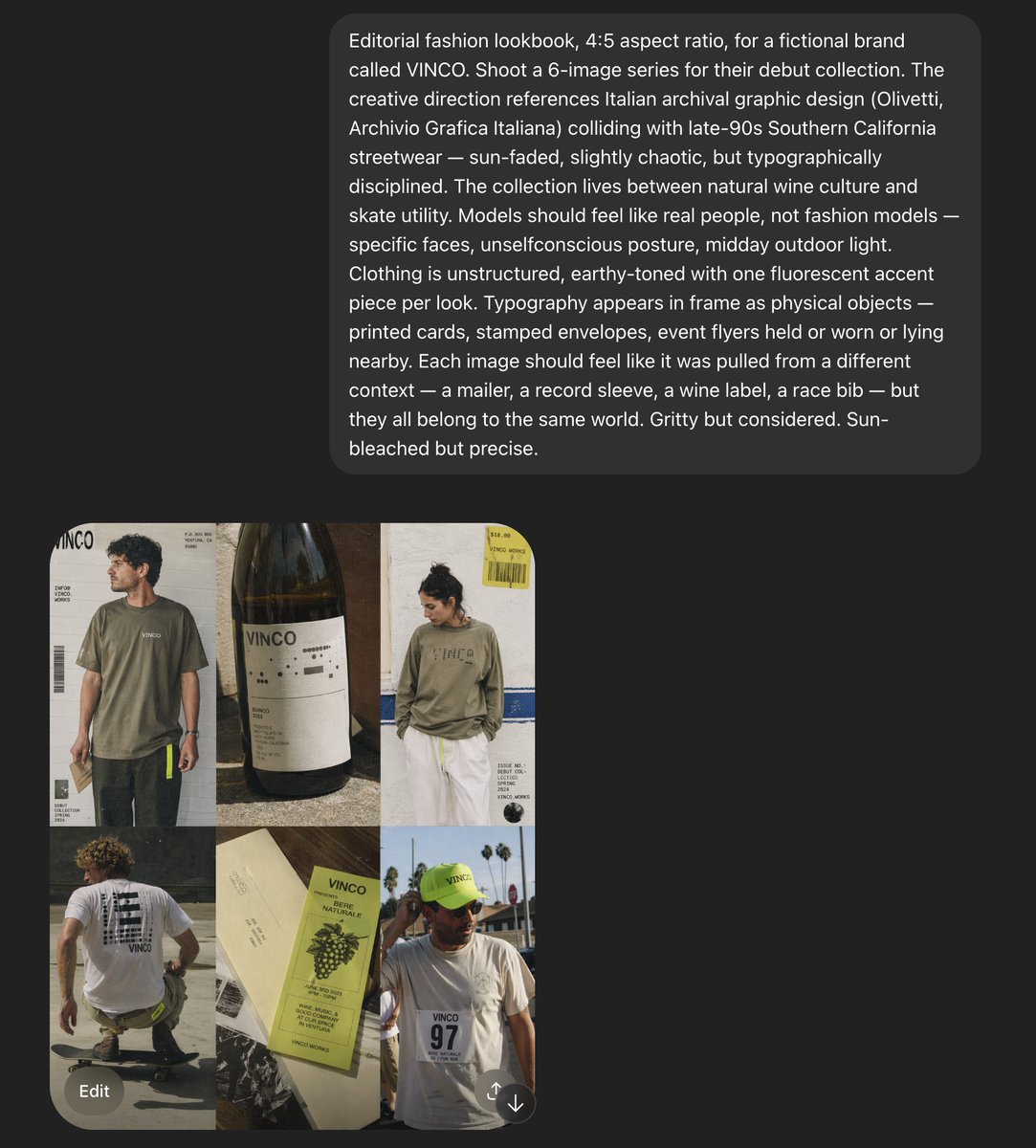
VINCO 에디토리얼 무드보드 스크린샷
가상의 스트리트웨어 및 내추럴 와인 브랜드의 패션 화보 콘셉트를 6장의 이미지로 보여주는 스크린샷 스타일의 AI 무드보드입니다. 아트 디렉션 자료나 캠페인 참고 자료를 재구성하는 데 유용합니다.
이것은 패션 & 뷰티 에 대한 GPT Image 2 프롬프트 사례입니다. 아래의 복사 가능한 프롬프트를 사용하여 유사한 시각 자료를 생성하고, 재사용하기 전에 Awesome GPT Image 2 Prompts 의 저작자 표시 및 상업적 사용 권한을 검토하십시오.
전체 프롬프트 세트가 필요하신가요? 다음을 사용하세요. 패션 & 뷰티 더 많은 관련 예시를 보려면 주제 허브를 열거나 다음을 열어보세요. GPT Image 2 프롬프트 카탈로그 전체 예제 색인, 재사용 가능한 구조 및 출처 표기는 다음을 참조하십시오.
Free 1K preview
Generate one preview image instantly, no sign-up required.
Free text preview doesn’t preserve reference-image consistency.
2968/4000
프롬프트
복사 준비 프롬프트
Create a 4:5 editorial fashion lookbook moodboard for a fictional brand called {argument name="brand name" default="VINCO"}. The image is a dark-interface screenshot-style composition with a large rounded charcoal text panel across the upper half and a 2-by-3 grid of six fashion/editorial images in the lower left quadrant. The overall aesthetic blends Italian archival graphic design with late-1990s Southern California streetwear, mixing natural wine culture, skate utility, and sun-faded documentary fashion photography. Use gritty but precise art direction, midday outdoor light, slightly chaotic but disciplined typography, and real-person casting rather than polished fashion-model energy. In the top text panel, show a long white sans-serif creative-direction paragraph describing the shoot, with multiple lines of copy, like an AI prompt or design brief displayed inside a rounded dark gray bubble on a near-black background. In the image grid, include exactly 6 tiles: tile 1 shows a young man in an oversized faded olive T-shirt and dark pants standing in front of an off-white poster-like backdrop with bold {argument name="logo text" default="VINCO"} branding, barcode graphics, and small editorial text; tile 2 is a close-up still life of a dark wine bottle with a minimalist white label reading {argument name="bottle label" default="VINCO"}, photographed in warm sunlight with tactile paper texture and shadow; tile 3 shows a person from the back in a washed olive long-sleeve shirt with large subtle chest or back branding, white shorts, and a yellow hanging tag or sticker element near the top right, posed against a pale wall with blue stripe detail and editorial layout text; tile 4 shows a skateboarder crouching or riding away, photographed from behind, wearing a white T-shirt with a large black graphic block on the back and dark shorts, in golden sun on pavement; tile 5 is a printed wine ephemera flat lay with cream paper and a pale chartreuse-green wine label or booklet reading {argument name="product text" default="Vino Naturale"}, featuring grape illustration, small black text, and layered paper pieces; tile 6 shows a person facing camera in a white T-shirt with a race-bib style chest print reading 97, wearing a fluorescent yellow-green cap with small brand text, standing outdoors with palm trees and bright sky behind them. Keep the six images slightly imperfect and collage-like, as if pulled from a campaign deck or saved references. Use earthy tones throughout: olive, cream, charcoal, sun-bleached white, asphalt gray, muted brown, and one fluorescent yellow-green accent repeated in small details. Include visible interface framing around the composition: a dark app-like background, the lower image grid aligned left, and a rounded gray “Edit” button near the bottom left, plus a small circular icon near the bottom right, reinforcing that this is a screenshot of a generated moodboard rather than a clean standalone poster.프롬프트 변수
프롬프트에 있는 편집 가능한 인수 자리 표시자와 해당 기본값입니다.
변하기 쉬운
brand name
기본
VINCO
변하기 쉬운
logo text
기본
VINCO
변하기 쉬운
bottle label
기본
VINCO
변하기 쉬운
product text
기본
Vino Naturale
Best for
- - 패션 & 뷰티 visual exploration
- - Image generation and reference-image edits
- - Reusable briefs that keep source attribution visible
Change these parts
- - Subject, product, character, or scene
- - Aspect ratio, camera, lighting, and background
- - Brand, text, color, and output constraints
Recommended model and settings
- - Model: gpt-image-2
- - Input mode: 이미지 to 이미지
- - Aspect ratio: source
- - Commercial status: review original source
How to use this prompt
- 1. Copy the prompt and preserve its structure for the first test.
- 2. Replace the subject, context, and publishing channel.
- 3. Change one camera, lighting, or style variable per iteration.
- 4. Inspect the output, source, text, and rights before reuse.
Limitations, source, and reuse cautions
- - Generated output is an editable draft, not factual, legal, or rights evidence.
- - Review the linked source, people, brands, logos, text, and third-party media before commercial use.
Awesome GPT Image 2 Prompts 에서 가져왔습니다. 출처 표기가 필요합니다. 상업적 이용 가능 여부는 allowed 입니다. 유료 사용 전에 원저작권 정보를 확인하세요.
이 범주에 속하는 더 많은 사례
범주, 입력 방식 호환성, 품질 및 위험도에 따라 우선순위가 정해집니다.






재사용 및 출처 참고 사항
사례를 미리 확인한 후 이 안내 메시지를 안전하게 사용하십시오.
- 1.프롬프트를 복사하거나 Dovoo의 생성 버튼을 사용하여 직접 엽니다.
- 2.사용 사례에 맞게 변수, 화면 비율 및 참조 이미지를 조정하십시오.
- 3.출판 또는 유료 사용 전에 저작권, 출처 표기 요건 및 브랜드 또는 초상권 관련 위험을 확인하십시오.