Sophisticated Style
출처가 명시된 Nano Banana Pro 이미지 프롬프트는 Awesome Nano Banana Pro Pro Pro 프롬프트 저장소에서 가져온 것으로, 미리보기 이미지와 재사용 검토 메모가 포함되어 있습니다.
이것은 인물과 캐릭터 에 대한 Nano Banana Pro 프롬프트 사례입니다. 아래의 복사 가능한 프롬프트를 사용하여 유사한 시각 자료를 생성하고, 재사용하기 전에 Awesome Nano Banana Pro Prompts 의 저작자 표시 및 상업적 사용 권한을 검토하십시오.
전체 프롬프트 세트가 필요하신가요? 다음을 사용하세요. 인물과 캐릭터 더 많은 관련 예시를 보려면 주제 허브를 열거나 다음을 열어보세요. Nano Banana Pro 프롬프트 카탈로그 전체 예제 색인, 재사용 가능한 구조 및 출처 표기는 다음을 참조하십시오.
프롬프트
복사 준비 프롬프트
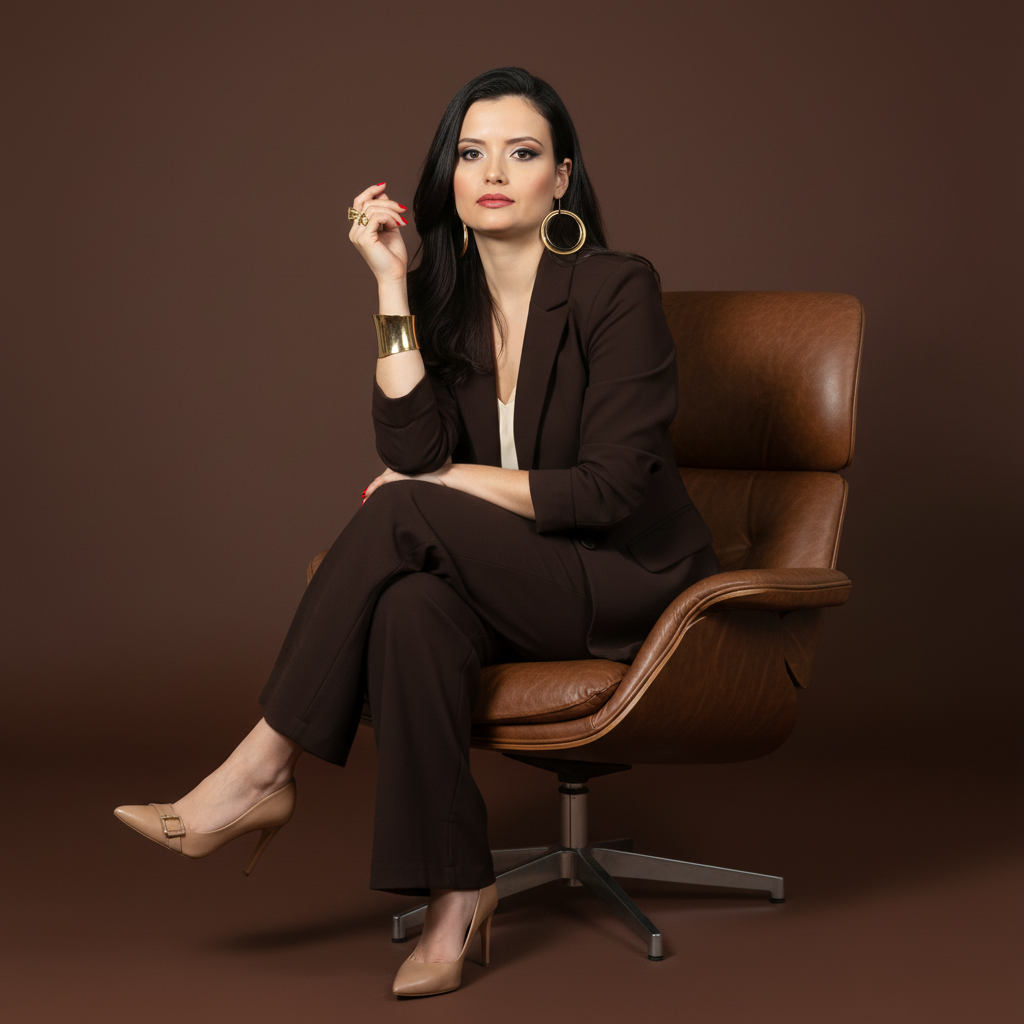
A full-length studio photograph with a sophisticated and professional aesthetic. It captures a female figure sitting elegantly in a modern brown leather armchair with a metal swivel base. The subject sits confidently, with her body at a slight angle, looking directly at the camera with a serene expression. One hand is resting on the knee or arm of the chair, while the other is close to her face. Her legs are crossed or elegantly positioned.

She wears a dark brown or chocolate suit (blazer and wide-leg pants) over a light (white or cream) top. On her feet are light-colored (nude or off-white) high-heeled shoes with buckle or jewel details. She wears several pieces of gold jewelry: earrings, rings, and a wide bracelet. Her nails are painted a vibrant red.

Her hair is dark, medium-length, with soft waves and swept to the side. Her makeup is polished and professional.

The background is a solid-colored studio backdrop in a shade of brown that complements the suit and armchair, creating a sophisticated, monochromatic color palette. The lighting is studio-grade, soft, and directional, coming from a front-to-side angle, shaping the face and body, highlighting the textures of the fabric and the shine of the jewelry.

Camera Settings: Captured with a prime portrait lens (e.g., 85mm or 100mm) on a full-frame camera for a flattering perspective and natural proportions. Aperture set between f/4.0 and f/5.6 to ensure sharpness across the subject. ISO 100-200 for maximum studio image quality. Shutter speed from 1/160s to 1/250s. Studio lighting with a large softbox or octabox as the main light and a reflector to fill in shadows.

Instructions for the "nano banana":

"Please use the user's reference image to capture and apply all of their facial features, facial structure, eye color, hairstyle, and skin tone with maximum fidelity. The goal is to create a professional version of the user in this portrait. The clothing (brown suit, light top, heels), jewelry, red nails, the pose sitting in the leather chair, the serene expression, the soft lighting, and the brown background should be created as described, creating a perfect fusion between the user's identity and the aesthetics of the image."
Best for
- - 인물과 캐릭터 visual exploration
- - Image generation and reference-image edits
- - Reusable briefs that keep source attribution visible
Change these parts
- - Subject, product, character, or scene
- - Aspect ratio, camera, lighting, and background
- - Brand, text, color, and output constraints
Recommended model and settings
- - Model: nano-banana-pro
- - Input mode: 이미지 to 이미지
- - Aspect ratio: square
- - Commercial status: restricted
How to use this prompt
- 1. Copy the prompt and preserve its structure for the first test.
- 2. Replace the subject, context, and publishing channel.
- 3. Change one camera, lighting, or style variable per iteration.
- 4. Inspect the output, source, text, and rights before reuse.
Limitations, source, and reuse cautions
- - Generated output is an editable draft, not factual, legal, or rights evidence.
- - Review the linked source, people, brands, logos, text, and third-party media before commercial use.
Awesome Nano Banana Pro Prompts 에서 가져왔습니다. 출처 표기가 필요합니다. 상업적 이용 가능 여부는 restricted 입니다. 유료 사용 전에 원저작권 정보를 확인하세요.
이 범주에 속하는 더 많은 사례
범주, 입력 방식 호환성, 품질 및 위험도에 따라 우선순위가 정해집니다.
재사용 및 출처 참고 사항
사례를 미리 확인한 후 이 안내 메시지를 안전하게 사용하십시오.
- 1.프롬프트를 복사하거나 Dovoo의 생성 버튼을 사용하여 직접 엽니다.
- 2.사용 사례에 맞게 변수, 화면 비율 및 참조 이미지를 조정하십시오.
- 3.출판 또는 유료 사용 전에 저작권, 출처 표기 요건 및 브랜드 또는 초상권 관련 위험을 확인하십시오.