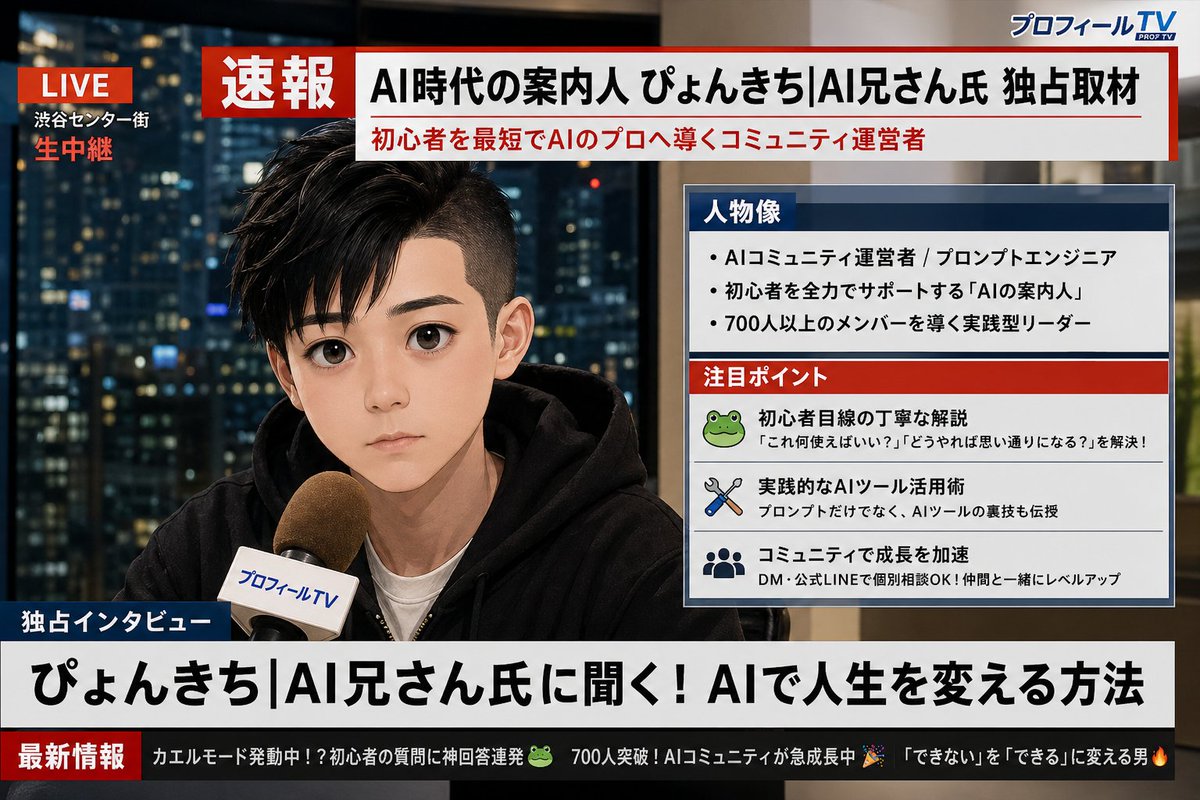
소셜 미디어 프로필 뉴스 방송 전환
사용자의 X(트위터) 프로필 스크린샷을 분석하여 해당 사용자가 등장하는 실제 일본 TV 속보 화면을 생성하는 상세한 안내 메시지입니다.
이것은 인물과 캐릭터 에 대한 GPT Image 2 프롬프트 사례입니다. 아래의 복사 가능한 프롬프트를 사용하여 유사한 시각 자료를 생성하고, 재사용하기 전에 Awesome GPT Image 2 Prompts 의 저작자 표시 및 상업적 사용 권한을 검토하십시오.
전체 프롬프트 세트가 필요하신가요? 다음을 사용하세요. 인물과 캐릭터 더 많은 관련 예시를 보려면 주제 허브를 열거나 다음을 열어보세요. GPT Image 2 프롬프트 카탈로그 전체 예제 색인, 재사용 가능한 구조 및 출처 표기는 다음을 참조하십시오.
Free 1K preview
Generate one preview image instantly, no sign-up required.
Free text preview doesn’t preserve reference-image consistency.
1412/4000
프롬프트
복사 준비 프롬프트
Analyze the uploaded X (Twitter) profile screenshot. First, extract my profile picture, display name, and bio text. Then, based on my bio and overall vibe, generate a realistic Japanese TV breaking news broadcast screen image featuring me. The character should closely resemble the person in the profile picture, shown as if being interviewed live on camera. Design it to look like a Japanese news program (similar to NHK News or News Zero style). All text must be in Japanese. Include the following elements: 1. A red "速報" banner at the top of the screen. 2. A large headline in Japanese summarizing who I am based on my bio (e.g., "AI時代の案内人 ○○氏 独占取材"). 3. A profile data box on the side of the screen (like Japanese news info panels) containing: - "人物像" section: 3 short bullet points about my personality or profession based on my bio - "注目ポイント" section: 3 small items representing my interests or skills inferred from my profile 4. A news ticker at the bottom with 2-3 humorous short updates derived from my bio and interests, written in Japanese. 5. A fictional Japanese news channel logo in the corner (e.g., "プロフィールTV" or "X速報チャンネル"). 6. A "生中継" or "LIVE" indicator in red in the upper corner. The overall look should be a photorealistic Japanese TV news broadcast screen with clean, modern Japanese typography. Ensure all Japanese text is perfectly legible and accurately reflects my profile information.
Best for
- - 인물과 캐릭터 visual exploration
- - Image generation and reference-image edits
- - Reusable briefs that keep source attribution visible
Change these parts
- - Subject, product, character, or scene
- - Aspect ratio, camera, lighting, and background
- - Brand, text, color, and output constraints
Recommended model and settings
- - Model: gpt-image-2
- - Input mode: 이미지 to 이미지
- - Aspect ratio: source
- - Commercial status: review original source
How to use this prompt
- 1. Copy the prompt and preserve its structure for the first test.
- 2. Replace the subject, context, and publishing channel.
- 3. Change one camera, lighting, or style variable per iteration.
- 4. Inspect the output, source, text, and rights before reuse.
Limitations, source, and reuse cautions
- - Generated output is an editable draft, not factual, legal, or rights evidence.
- - Review the linked source, people, brands, logos, text, and third-party media before commercial use.
Awesome GPT Image 2 Prompts 에서 가져왔습니다. 출처 표기가 필요합니다. 상업적 이용 가능 여부는 allowed 입니다. 유료 사용 전에 원저작권 정보를 확인하세요.
이 범주에 속하는 더 많은 사례
범주, 입력 방식 호환성, 품질 및 위험도에 따라 우선순위가 정해집니다.






재사용 및 출처 참고 사항
사례를 미리 확인한 후 이 안내 메시지를 안전하게 사용하십시오.
- 1.프롬프트를 복사하거나 Dovoo의 생성 버튼을 사용하여 직접 엽니다.
- 2.사용 사례에 맞게 변수, 화면 비율 및 참조 이미지를 조정하십시오.
- 3.출판 또는 유료 사용 전에 저작권, 출처 표기 요건 및 브랜드 또는 초상권 관련 위험을 확인하십시오.