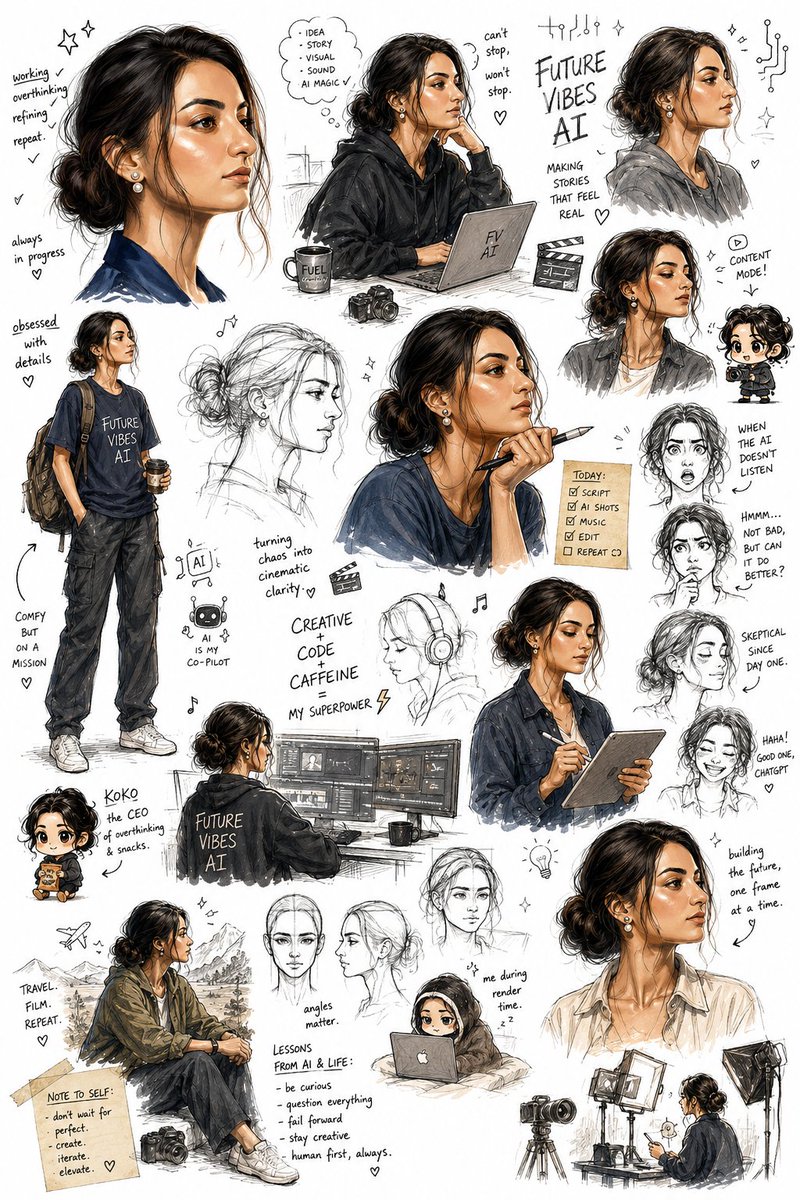
Sketchbook Character Exploration Sheet
An ultra-detailed prompt for creating a character exploration page in a sketchbook style, featuring various poses, expressions, and technical notes on a white background.
이것은 인물과 캐릭터 에 대한 GPT Image 2 프롬프트 사례입니다. 아래의 복사 가능한 프롬프트를 사용하여 유사한 시각 자료를 생성하고, 재사용하기 전에 Awesome GPT Image 2 Prompts 의 저작자 표시 및 상업적 사용 권한을 검토하십시오.
전체 프롬프트 세트가 필요하신가요? 다음을 사용하세요. 인물과 캐릭터 더 많은 관련 예시를 보려면 주제 허브를 열거나 다음을 열어보세요. GPT Image 2 프롬프트 카탈로그 전체 예제 색인, 재사용 가능한 구조 및 출처 표기는 다음을 참조하십시오.
Free 1K preview
Generate one preview image instantly, no sign-up required.
Free text preview doesn’t preserve reference-image consistency.
2848/4000
프롬프트
복사 준비 프롬프트
Create an ultra-detailed sketchbook-style character exploration page on a pure bright white background, using my uploaded photo as a STRICT facial reference with absolute identity preservation. The character must unmistakably retain my exact facial structure, with zero facial drift, zero beautification, and no reinterpretation of identity. The page should look like an illustrator’s personal sketchbook filled organically over time, not like a clean or organized character sheet. Arrange the drawings in a spontaneous, overlapping, scattered composition with varying sizes and angles, as though an artist casually filled the page with ideas, expressions, experiments, notes, and visual jokes. Include a dynamic mix of: expressive full-body sketches, face close-ups, rough construction sketches, loose gesture drawings, tiny doodles, exaggerated reaction faces, chibi/deformed mini versions, casual pose studies, humorous scribbles, motion sketches, emotional expression tests, profile and three-quarter face angles, playful character exaggerations, unfinished line-art fragments, layered redraws and crossed-out sketch attempts. The overall art style should feel raw, energetic, intelligent, and highly expressive, with confident pencil strokes, messy line weight variation, rough ink marks, light shading, accidental smudges, handwritten notes, tiny arrows, annotations, and sketchbook imperfections. Preserve a handmade traditional animation-development feel. Visually interpret the character as: highly creative and analytical, tech-oriented and engineering-minded, observant and skeptical, quietly confident, humorous in a dry, understated way, stylish without trying too hard, mentally sharp but slightly chaotic from overthinking ideas, someone constantly experimenting, refining, and building things. The clothing designs should blend modern casual fashion with subtle creative-tech aesthetics: relaxed streetwear, {argument name="clothing theme" default="football-inspired outfits"}, layered jackets or hoodies, clean sneakers, bracelets or small accessories, occasional {argument name="branding" default="Arsenal-inspired"} visual elements, casual poses that feel natural and self-assured. Some sketches should look polished while others remain rough and incomplete, creating the feeling of an authentic working sketchbook page. Include a few exaggerated comedic moments and expressive chibi versions that amplify personality while still maintaining recognizable identity cues from my face. Use mostly monochrome pencil and ink sketch aesthetics with selective soft accent colors if needed. Maintain strong visual rhythm and controlled chaos across the page. The final result should feel like a beloved main character concept page from an animated film, manga production notebook, or elite character designer’s private sketch collection.프롬프트 변수
프롬프트에 있는 편집 가능한 인수 자리 표시자와 해당 기본값입니다.
변하기 쉬운
clothing theme
기본
football-inspired outfits
변하기 쉬운
branding
기본
Arsenal-inspired
Best for
- - 인물과 캐릭터 visual exploration
- - Image generation and reference-image edits
- - Reusable briefs that keep source attribution visible
Change these parts
- - Subject, product, character, or scene
- - Aspect ratio, camera, lighting, and background
- - Brand, text, color, and output constraints
Recommended model and settings
- - Model: gpt-image-2
- - Input mode: 이미지 to 이미지
- - Aspect ratio: source
- - Commercial status: review original source
How to use this prompt
- 1. Copy the prompt and preserve its structure for the first test.
- 2. Replace the subject, context, and publishing channel.
- 3. Change one camera, lighting, or style variable per iteration.
- 4. Inspect the output, source, text, and rights before reuse.
Limitations, source, and reuse cautions
- - Generated output is an editable draft, not factual, legal, or rights evidence.
- - Review the linked source, people, brands, logos, text, and third-party media before commercial use.
Awesome GPT Image 2 Prompts 에서 가져왔습니다. 출처 표기가 필요합니다. 상업적 이용 가능 여부는 allowed 입니다. 유료 사용 전에 원저작권 정보를 확인하세요.
이 범주에 속하는 더 많은 사례
범주, 입력 방식 호환성, 품질 및 위험도에 따라 우선순위가 정해집니다.






재사용 및 출처 참고 사항
사례를 미리 확인한 후 이 안내 메시지를 안전하게 사용하십시오.
- 1.프롬프트를 복사하거나 Dovoo의 생성 버튼을 사용하여 직접 엽니다.
- 2.사용 사례에 맞게 변수, 화면 비율 및 참조 이미지를 조정하십시오.
- 3.출판 또는 유료 사용 전에 저작권, 출처 표기 요건 및 브랜드 또는 초상권 관련 위험을 확인하십시오.