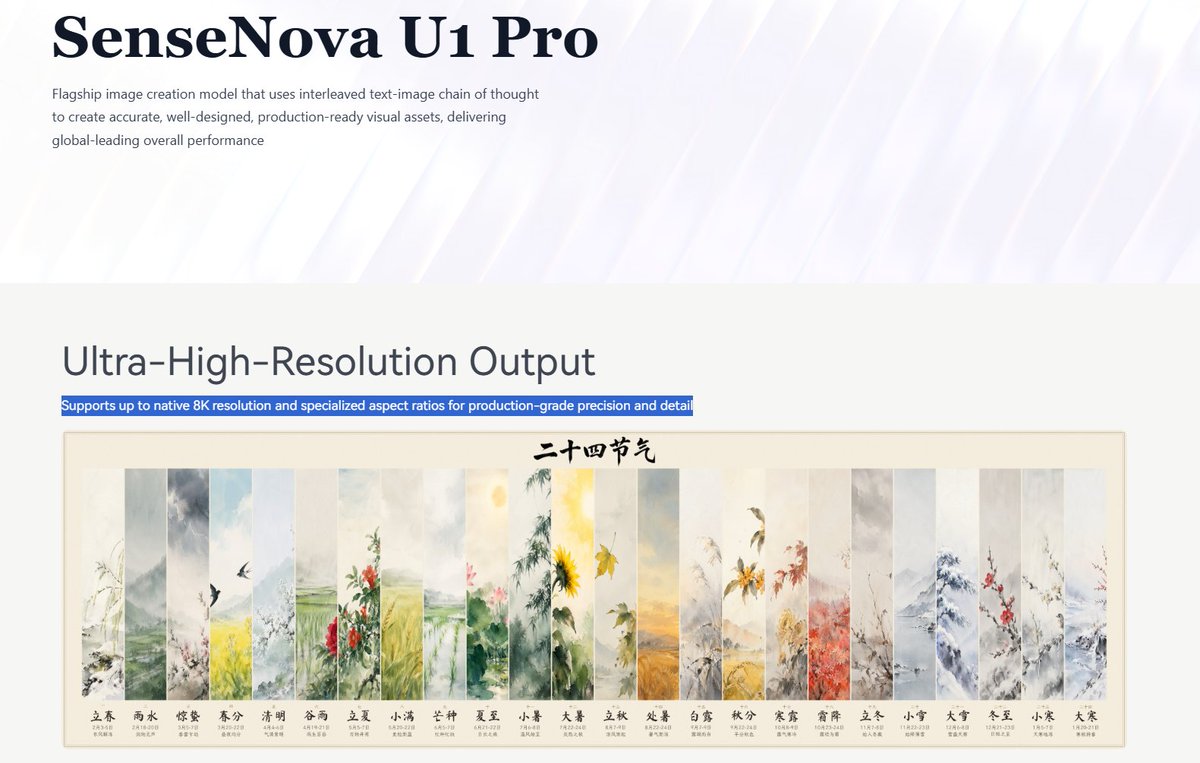
SenseNova U1 Pro Landing Page
Creates a polished AI product landing-page screenshot featuring an 8K output section and a 24-panel Chinese solar terms artwork preview.
이것은 제품 및 상업 에 대한 GPT Image 2 프롬프트 사례입니다. 아래의 복사 가능한 프롬프트를 사용하여 유사한 시각 자료를 생성하고, 재사용하기 전에 Awesome GPT Image 2 Prompts 의 저작자 표시 및 상업적 사용 권한을 검토하십시오.
전체 프롬프트 세트가 필요하신가요? 다음을 사용하세요. 제품 및 상업 더 많은 관련 예시를 보려면 주제 허브를 열거나 다음을 열어보세요. GPT Image 2 프롬프트 카탈로그 전체 예제 색인, 재사용 가능한 구조 및 출처 표기는 다음을 참조하십시오.
Free 1K preview
Generate one preview image instantly, no sign-up required.
3639/4000
프롬프트
복사 준비 프롬프트
Objective: Create a concise enterprise-level product landing page header and functional area for {argument name="product name" default="SenseNova U1 Pro"}, showcasing its ultra-high-resolution image generation model.

Canvas: Wide-screen 16:9 screenshot-style composition, approximately 1200x675 pixels, with ample whitespace, presenting a refined aesthetic of a technology company landing page.

Top Header: Use an extremely pale lavender to white background with a subtle translucent diagonal light beam sweeping from the upper right to the lower left. Place a very large, deep navy blue serif font title in the upper left corner, reading “{argument name="product name" default="SenseNova U1 Pro"}”. Below it, add a small-font gray sans-serif paragraph: “Flagship-level image creation model, employing an interleaved graphic-text chain of thought to create precise, well-designed, and production-ready visual assets, offering globally leading comprehensive performance.” Maintain transparency in the header, leaving most of the right side blank.

Functional Area: Below the header, transition to a light warm gray content area. Place a large, dark gray sans-serif title on the left, reading “{argument name="section heading" default="Flagship image creation model that uses interleaved text-image chain of thought to create accurate, well-designed, production-ready visual assets, delivering global-leading overall performance"}”. Directly below it, add a narrow blue highlight bar with white text reading “{argument name="highlight caption" default="Ultra-High-Resolution Output"}”.

Main Visual: Below the title, center a framed traditional Chinese ink painting poster with a fine rice-colored border and a cream-colored paper background. The top center of the poster contains black calligraphy text reading “Twenty-Four Solar Terms”. The poster consists of 24 identical narrow, long, vertical ink panels arranged horizontally, separated by light-colored boundaries, delicately depicting seasonal landscapes, flowers, rain, snow, birds, fields, bamboo forests, mountains, leaves, and flowers. From left to right, the 24 labeled panels are: 1 “Lichun” (early spring branches), 2 “Yushui” (mist and rain), 3 “Jingzhe” (birds and awakening spring), 4 “Chunfen” (yellow-green spring fields), 5 “Qingming” (elegant and refreshing landscape), 6 “Guyu” (red flowers and rain), 7 “Lixia” (lush greenery), 8 “Xiaoman” (green field texture), 9 “Mangzhong” (lotus flowers and wetland atmosphere), 10 “Xiazhi” (bright sunshine and sunflowers), 11 “Xiaoshu” (warm summer plants), 12 “Dashu” (golden heat waves and fields), 13 “Lichu” (fading plants), 14 “Chushu” (yellow autumn tones), 15 “Bailu” (morning dew and grass), 16 “Qiufen” (red-orange leaves), 17 “Hanlu” (golden flowers and cool air), 18 “Shuangjiang” (frost-covered branches), 19 “Lidong” (steady winter plants), 20 “Xiaoxue” (snowy mountains), 21 “Daxue” (thick snow and bluish-gray peaks), 22 “Dongzhi” (bare branches and cold landscape), 23 “Xiaohan” (red plum blossoms), and 24 “Dahan” (sparse frozen branches). Each panel includes its Chinese label and neat miniature date text below it.

Visual Style: A combination of minimalist modern SaaS page design and exquisite Chinese ink painting. Use clear typography, realistic screenshot spacing, soft navy/gray text, blue highlight selection bars, soft watercolor color schemes, and high-resolution sharpness.

Constraints: Retain the 24 solar term panels and their labels, do not add additional UI controls, do not include people, do not add logos except for the product name, no watermarks, and maintain a spacious web page layout.
프롬프트 변수
프롬프트에 있는 편집 가능한 인수 자리 표시자와 해당 기본값입니다.
변하기 쉬운
product name
기본
SenseNova U1 Pro
변하기 쉬운
section heading
기본
Flagship image creation model that uses interleaved text-image chain of thought to create accurate, well-designed, production-ready visual assets, delivering global-leading overall performance
변하기 쉬운
highlight caption
기본
Ultra-High-Resolution Output
Best for
- - 제품 및 상업 visual exploration
- - Image generation and reference-image edits
- - Reusable briefs that keep source attribution visible
Change these parts
- - Subject, product, character, or scene
- - Aspect ratio, camera, lighting, and background
- - Brand, text, color, and output constraints
Recommended model and settings
- - Model: gpt-image-2
- - Input mode: 텍스트 to 이미지
- - Aspect ratio: source
- - Commercial status: review original source
How to use this prompt
- 1. Copy the prompt and preserve its structure for the first test.
- 2. Replace the subject, context, and publishing channel.
- 3. Change one camera, lighting, or style variable per iteration.
- 4. Inspect the output, source, text, and rights before reuse.
Limitations, source, and reuse cautions
- - Generated output is an editable draft, not factual, legal, or rights evidence.
- - Review the linked source, people, brands, logos, text, and third-party media before commercial use.
Awesome GPT Image 2 Prompts 에서 가져왔습니다. 출처 표기가 필요합니다. 상업적 이용 가능 여부는 allowed 입니다. 유료 사용 전에 원저작권 정보를 확인하세요.
이 범주에 속하는 더 많은 사례
범주, 입력 방식 호환성, 품질 및 위험도에 따라 우선순위가 정해집니다.






재사용 및 출처 참고 사항
사례를 미리 확인한 후 이 안내 메시지를 안전하게 사용하십시오.
- 1.프롬프트를 복사하거나 Dovoo의 생성 버튼을 사용하여 직접 엽니다.
- 2.사용 사례에 맞게 변수, 화면 비율 및 참조 이미지를 조정하십시오.
- 3.출판 또는 유료 사용 전에 저작권, 출처 표기 요건 및 브랜드 또는 초상권 관련 위험을 확인하십시오.