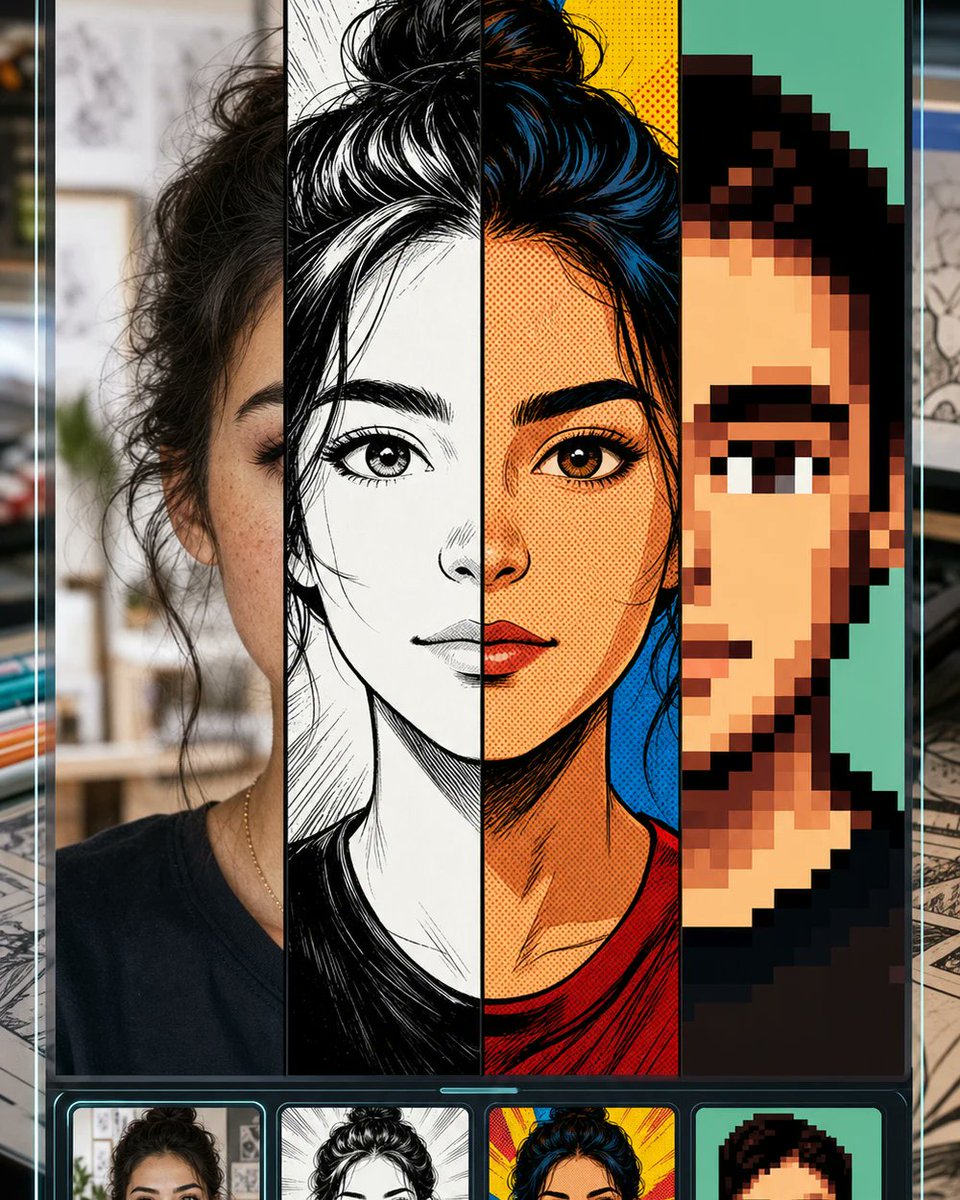
셀카를 만화 스타일로 분할한 목업
셀카 사진을 사진, 만화, 복고풍 만화, 픽셀 아트 스타일로 변환하는 만화 변환 도구를 보여주는 세로형 모바일 UI 목업입니다.
이것은 제품 및 상업 에 대한 GPT Image 2 프롬프트 사례입니다. 아래의 복사 가능한 프롬프트를 사용하여 유사한 시각 자료를 생성하고, 재사용하기 전에 Awesome GPT Image 2 Prompts 의 저작자 표시 및 상업적 사용 권한을 검토하십시오.
전체 프롬프트 세트가 필요하신가요? 다음을 사용하세요. 제품 및 상업 더 많은 관련 예시를 보려면 주제 허브를 열거나 다음을 열어보세요. GPT Image 2 프롬프트 카탈로그 전체 예제 색인, 재사용 가능한 구조 및 출처 표기는 다음을 참조하십시오.
Free 1K preview
Generate one preview image instantly, no sign-up required.
Free text preview doesn’t preserve reference-image consistency.
2565/4000
프롬프트
복사 준비 프롬프트
Goal: Create a vertical promotional app-style mockup for a “selfie to comic” image transformation tool, showing one portrait converted into multiple comic styles while keeping the same face structure recognizable.

Canvas: Tall smartphone-like 4:5 composition, dark glossy interface frame with thin cyan glow lines along the left and right edges. Background outside the phone is softly blurred, like a desk or creative studio with papers and drawing materials.

Layout: The main preview fills most of the screen and is split into exactly 4 vertical style panels from left to right: 1) realistic selfie/photo style, 2) black-and-white manga ink drawing, 3) saturated retro comic book halftone style, 4) chunky pixel-art avatar style. A large centered square mask/placeholder covers the middle of the face and upper torso area, colored warm beige/gray, as if the central facial region is intentionally hidden. Below the main preview is a dark carousel strip with exactly 4 rounded thumbnail cards matching the same four styles: photo selfie, manga ink, retro comic, and pixel art.

Subject details: Use a young woman with {argument name="hair color" default="dark brown/black"} messy hair tied in a high bun, visible eyebrow and eye on the left and right panels, medium warm skin tone, wearing a simple dark crew-neck shirt and a thin necklace. Keep the same head position across all four transformations.

Style panel details: The photo panel should look like a casual indoor selfie with shallow depth of field and natural texture. The manga panel should use dramatic black ink, white highlights, crosshatching, and clean linework. The retro comic panel should use bold outlines, red and yellow background bursts, blue-black hair highlights, orange skin tones, and halftone dots. The pixel-art panel should use large square pixels, simplified facial features, teal background, and a limited palette.

Visual style: High-contrast social media product preview, crisp vertical divisions, glossy black UI chrome, neon cyan accents, clean rounded thumbnail cards, polished GPT-image promotional aesthetic.

Constraints: Include exactly 4 main vertical panels and exactly 4 bottom thumbnails. Do not add readable text, logos, or watermarks. Keep the central beige square mask prominent and perfectly centered. Use {argument name="interface mood" default="dark futuristic mobile UI"}, {argument name="comic transformation theme" default="manga, retro comic, and pixel art selfie conversion"}, and {argument name="background setting" default="blurred creative studio desk"}.
프롬프트 변수
프롬프트에 있는 편집 가능한 인수 자리 표시자와 해당 기본값입니다.
변하기 쉬운
hair color
기본
dark brown/black
변하기 쉬운
interface mood
기본
dark futuristic mobile UI
변하기 쉬운
comic transformation theme
기본
manga, retro comic, and pixel art selfie conversion
변하기 쉬운
background setting
기본
blurred creative studio desk
Best for
- - 제품 및 상업 visual exploration
- - Image generation and reference-image edits
- - Reusable briefs that keep source attribution visible
Change these parts
- - Subject, product, character, or scene
- - Aspect ratio, camera, lighting, and background
- - Brand, text, color, and output constraints
Recommended model and settings
- - Model: gpt-image-2
- - Input mode: 이미지 to 이미지
- - Aspect ratio: source
- - Commercial status: review original source
How to use this prompt
- 1. Copy the prompt and preserve its structure for the first test.
- 2. Replace the subject, context, and publishing channel.
- 3. Change one camera, lighting, or style variable per iteration.
- 4. Inspect the output, source, text, and rights before reuse.
Limitations, source, and reuse cautions
- - Generated output is an editable draft, not factual, legal, or rights evidence.
- - Review the linked source, people, brands, logos, text, and third-party media before commercial use.
Awesome GPT Image 2 Prompts 에서 가져왔습니다. 출처 표기가 필요합니다. 상업적 이용 가능 여부는 allowed 입니다. 유료 사용 전에 원저작권 정보를 확인하세요.
이 범주에 속하는 더 많은 사례
범주, 입력 방식 호환성, 품질 및 위험도에 따라 우선순위가 정해집니다.






재사용 및 출처 참고 사항
사례를 미리 확인한 후 이 안내 메시지를 안전하게 사용하십시오.
- 1.프롬프트를 복사하거나 Dovoo의 생성 버튼을 사용하여 직접 엽니다.
- 2.사용 사례에 맞게 변수, 화면 비율 및 참조 이미지를 조정하십시오.
- 3.출판 또는 유료 사용 전에 저작권, 출처 표기 요건 및 브랜드 또는 초상권 관련 위험을 확인하십시오.