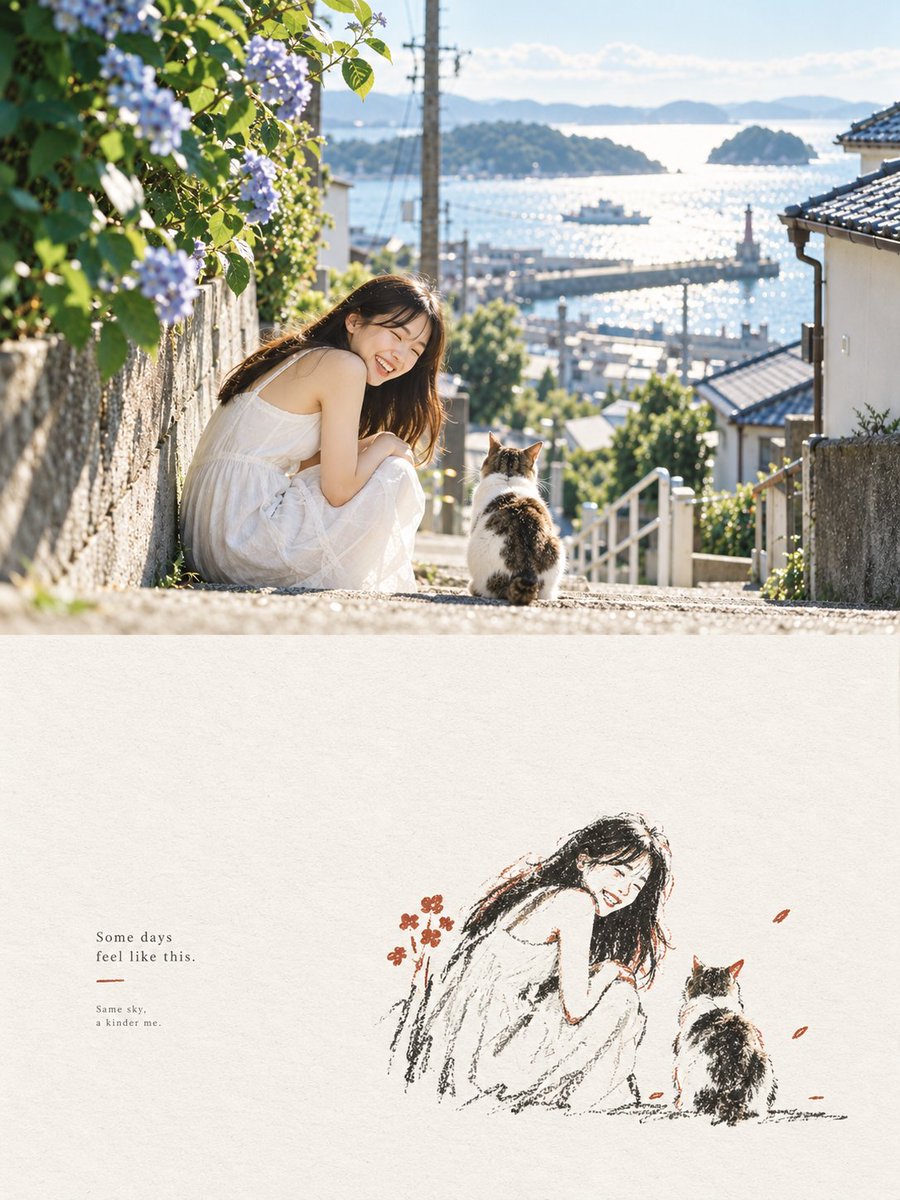
Seaside Photo and Charcoal Sketch Poster
Generates a serene vertical diptych combining a sunny coastal lifestyle photo with a minimalist charcoal sketch and poetic caption.
이것은 그래픽 및 포스터 에 대한 GPT Image 2 프롬프트 사례입니다. 아래의 복사 가능한 프롬프트를 사용하여 유사한 시각 자료를 생성하고, 재사용하기 전에 Awesome GPT Image 2 Prompts 의 저작자 표시 및 상업적 사용 권한을 검토하십시오.
전체 프롬프트 세트가 필요하신가요? 다음을 사용하세요. 그래픽 및 포스터 더 많은 관련 예시를 보려면 주제 허브를 열거나 다음을 열어보세요. GPT Image 2 프롬프트 카탈로그 전체 예제 색인, 재사용 가능한 구조 및 출처 표기는 다음을 참조하십시오.
Free 1K preview
Generate one preview image instantly, no sign-up required.
2097/4000
프롬프트
복사 준비 프롬프트
Create a vertical editorial poster split into 2 stacked panels. Top panel: a bright, dreamy realistic photograph of a young woman with long dark hair wearing a loose white sleeveless summer dress, sitting on sunlit stone steps on a steep seaside town street. She is turned toward the camera, smiling warmly, with 1 calico cat sitting beside her facing away toward the harbor. The street slopes down between old Japanese-style houses with tiled roofs, white railings, stone walls, utility poles, greenery, and blooming pale purple hydrangeas on the left foreground. In the background, show a sparkling blue inland sea with small islands, a harbor pier, tiny boats, soft distant mountains, and a clear pale blue sky. Use golden morning sunlight, backlit highlights, shallow depth of field, natural lens flare, airy coastal atmosphere, and a nostalgic Japanese travel-photography aesthetic. Bottom panel: large off-white handmade paper texture with a minimalist charcoal-and-colored-pencil sketch recreation of the same scene placed slightly right of center: exactly 2 figures, the smiling seated woman in a white dress and the calico cat facing the sea, drawn with loose black carbon-pencil strokes, sparse warm brown and muted red accents, and a few small red-orange petals or flowers. On the left side of the bottom panel, add small serif text reading exactly: “Some days\nfeel like this.” then a short thin muted red underline, then smaller text reading exactly: “Same sky,\na kinder me.” Keep the top half photographic and the bottom half hand-drawn, with generous negative space, soft grain, elegant magazine layout, calm healing mood, no extra people, no watermark. Customizable elements: {argument name="main subject" default="young woman with long dark hair in a loose white sleeveless summer dress"}, {argument name="animal companion" default="calico cat"}, {argument name="location" default="sunlit Japanese seaside town overlooking a harbor and islands"}, {argument name="main quote" default="Some days\nfeel like this."}, {argument name="small caption" default="Same sky,\na kinder me."}프롬프트 변수
프롬프트에 있는 편집 가능한 인수 자리 표시자와 해당 기본값입니다.
변하기 쉬운
main subject
기본
young woman with long dark hair in a loose white sleeveless summer dress
변하기 쉬운
animal companion
기본
calico cat
변하기 쉬운
location
기본
sunlit Japanese seaside town overlooking a harbor and islands
변하기 쉬운
main quote
기본
Some days\nfeel like this.
변하기 쉬운
small caption
기본
Same sky,\na kinder me.
Best for
- - 그래픽 및 포스터 visual exploration
- - Image generation and reference-image edits
- - Reusable briefs that keep source attribution visible
Change these parts
- - Subject, product, character, or scene
- - Aspect ratio, camera, lighting, and background
- - Brand, text, color, and output constraints
Recommended model and settings
- - Model: gpt-image-2
- - Input mode: 텍스트 to 이미지
- - Aspect ratio: source
- - Commercial status: review original source
How to use this prompt
- 1. Copy the prompt and preserve its structure for the first test.
- 2. Replace the subject, context, and publishing channel.
- 3. Change one camera, lighting, or style variable per iteration.
- 4. Inspect the output, source, text, and rights before reuse.
Limitations, source, and reuse cautions
- - Generated output is an editable draft, not factual, legal, or rights evidence.
- - Review the linked source, people, brands, logos, text, and third-party media before commercial use.
Awesome GPT Image 2 Prompts 에서 가져왔습니다. 출처 표기가 필요합니다. 상업적 이용 가능 여부는 allowed 입니다. 유료 사용 전에 원저작권 정보를 확인하세요.
이 범주에 속하는 더 많은 사례
범주, 입력 방식 호환성, 품질 및 위험도에 따라 우선순위가 정해집니다.






재사용 및 출처 참고 사항
사례를 미리 확인한 후 이 안내 메시지를 안전하게 사용하십시오.
- 1.프롬프트를 복사하거나 Dovoo의 생성 버튼을 사용하여 직접 엽니다.
- 2.사용 사례에 맞게 변수, 화면 비율 및 참조 이미지를 조정하십시오.
- 3.출판 또는 유료 사용 전에 저작권, 출처 표기 요건 및 브랜드 또는 초상권 관련 위험을 확인하십시오.