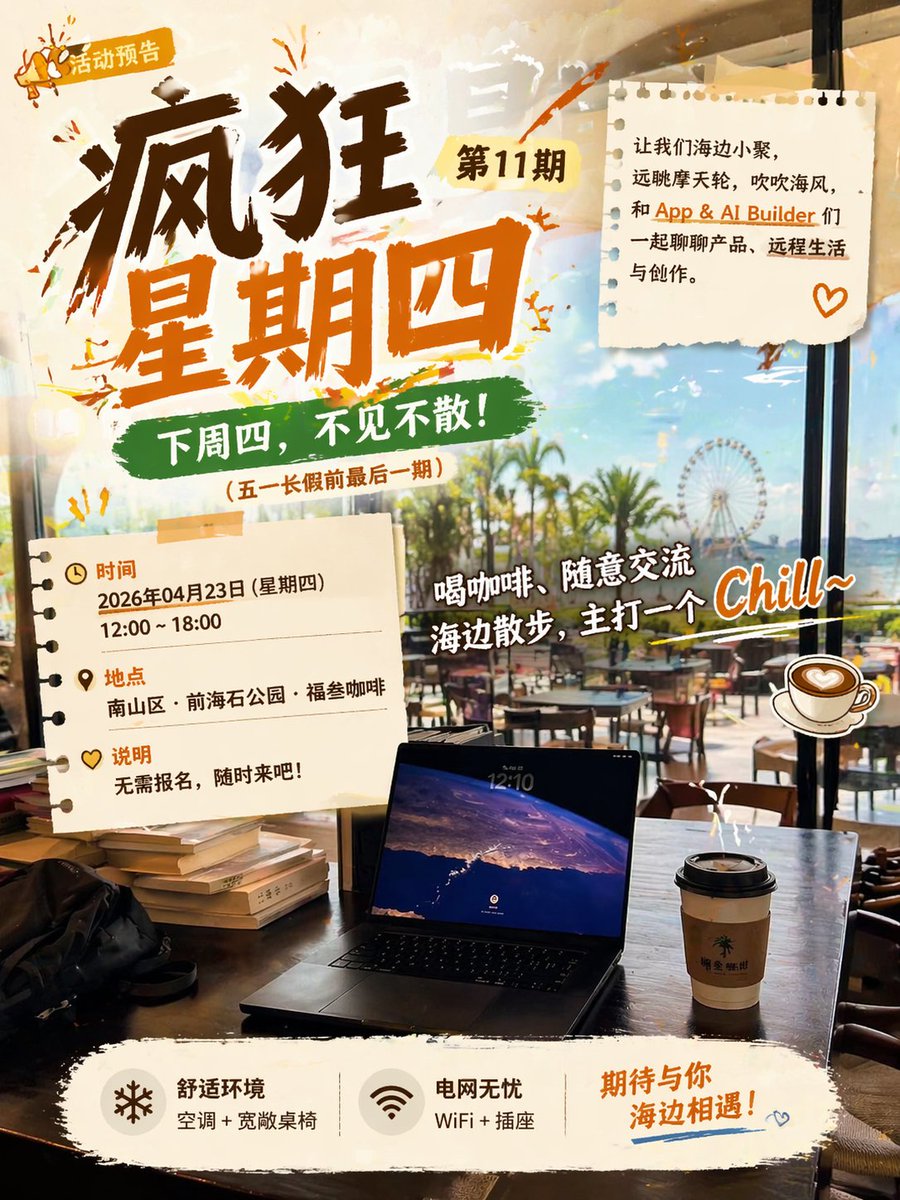
해변 카페 이벤트 포스터
해변가에서 열리는 편안한 커피 모임을 위한 생동감 넘치는 중국 홍보 포스터로, 사교 행사 안내, 커뮤니티 모임 및 라이프스타일 마케팅에 유용합니다.
이것은 그래픽 및 포스터 에 대한 GPT Image 2 프롬프트 사례입니다. 아래의 복사 가능한 프롬프트를 사용하여 유사한 시각 자료를 생성하고, 재사용하기 전에 Awesome GPT Image 2 Prompts 의 저작자 표시 및 상업적 사용 권한을 검토하십시오.
전체 프롬프트 세트가 필요하신가요? 다음을 사용하세요. 그래픽 및 포스터 더 많은 관련 예시를 보려면 주제 허브를 열거나 다음을 열어보세요. GPT Image 2 프롬프트 카탈로그 전체 예제 색인, 재사용 가능한 구조 및 출처 표기는 다음을 참조하십시오.
Free 1K preview
Generate one preview image instantly, no sign-up required.
3257/4000
프롬프트
복사 준비 프롬프트
Create a vibrant Chinese event poster with a warm, fashionable café aesthetic. The perspective should be from inside a seaside café looking outwards, with a view through large floor-to-ceiling windows of palm trees, a bright blue sky, outdoor seating, and a distant Ferris wheel. The composition should combine a sense of real-life scene with energetic graphic design. In the foreground, place a dark wood table with 1 open laptop in the center at the bottom, 1 to-go coffee cup with a black lid to the right, 1 black bag to the left, and a small stack of books near the left edge. Use a bright, slightly golden afternoon atmosphere with reflections on the glass to create a relaxed vacation vibe.

Overlay the poster graphics in a collage style, using elements like torn paper, brushstroke scribbles, stickers, and washi tape. The main title in the upper left corner should be in large, deep brown and orange handwritten calligraphy, reading “Crazy Thursday,” with a small yellow tag next to it reading “Issue 11,” and an even smaller badge in the upper left corner reading “Event Preview” with a miniature megaphone icon. Below the main title, add a green brushstroke banner with the text “See you next Thursday!” and a smaller line of text in brackets below: “ (Last issue before the May Day holiday).”

Add 2 torn notebook paper cards: one in the upper right corner and one in the lower left corner. The paper in the upper right corner should contain a concise Chinese invitation copy, using black and orange typography, reading: “Let’s gather by the sea, gaze at the Ferris wheel, feel the sea breeze, and chat about products, remote life, and creation with App & AI Builder friends.” and add a small orange heart doodle in the lower right corner of the paper. The paper in the lower left corner should list 3 information blocks with icons and orange titles: “Time,” “Location,” and “Description.” Under “Time,” write “April 23, 2026 (Thursday)” and “12:00 ~ 18:00.” Under “Location,” write “Nanshan District · Qianhai Stone Park · Fu San Coffee.” Under “Description,” write “No registration required, come anytime!”

In the right-center area, place a large, white handwritten-style playful slogan with a dark outline, slightly tilted upwards, reading “Drink coffee, chat casually, stroll along the beach, aiming for a Chill~ vibe.” Add 1 illustration-style coffee cup sticker to the right of this slogan. Use vibrant orange paint splatters and sketch doodles around the titles and paper notes to make the poster look young and casual.

At the bottom, place a wide, off-white torn paper-style footer with 3 functional blocks arranged horizontally. Block 1: a snowflake icon with the text “Comfortable Environment” and small text “Air conditioning + spacious tables and chairs.” Block 2: a Wi-Fi icon with the text “Worry-free Power” and small text “WiFi + outlets.” Block 3: larger orange handwritten text “Looking forward to meeting you by the sea!” with a blue underline decoration and a miniature heart doodle below. The overall design should integrate realistic photography with poster elements, featuring strong contrast, calligraphy strokes, scrapbook texture, café life atmosphere, and a fashionable AI-generated social media event poster style.
Best for
- - 그래픽 및 포스터 visual exploration
- - Image generation and reference-image edits
- - Reusable briefs that keep source attribution visible
Change these parts
- - Subject, product, character, or scene
- - Aspect ratio, camera, lighting, and background
- - Brand, text, color, and output constraints
Recommended model and settings
- - Model: gpt-image-2
- - Input mode: 텍스트 to 이미지
- - Aspect ratio: source
- - Commercial status: review original source
How to use this prompt
- 1. Copy the prompt and preserve its structure for the first test.
- 2. Replace the subject, context, and publishing channel.
- 3. Change one camera, lighting, or style variable per iteration.
- 4. Inspect the output, source, text, and rights before reuse.
Limitations, source, and reuse cautions
- - Generated output is an editable draft, not factual, legal, or rights evidence.
- - Review the linked source, people, brands, logos, text, and third-party media before commercial use.
Awesome GPT Image 2 Prompts 에서 가져왔습니다. 출처 표기가 필요합니다. 상업적 이용 가능 여부는 allowed 입니다. 유료 사용 전에 원저작권 정보를 확인하세요.
이 범주에 속하는 더 많은 사례
범주, 입력 방식 호환성, 품질 및 위험도에 따라 우선순위가 정해집니다.






재사용 및 출처 참고 사항
사례를 미리 확인한 후 이 안내 메시지를 안전하게 사용하십시오.
- 1.프롬프트를 복사하거나 Dovoo의 생성 버튼을 사용하여 직접 엽니다.
- 2.사용 사례에 맞게 변수, 화면 비율 및 참조 이미지를 조정하십시오.
- 3.출판 또는 유료 사용 전에 저작권, 출처 표기 요건 및 브랜드 또는 초상권 관련 위험을 확인하십시오.