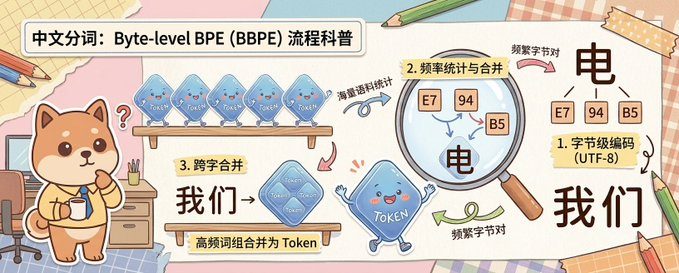
스크랩북 바이트 레벨 BPE 설명
이 프롬프트는 귀여운 마스코트 캐릭터가 등장하는 손으로 그린 교육용 인포그래픽을 생성하여 바이트 수준 BPE 토큰화를 친근한 중국 과학 대중문화 스타일로 설명합니다.
이것은 일러스트레이션 및 미술 에 대한 GPT Image 2 프롬프트 사례입니다. 아래의 복사 가능한 프롬프트를 사용하여 유사한 시각 자료를 생성하고, 재사용하기 전에 Awesome GPT Image 2 Prompts 의 저작자 표시 및 상업적 사용 권한을 검토하십시오.
전체 프롬프트 세트가 필요하신가요? 다음을 사용하세요. 일러스트레이션 및 미술 더 많은 관련 예시를 보려면 주제 허브를 열거나 다음을 열어보세요. GPT Image 2 프롬프트 카탈로그 전체 예제 색인, 재사용 가능한 구조 및 출처 표기는 다음을 참조하십시오.
Free 1K preview
Generate one preview image instantly, no sign-up required.
2500/4000
프롬프트
복사 준비 프롬프트
A cute horizontal educational infographic in a hand-drawn scrapbook style, with a soft desktop and paper collage background, designed to explain the principle of Chinese word segmentation based on byte-level BPE. The picture is divided into 3 clear teaching areas, spanning the entire width of the banner from left to right. On the far left stands a cute Shiba Inu mascot, {argument name="character name" default="Chai Xiaoqi"}, with warm brown and cream fur, a round face, small triangular ears, rosy cheeks, and a curious expression, holding a cup and standing next to a desk with drawers, pencils, and a chair. Above the Shiba Inu is a bold, rounded white title box containing black Chinese characters: {argument name="headline text" default="Chinese Word Segmentation: A Popular Science Explanation of Byte-level BPE (BBPE) Process"}. In the first teaching area near the top, 4 translucent blue Token-shaped squares are displayed on a wooden shelf, each labeled “Token” and accompanied by a curved arrow and handwritten Chinese annotation “word frequency corpus statistics” pointing to the next step. In the second area, a large magnifying glass highlights 3 frequency squares labeled “E7”, “94”, and “B5”, with a regional label written on a yellow sticky note that reads “2. Frequency Statistics and Merging”; below and inside the magnified area is a large black Chinese character “electricity”, accompanied by handwritten notes “frequent byte pairs”. In the lower middle of the third area, add a wooden sign and a larger merged translucent blue Token square labeled “Token”, with a yellow sticky note that reads “3. Cross-word Merging”, large black Chinese characters “we→”, and a description strip below “high-frequency word combinations are merged into Tokens”. On the far right, the final explanation result is displayed, with 3 small byte squares labeled “E7”, “94”, and “B5” located above a large black Chinese character “electricity”, next to a sticky note card that reads “1. Byte-level Encoding (UTF-8)”, and below a large black Chinese vocabulary “we”. Connect the areas with pink, blue, and green curved arrows to show the process flow. Near the bottom center, include a blue Token mascot with small limbs, a smiling face, and waving hands. Use soft cream, pink, beige, and light blue colors, with thick and clear lines, sticker-like cut-out shapes, tape corners, notebook textures, scattered pencils, and a friendly handwritten illustration style suitable for popular science charts.프롬프트 변수
프롬프트에 있는 편집 가능한 인수 자리 표시자와 해당 기본값입니다.
변하기 쉬운
character name
기본
Chai Xiaoqi
변하기 쉬운
headline text
기본
Chinese Word Segmentation: A Popular Science Explanation of Byte-level BPE (BBPE) Process
Best for
- - 일러스트레이션 및 미술 visual exploration
- - Image generation and reference-image edits
- - Reusable briefs that keep source attribution visible
Change these parts
- - Subject, product, character, or scene
- - Aspect ratio, camera, lighting, and background
- - Brand, text, color, and output constraints
Recommended model and settings
- - Model: gpt-image-2
- - Input mode: 텍스트 to 이미지
- - Aspect ratio: source
- - Commercial status: review original source
How to use this prompt
- 1. Copy the prompt and preserve its structure for the first test.
- 2. Replace the subject, context, and publishing channel.
- 3. Change one camera, lighting, or style variable per iteration.
- 4. Inspect the output, source, text, and rights before reuse.
Limitations, source, and reuse cautions
- - Generated output is an editable draft, not factual, legal, or rights evidence.
- - Review the linked source, people, brands, logos, text, and third-party media before commercial use.
Awesome GPT Image 2 Prompts 에서 가져왔습니다. 출처 표기가 필요합니다. 상업적 이용 가능 여부는 allowed 입니다. 유료 사용 전에 원저작권 정보를 확인하세요.
이 범주에 속하는 더 많은 사례
범주, 입력 방식 호환성, 품질 및 위험도에 따라 우선순위가 정해집니다.






재사용 및 출처 참고 사항
사례를 미리 확인한 후 이 안내 메시지를 안전하게 사용하십시오.
- 1.프롬프트를 복사하거나 Dovoo의 생성 버튼을 사용하여 직접 엽니다.
- 2.사용 사례에 맞게 변수, 화면 비율 및 참조 이미지를 조정하십시오.
- 3.출판 또는 유료 사용 전에 저작권, 출처 표기 요건 및 브랜드 또는 초상권 관련 위험을 확인하십시오.