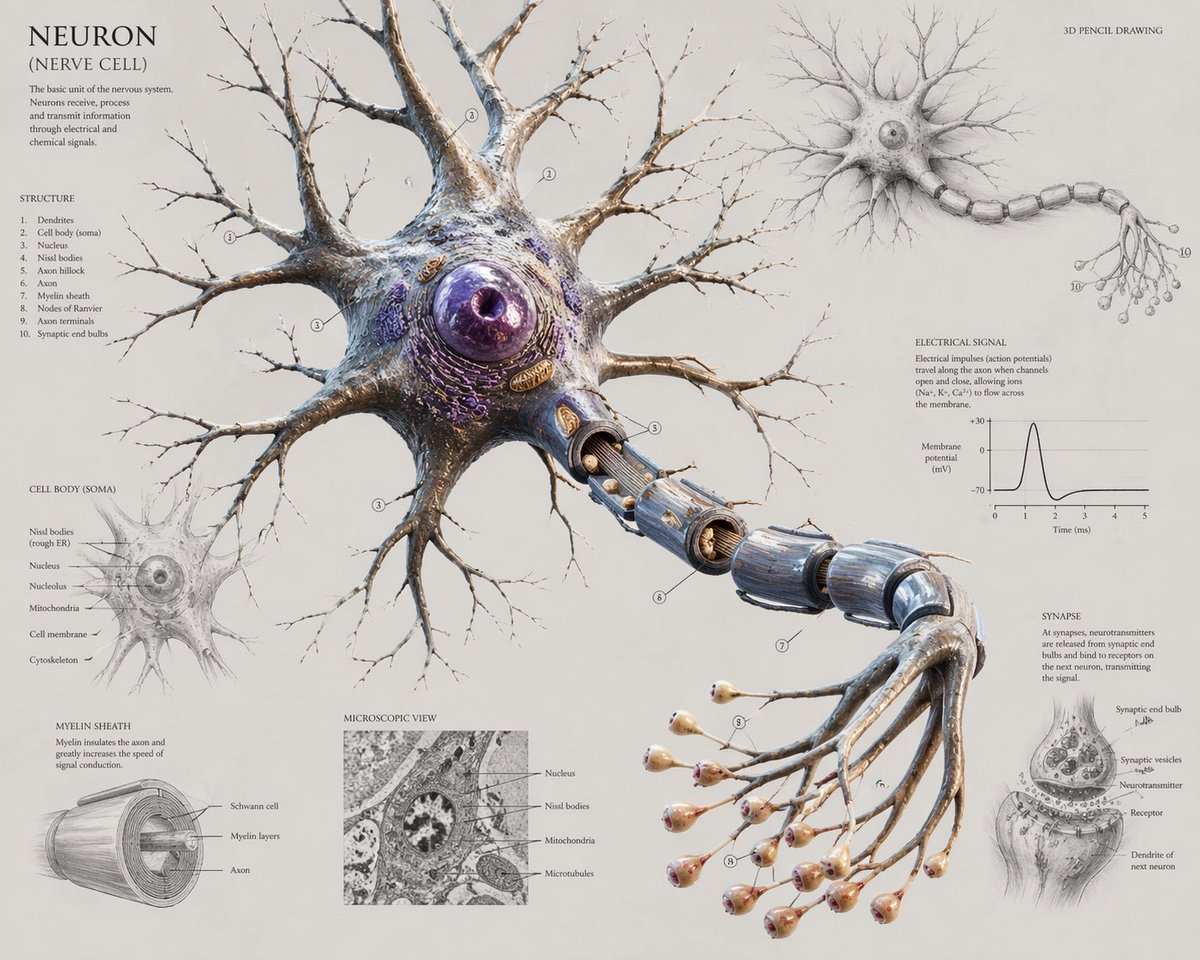
신경 세포 해부학에 관한 과학 포스터
이 프롬프트는 교과서, 편집 또는 수업용으로 사용할 수 있는, 중앙의 3D 생물학적 렌더링과 여러 개의 해부학적 삽입 다이어그램(라벨 포함)으로 구성된 상세한 교육용 뉴런 인포그래픽 포스터를 생성합니다.
이것은 그래픽 및 포스터 에 대한 GPT Image 2 프롬프트 사례입니다. 아래의 복사 가능한 프롬프트를 사용하여 유사한 시각 자료를 생성하고, 재사용하기 전에 Awesome GPT Image 2 Prompts 의 저작자 표시 및 상업적 사용 권한을 검토하십시오.
전체 프롬프트 세트가 필요하신가요? 다음을 사용하세요. 그래픽 및 포스터 더 많은 관련 예시를 보려면 주제 허브를 열거나 다음을 열어보세요. GPT Image 2 프롬프트 카탈로그 전체 예제 색인, 재사용 가능한 구조 및 출처 표기는 다음을 참조하십시오.
Free 1K preview
Generate one preview image instantly, no sign-up required.
2260/4000
프롬프트
복사 준비 프롬프트
Create a highly detailed scientific anatomical poster of a {argument name="subject" default="neuron"} on a clean warm off-white paper background, presented as a museum-quality hybrid of 3D pencil drawing and ultra-realistic biological illustration. The composition centers on one large neuron in three-quarter view, with an oversized spherical purple nucleus inside a textured cell body, many branching dendrites spreading outward like winter tree branches, and a long axon extending diagonally down to the right. The axon is partially cut away to reveal its internal structure and is wrapped in segmented blue-gray myelin sheaths with visible gaps at the nodes of Ranvier. At the far end, the axon branches into exactly 15 thin terminal fibers, each ending in a rounded synaptic bulb with pale peach and pink tips. The main central figure should look sculptural, organic, and slightly glossy, with intricate membrane textures, subtle beige, ivory, silver, brown, and violet coloration, and extremely fine linework for the distal branches. Surround the centerpiece with 6 labeled educational inset sections arranged like a textbook infographic: top left a title block reading {argument name="title text" default="NEURON (NERVE CELL)"} with a short explanatory paragraph and a numbered structure list containing exactly 10 items; upper right a smaller monochrome full-neuron sketch labeled {argument name="style note" default="3D PENCIL DRAWING"}; lower left a cell body soma detail diagram with labels pointing to internal organelles; bottom left a myelin sheath cross-section cylinder diagram; lower center a square grayscale microscopic view panel with 4 labels; right center an electrical signal section with a small action potential graph showing membrane potential versus time; lower right a synapse close-up drawing with receptor and neurotransmitter labeling. Include fine serif typography, delicate leader lines, small circled numbers on the main neuron, and the feel of an elegant old scientific plate mixed with modern biomedical visualization. Keep the layout airy and balanced, with the central neuron dominating most of the canvas, landscape orientation, extremely high resolution, crisp educational poster design, and a refined neutral aesthetic.프롬프트 변수
프롬프트에 있는 편집 가능한 인수 자리 표시자와 해당 기본값입니다.
변하기 쉬운
subject
기본
neuron
변하기 쉬운
title text
기본
NEURON (NERVE CELL)
변하기 쉬운
style note
기본
3D PENCIL DRAWING
Best for
- - 그래픽 및 포스터 visual exploration
- - Image generation and reference-image edits
- - Reusable briefs that keep source attribution visible
Change these parts
- - Subject, product, character, or scene
- - Aspect ratio, camera, lighting, and background
- - Brand, text, color, and output constraints
Recommended model and settings
- - Model: gpt-image-2
- - Input mode: 텍스트 to 이미지
- - Aspect ratio: source
- - Commercial status: review original source
How to use this prompt
- 1. Copy the prompt and preserve its structure for the first test.
- 2. Replace the subject, context, and publishing channel.
- 3. Change one camera, lighting, or style variable per iteration.
- 4. Inspect the output, source, text, and rights before reuse.
Limitations, source, and reuse cautions
- - Generated output is an editable draft, not factual, legal, or rights evidence.
- - Review the linked source, people, brands, logos, text, and third-party media before commercial use.
Awesome GPT Image 2 Prompts 에서 가져왔습니다. 출처 표기가 필요합니다. 상업적 이용 가능 여부는 allowed 입니다. 유료 사용 전에 원저작권 정보를 확인하세요.
이 범주에 속하는 더 많은 사례
범주, 입력 방식 호환성, 품질 및 위험도에 따라 우선순위가 정해집니다.






재사용 및 출처 참고 사항
사례를 미리 확인한 후 이 안내 메시지를 안전하게 사용하십시오.
- 1.프롬프트를 복사하거나 Dovoo의 생성 버튼을 사용하여 직접 엽니다.
- 2.사용 사례에 맞게 변수, 화면 비율 및 참조 이미지를 조정하십시오.
- 3.출판 또는 유료 사용 전에 저작권, 출처 표기 요건 및 브랜드 또는 초상권 관련 위험을 확인하십시오.