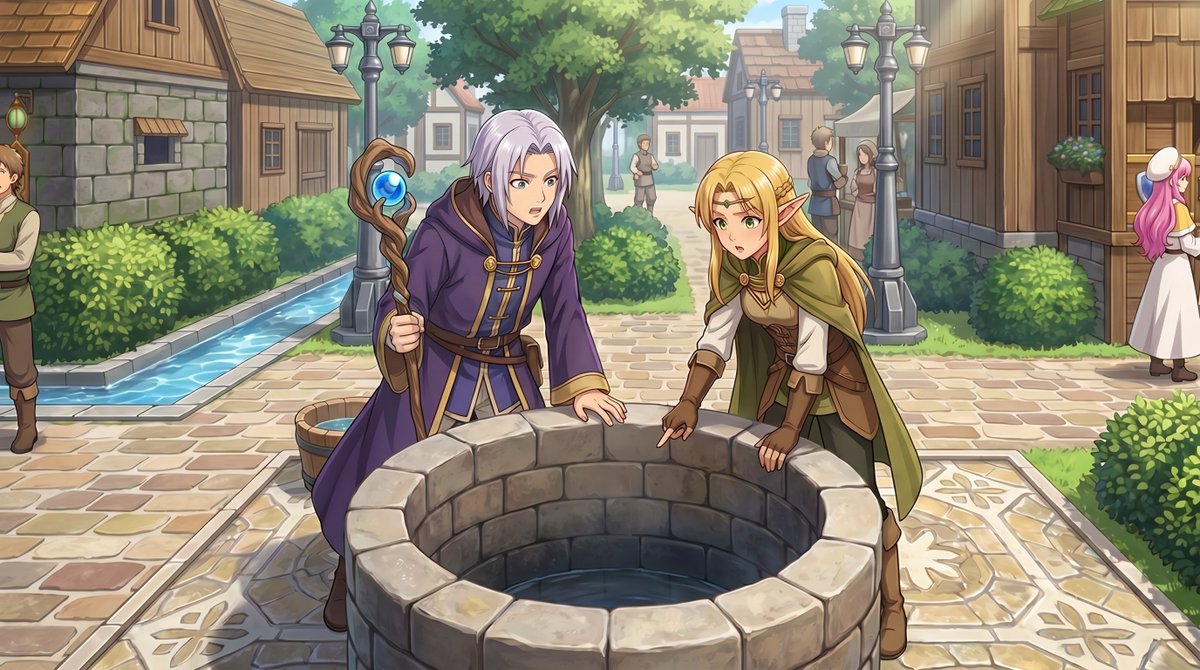
RPG 맵에서 애니메이션 이벤트 장면으로
이 프롬프트는 RPG Maker에서 위에서 내려다본 마을 스크린샷을 게임 내 이벤트 순간을 시각화하는 데 사용할 수 있는 전신 시점의 애니메이션 컷신 일러스트로 변환합니다.
이것은 애니메이션 & 게임 에 대한 GPT Image 2 프롬프트 사례입니다. 아래의 복사 가능한 프롬프트를 사용하여 유사한 시각 자료를 생성하고, 재사용하기 전에 Awesome GPT Image 2 Prompts 의 저작자 표시 및 상업적 사용 권한을 검토하십시오.
전체 프롬프트 세트가 필요하신가요? 다음을 사용하세요. 애니메이션 & 게임 더 많은 관련 예시를 보려면 주제 허브를 열거나 다음을 열어보세요. GPT Image 2 프롬프트 카탈로그 전체 예제 색인, 재사용 가능한 구조 및 출처 표기는 다음을 참조하십시오.
Free 1K preview
Generate one preview image instantly, no sign-up required.
Free text preview doesn’t preserve reference-image consistency.
1021/4000
프롬프트
복사 준비 프롬프트
Using the provided reference image, transform the top-down RPG town map into a polished anime-style event illustration from a human eye-level perspective. Keep the same village location and layout cues: the central stone well, the path network, the hedges, the wooden houses, and the narrow water canal on the left. Convert the 2 small sprite characters by the well into 2 full-size fantasy characters in the foreground: a silver-haired mage in a purple robe holding a staff, and a blonde elf in green-and-brown adventurer clothing, both leaning over and looking into the well. Add a cinematic JRPG feel with soft daylight, detailed painterly rendering, clean line art, and gentle depth of field. Preserve the sense that this scene is taking place in the same town square, but enrich it with natural perspective, more environmental detail, and 5 background villagers: 1 man cropped at the far left edge, 2 small figures standing on the center path in the distance, and 2 townspeople talking near the right-side buildings.
Best for
- - 애니메이션 & 게임 visual exploration
- - Image generation and reference-image edits
- - Reusable briefs that keep source attribution visible
Change these parts
- - Subject, product, character, or scene
- - Aspect ratio, camera, lighting, and background
- - Brand, text, color, and output constraints
Recommended model and settings
- - Model: gpt-image-2
- - Input mode: 이미지 to 이미지
- - Aspect ratio: source
- - Commercial status: review original source
How to use this prompt
- 1. Copy the prompt and preserve its structure for the first test.
- 2. Replace the subject, context, and publishing channel.
- 3. Change one camera, lighting, or style variable per iteration.
- 4. Inspect the output, source, text, and rights before reuse.
Limitations, source, and reuse cautions
- - Generated output is an editable draft, not factual, legal, or rights evidence.
- - Review the linked source, people, brands, logos, text, and third-party media before commercial use.
Awesome GPT Image 2 Prompts 에서 가져왔습니다. 출처 표기가 필요합니다. 상업적 이용 가능 여부는 allowed 입니다. 유료 사용 전에 원저작권 정보를 확인하세요.
이 범주에 속하는 더 많은 사례
범주, 입력 방식 호환성, 품질 및 위험도에 따라 우선순위가 정해집니다.






재사용 및 출처 참고 사항
사례를 미리 확인한 후 이 안내 메시지를 안전하게 사용하십시오.
- 1.프롬프트를 복사하거나 Dovoo의 생성 버튼을 사용하여 직접 엽니다.
- 2.사용 사례에 맞게 변수, 화면 비율 및 참조 이미지를 조정하십시오.
- 3.출판 또는 유료 사용 전에 저작권, 출처 표기 요건 및 브랜드 또는 초상권 관련 위험을 확인하십시오.