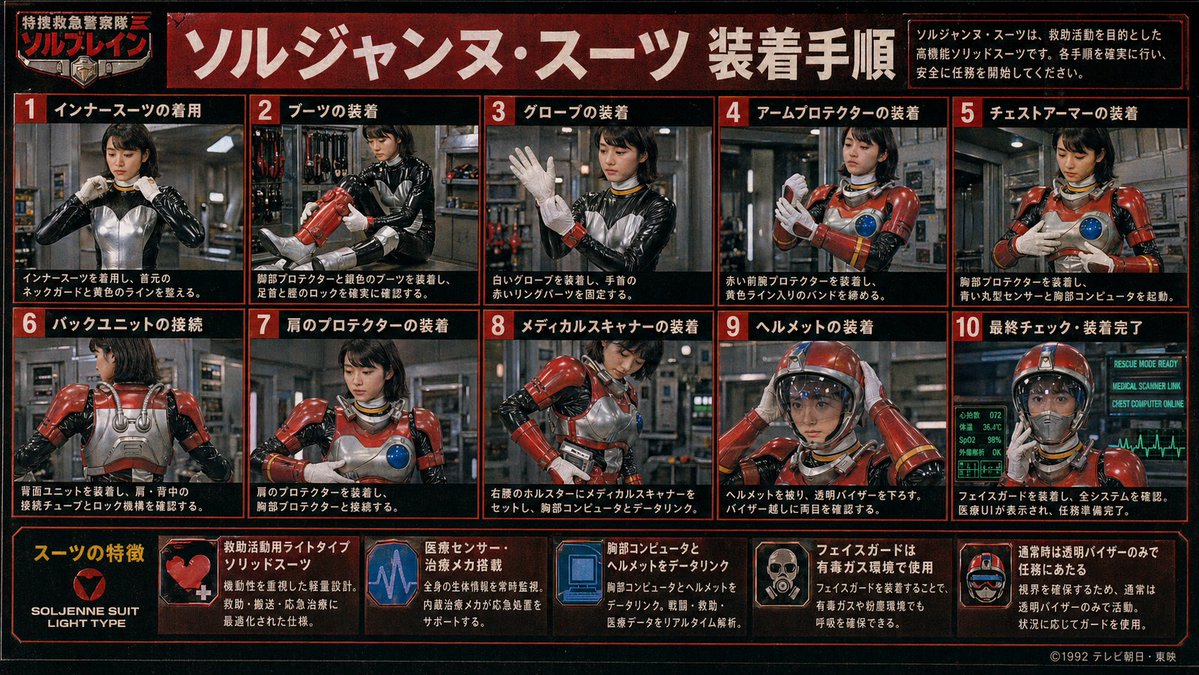
레트로 특촬 슈트 절차 포스터
일본 특수작전 시리즈에 나오는 여성 구조대원이 붉은색 방탄복을 단계별로 착용하는 모습을 빽빽하게 묘사한 설명서 포스터로, 복고풍 특촬물 매뉴얼이나 TV 드라마 소품 그래픽을 재현하기에 이상적입니다.
이것은 그래픽 및 포스터 에 대한 GPT Image 2 프롬프트 사례입니다. 아래의 복사 가능한 프롬프트를 사용하여 유사한 시각 자료를 생성하고, 재사용하기 전에 Awesome GPT Image 2 Prompts 의 저작자 표시 및 상업적 사용 권한을 검토하십시오.
전체 프롬프트 세트가 필요하신가요? 다음을 사용하세요. 그래픽 및 포스터 더 많은 관련 예시를 보려면 주제 허브를 열거나 다음을 열어보세요. GPT Image 2 프롬프트 카탈로그 전체 예제 색인, 재사용 가능한 구조 및 출처 표기는 다음을 참조하십시오.
Free 1K preview
Generate one preview image instantly, no sign-up required.
4000/4000
프롬프트
복사 준비 프롬프트
{
  "type": "retro Japanese tokusatsu instruction poster",
  "theme": "1980s-1990s emergency hero equipment manual",
  "subject": {
    "character": "female rescue operative in a glossy black undersuit with metallic silver torso panel, red armored rescue suit components, yellow accent lines, blue circular chest sensor, white gloves, red helmet with clear visor",
    "franchise_style": "fictional TV hero series promotional board",
    "organization_name": "特捜救急警察隊 ソルブレイン",
    "suit_name": "{argument name=\"suit name\" default=\"ソルジャンヌ・スーツ\"}"
  },
  "style": {
    "print": "aged TV magazine or studio prop display board",
    "color_palette": [
      "black",
      "deep red",
      "orange-red borders",
      "white Japanese text",
      "steel gray",
      "emergency red armor",
      "blue monitor glow"
    ],
    "texture": "heavy film grain, mild blur, low-resolution analog broadcast look, slight vignette, worn poster surface",
    "lighting": "industrial indoor lighting with metallic reflections"
  },
  "layout": {
    "format": "landscape poster with red border grid",
    "header": {
      "title": "{argument name=\"headline text\" default=\"ソルジャンヌ・スーツ 装着手順\"}",
      "left_badge": "特捜救急警察隊 ソルブレイン",
      "right_note": "ソルジャンヌ・スーツは、救助活動を目的とした高機能ソリッドスーツです。各手順を確実に行い、安全に任務を開始してください。"
    },
    "sections": [
      {
        "title": "Installation Procedure",
        "position": "upper and middle area in a 2-row grid",
        "count": 10,
        "panels": [
          {
            "number": 1,
            "label": "インナースーツの着用",
            "scene": "front view, operative adjusts the collar/neck guard of the black and silver inner suit"
          },
          {
            "number": 2,
            "label": "ブーツの装着",
            "scene": "operative fitting red armored boots and checking shin and ankle locks"
          },
          {
            "number": 3,
            "label": "グローブの装着",
            "scene": "operative raises one hand while putting on white gloves and securing red wrist ring parts"
          },
          {
            "number": 4,
            "label": "アームプロテクターの装着",
            "scene": "operative fastening red forearm protectors and tightening yellow striped bands"
          },
          {
            "number": 5,
            "label": "チェストアーマーの装着",
            "scene": "operative attaching chest armor, blue circular sensor visible on the breastplate"
          },
          {
            "number": 6,
            "label": "バックユニットの接続",
            "scene": "rear view showing silver back unit, shoulder tubes, and connection locks"
          },
          {
            "number": 7,
            "label": "肩のプロテクターの装着",
            "scene": "front three-quarter view, red shoulder armor being mounted and aligned to chest armor"
          },
          {
            "number": 8,
            "label": "メディカルスキャナーの装着",
            "scene": "operative setting a medical scanner device into a right-waist holster and linking it to the chest computer"
          },
          {
            "number": 9,
            "label": "ヘルメットの装着",
            "scene": "operative placing red helmet on her head and lowering the transparent visor"
          },
          {
            "number": 10,
            "label": "最終チェック・装着完了",
            "scene": "fully suited operative facing forward with glowing diagnostic monitors behind her indicating readiness"
          }
        ]
      },
      {
        "title": "スーツの特徴",
        "position": "bottom strip",
        "count": 6,
        "items": [
          {
            "label": "SOLJENNE SUIT LIGHT TYPE",
            "icon": "heart-like red emblem on black background"
          },
          {
            "label": "救助活動用ライトタイプソリッドスーツ",
            "icon": "red armor close-up with white medical cross"
          },
          {
            "label": "医療センサー・治療メカ搭載",
            "icon": "purple-blue heartbeat monitor graphic"
          },
          {
            "label": "胸部コンピュータとヘルメットをデータリンク",
            "icon": "blue computer display graphic"
          },
          {
            "label": "フェイスガードは有毒ガス環境で使用",
            "icon": "small portrait showing face guard deployment"
          },
          {
            "label": "通常時は透明バイザーのみで任務にあたる",
            "icon": "helmet diagram with clear visor"
          }
        ]
      }
    ],
    "footer": {
      "left": "feature strip integrated into bottom row",
      "right": "{argument name=\"copyright text\" default=\"©1992 テレビ朝日・東映\"}"
    }
  },
  "environment": {
    "main_panels": "industrial equipment room or rescue base interior with pipes, lockers, tools, and metallic walls",
    "final_panel": "green-blue medical and system status monitors with ECG line and status text such as RESCUE MODE READY"
  },
  "composition_notes": "all 10 procedure panels show the same operative step by step; face is soft, low-detail, and partially blurred like a vintage printed guide; each panel framed with thick red borders on black background; bold white Japanese text with red numbered boxes; dense infographic layout filling the entire image",
  "generation_notes": "create a convincing Japanese practical-effects superhero manual poster, not modern clean vector design; prioritize photographic tokusatsu stills arranged as an instruction chart, with authentic period typography and prop-like realism"
}
프롬프트 변수
프롬프트에 있는 편집 가능한 인수 자리 표시자와 해당 기본값입니다.
변하기 쉬운
suit name
기본
ソルジャンヌ・スーツ
변하기 쉬운
headline text
기본
ソルジャンヌ・スーツ 装着手順
변하기 쉬운
copyright text
기본
©1992 テレビ朝日・東映
Best for
- - 그래픽 및 포스터 visual exploration
- - Image generation and reference-image edits
- - Reusable briefs that keep source attribution visible
Change these parts
- - Subject, product, character, or scene
- - Aspect ratio, camera, lighting, and background
- - Brand, text, color, and output constraints
Recommended model and settings
- - Model: gpt-image-2
- - Input mode: 텍스트 to 이미지
- - Aspect ratio: source
- - Commercial status: review original source
How to use this prompt
- 1. Copy the prompt and preserve its structure for the first test.
- 2. Replace the subject, context, and publishing channel.
- 3. Change one camera, lighting, or style variable per iteration.
- 4. Inspect the output, source, text, and rights before reuse.
Limitations, source, and reuse cautions
- - Generated output is an editable draft, not factual, legal, or rights evidence.
- - Review the linked source, people, brands, logos, text, and third-party media before commercial use.
Awesome GPT Image 2 Prompts 에서 가져왔습니다. 출처 표기가 필요합니다. 상업적 이용 가능 여부는 allowed 입니다. 유료 사용 전에 원저작권 정보를 확인하세요.
이 범주에 속하는 더 많은 사례
범주, 입력 방식 호환성, 품질 및 위험도에 따라 우선순위가 정해집니다.






재사용 및 출처 참고 사항
사례를 미리 확인한 후 이 안내 메시지를 안전하게 사용하십시오.
- 1.프롬프트를 복사하거나 Dovoo의 생성 버튼을 사용하여 직접 엽니다.
- 2.사용 사례에 맞게 변수, 화면 비율 및 참조 이미지를 조정하십시오.
- 3.출판 또는 유료 사용 전에 저작권, 출처 표기 요건 및 브랜드 또는 초상권 관련 위험을 확인하십시오.