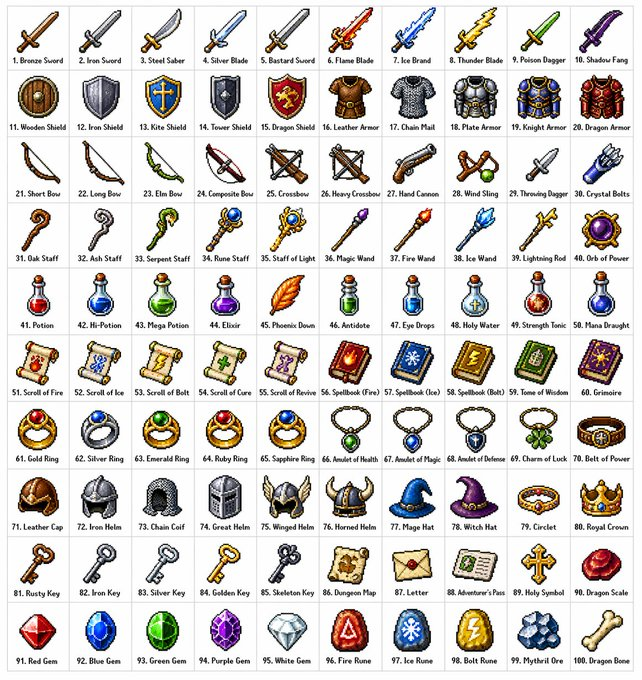
레트로 RPG 아이템 그리드 프롬프트
다양한 판타지 RPG 아이템 100개를 카테고리별로 정리하여 고전적인 16비트 또는 32비트 픽셀 아트 스타일로 10x10 그리드에 배치하는 방법에 대한 자세한 지침입니다.
이것은 애니메이션 & 게임 에 대한 GPT Image 2 프롬프트 사례입니다. 아래의 복사 가능한 프롬프트를 사용하여 유사한 시각 자료를 생성하고, 재사용하기 전에 Awesome GPT Image 2 Prompts 의 저작자 표시 및 상업적 사용 권한을 검토하십시오.
전체 프롬프트 세트가 필요하신가요? 다음을 사용하세요. 애니메이션 & 게임 더 많은 관련 예시를 보려면 주제 허브를 열거나 다음을 열어보세요. GPT Image 2 프롬프트 카탈로그 전체 예제 색인, 재사용 가능한 구조 및 출처 표기는 다음을 참조하십시오.
Free 1K preview
Generate one preview image instantly, no sign-up required.
1363/4000
프롬프트
복사 준비 프롬프트
Create a {argument name="grid size" default="10x10"} grid containing {argument name="item count" default="100"} different fantasy role-playing game (RPG) items in a {argument name="art style" default="classic pixel art style"} (16-bit or 32-bit sprite style, similar to Japanese RPGs from the SNES/GBA era). Each item should occupy a square tile individually with a short, clear label below. The grid should be neatly arranged on a white background. Ensure each item is visually unique and every label is spelled correctly. Use clean pixel edges, a limited palette for each sprite, and subtle dithering for shadows. Use the following row themes: Row 1: Swords and blades; Row 2: Shields and armor; Row 3: Bows, crossbows, and ranged weapons; Row 4: Staves, wands, and magical implements; Row 5: Potions, elixirs, and bottles; Row 6: Scrolls, grimoires, and spellbooks; Row 7: Rings, amulets, and enchanted accessories; Row 8: Helmets, crowns, and headgear; Row 9: Keys, relics, and quest items; Row 10: Gems, runes, and crafting materials. Display each tile as a centered item sprite on a clean background square, presented in the form of classic inventory icons—similar to what you'd see in a fantasy RPG menu. Maintain consistency and coherence in the overall style, reminiscent of beloved retro fantasy RPGs—charming and refined, yet clear even at small sizes.프롬프트 변수
프롬프트에 있는 편집 가능한 인수 자리 표시자와 해당 기본값입니다.
변하기 쉬운
grid size
기본
10x10
변하기 쉬운
item count
기본
100
변하기 쉬운
art style
기본
classic pixel art style
Best for
- - 애니메이션 & 게임 visual exploration
- - Image generation and reference-image edits
- - Reusable briefs that keep source attribution visible
Change these parts
- - Subject, product, character, or scene
- - Aspect ratio, camera, lighting, and background
- - Brand, text, color, and output constraints
Recommended model and settings
- - Model: gpt-image-2
- - Input mode: 텍스트 to 이미지
- - Aspect ratio: source
- - Commercial status: review original source
How to use this prompt
- 1. Copy the prompt and preserve its structure for the first test.
- 2. Replace the subject, context, and publishing channel.
- 3. Change one camera, lighting, or style variable per iteration.
- 4. Inspect the output, source, text, and rights before reuse.
Limitations, source, and reuse cautions
- - Generated output is an editable draft, not factual, legal, or rights evidence.
- - Review the linked source, people, brands, logos, text, and third-party media before commercial use.
Awesome GPT Image 2 Prompts 에서 가져왔습니다. 출처 표기가 필요합니다. 상업적 이용 가능 여부는 allowed 입니다. 유료 사용 전에 원저작권 정보를 확인하세요.
이 범주에 속하는 더 많은 사례
범주, 입력 방식 호환성, 품질 및 위험도에 따라 우선순위가 정해집니다.






재사용 및 출처 참고 사항
사례를 미리 확인한 후 이 안내 메시지를 안전하게 사용하십시오.
- 1.프롬프트를 복사하거나 Dovoo의 생성 버튼을 사용하여 직접 엽니다.
- 2.사용 사례에 맞게 변수, 화면 비율 및 참조 이미지를 조정하십시오.
- 3.출판 또는 유료 사용 전에 저작권, 출처 표기 요건 및 브랜드 또는 초상권 관련 위험을 확인하십시오.