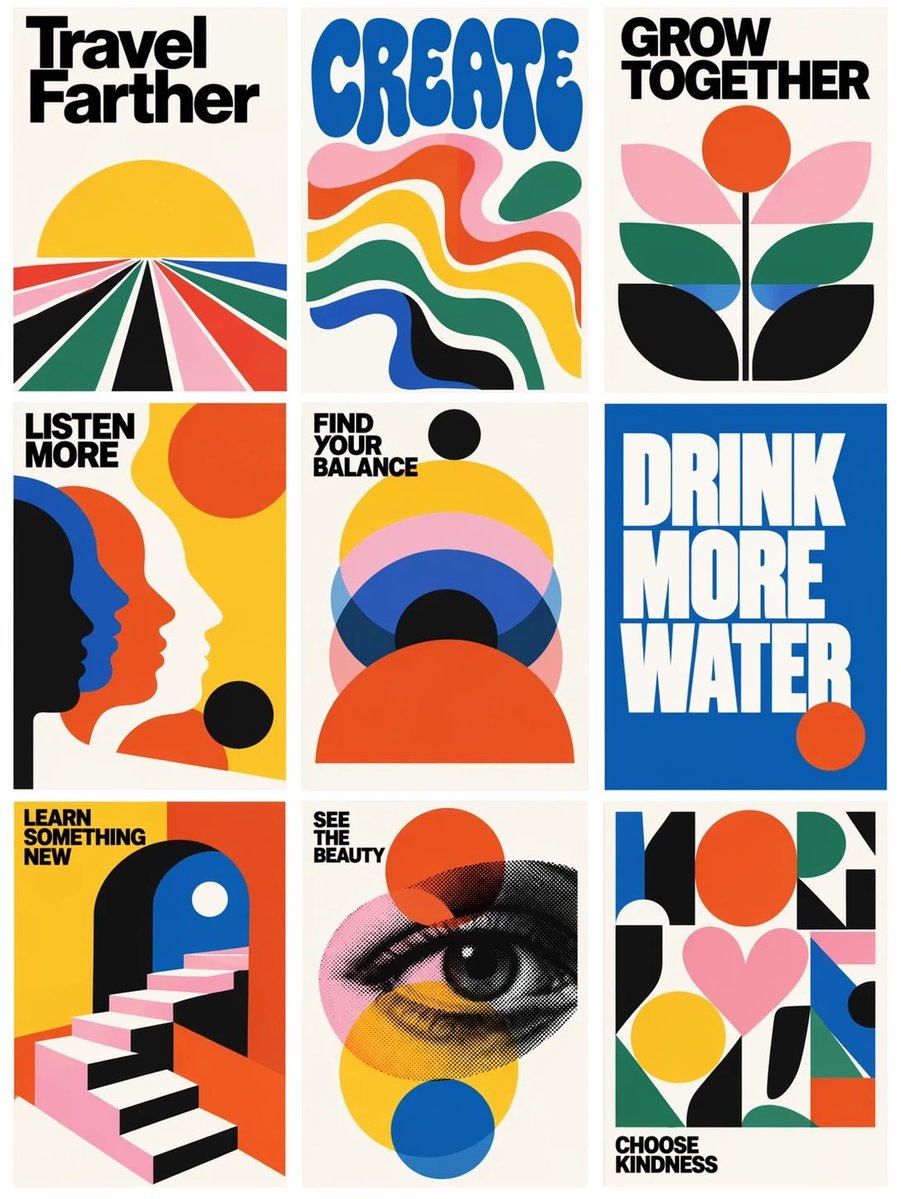
Retro Motivational Poster Grid
Generates a 3x3 gallery of bold vintage-style motivational posters from a reference grid layout.
이것은 그래픽 및 포스터 에 대한 GPT Image 2 프롬프트 사례입니다. 아래의 복사 가능한 프롬프트를 사용하여 유사한 시각 자료를 생성하고, 재사용하기 전에 Awesome GPT Image 2 Prompts 의 저작자 표시 및 상업적 사용 권한을 검토하십시오.
전체 프롬프트 세트가 필요하신가요? 다음을 사용하세요. 그래픽 및 포스터 더 많은 관련 예시를 보려면 주제 허브를 열거나 다음을 열어보세요. GPT Image 2 프롬프트 카탈로그 전체 예제 색인, 재사용 가능한 구조 및 출처 표기는 다음을 참조하십시오.
Free 1K preview
Generate one preview image instantly, no sign-up required.
Free text preview doesn’t preserve reference-image consistency.
2106/4000
프롬프트
복사 준비 프롬프트
Using the provided reference image as a loose layout reference, replace the prompt-library interface with a clean 3-column by 3-row gallery of exactly 9 vertical retro graphic posters. Remove all website UI elements, author names, buttons, borders, Korean interface text, and card metadata. Keep only the idea of a tiled poster grid with narrow gutters on an off-white background.

Style: Bold 1960s–1970s modernist poster design, flat vector shapes, cream paper backgrounds, high-contrast black typography, saturated primary colors, simple geometric compositions, minimal texture, crisp print-poster look.

Create exactly 9 posters, arranged left to right, top to bottom:
1. Poster text: “Travel Farther” — radiating perspective road/fields leading to a yellow sun.
2. Poster text: “CREATE” — large rounded blue psychedelic type above flowing wavy color bands.
3. Poster text: “GROW TOGETHER” — abstract flower with orange sun/circle and layered leaves.
4. Poster text: “LISTEN MORE” — overlapping side-profile silhouettes in black, blue, orange, and cream.
5. Poster text: “FIND YOUR BALANCE” — stacked semicircles and circles in yellow, pink, blue, black, and orange.
6. Poster text: “DRINK MORE WATER” — oversized white block type on a solid blue field with a small orange circle.
7. Poster text: “LEARN SOMETHING NEW” — geometric staircase entering an archway.
8. Poster text: “SEE THE BEAUTY” — halftone illustrated eye over transparent colored circles.
9. Poster text: “CHOOSE KINDNESS” — abstract geometric collage with a pink heart and colorful blocks.

Typography: Use bold condensed sans-serif headline lettering; make the text large, readable, and integrated into each poster. Use the headline set {argument name="poster message theme" default="uplifting lifestyle reminders"} while preserving the exact 9-poster count and grid structure. Use a palette based on {argument name="color palette" default="cream, black, yellow, orange-red, cobalt blue, forest green, and pink"}. Overall composition should feel like {argument name="poster era" default="1970s modernist motivational print posters"}.
프롬프트 변수
프롬프트에 있는 편집 가능한 인수 자리 표시자와 해당 기본값입니다.
변하기 쉬운
poster message theme
기본
uplifting lifestyle reminders
변하기 쉬운
color palette
기본
cream, black, yellow, orange-red, cobalt blue, forest green, and pink
변하기 쉬운
poster era
기본
1970s modernist motivational print posters
Best for
- - 그래픽 및 포스터 visual exploration
- - Image generation and reference-image edits
- - Reusable briefs that keep source attribution visible
Change these parts
- - Subject, product, character, or scene
- - Aspect ratio, camera, lighting, and background
- - Brand, text, color, and output constraints
Recommended model and settings
- - Model: gpt-image-2
- - Input mode: 이미지 to 이미지
- - Aspect ratio: source
- - Commercial status: review original source
How to use this prompt
- 1. Copy the prompt and preserve its structure for the first test.
- 2. Replace the subject, context, and publishing channel.
- 3. Change one camera, lighting, or style variable per iteration.
- 4. Inspect the output, source, text, and rights before reuse.
Limitations, source, and reuse cautions
- - Generated output is an editable draft, not factual, legal, or rights evidence.
- - Review the linked source, people, brands, logos, text, and third-party media before commercial use.
Awesome GPT Image 2 Prompts 에서 가져왔습니다. 출처 표기가 필요합니다. 상업적 이용 가능 여부는 allowed 입니다. 유료 사용 전에 원저작권 정보를 확인하세요.
이 범주에 속하는 더 많은 사례
범주, 입력 방식 호환성, 품질 및 위험도에 따라 우선순위가 정해집니다.






재사용 및 출처 참고 사항
사례를 미리 확인한 후 이 안내 메시지를 안전하게 사용하십시오.
- 1.프롬프트를 복사하거나 Dovoo의 생성 버튼을 사용하여 직접 엽니다.
- 2.사용 사례에 맞게 변수, 화면 비율 및 참조 이미지를 조정하십시오.
- 3.출판 또는 유료 사용 전에 저작권, 출처 표기 요건 및 브랜드 또는 초상권 관련 위험을 확인하십시오.