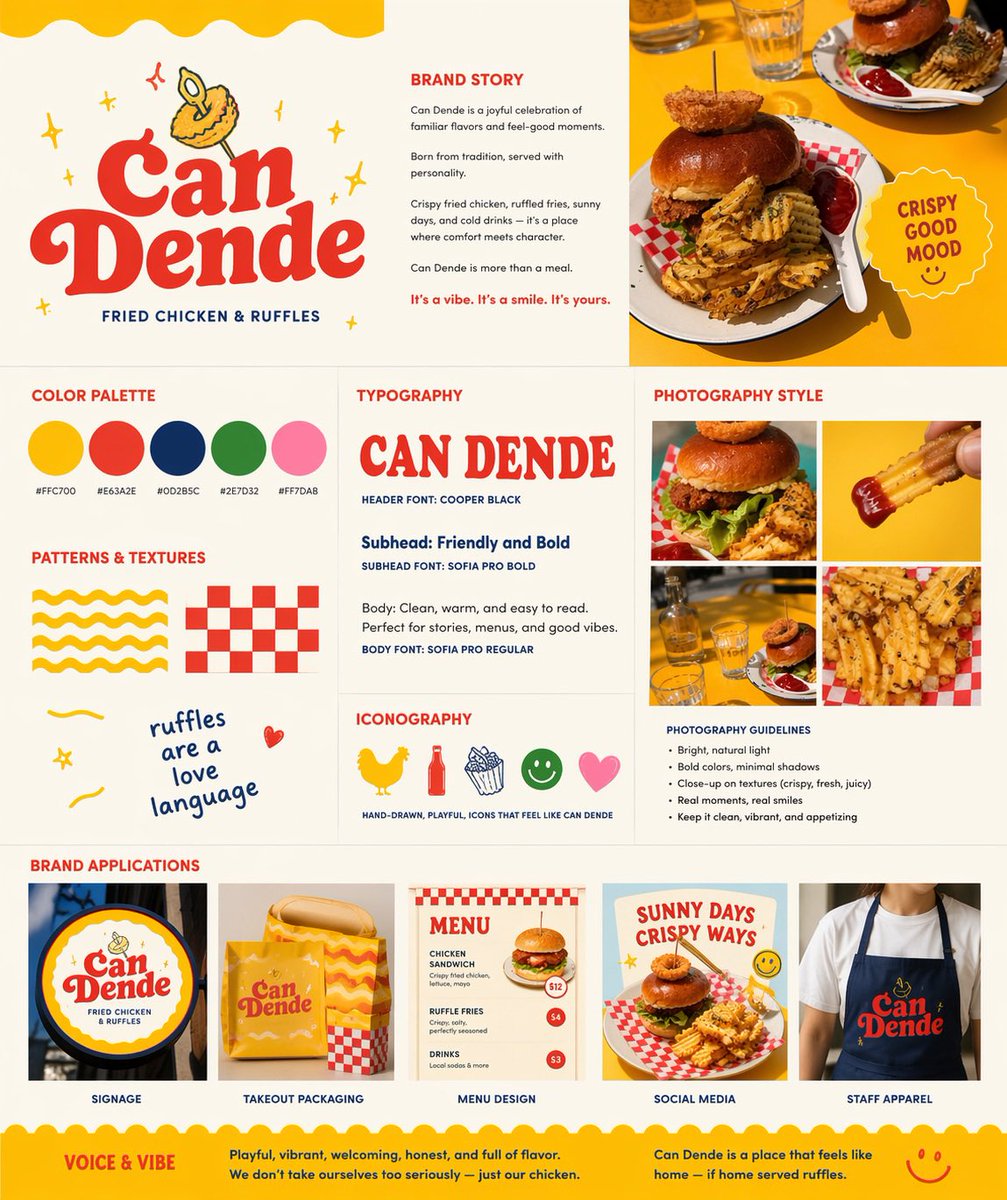
레트로 패스트푸드 브랜드 보드
이 프롬프트는 참고용 음식 사진을 로고, 색상 팔레트, 타이포그래피, 사진 스타일 및 브랜드 적용 사례를 보여주는 완벽한 레스토랑 브랜딩 프레젠테이션 보드로 변환합니다.
이것은 그래픽 및 포스터 에 대한 GPT Image 2 프롬프트 사례입니다. 아래의 복사 가능한 프롬프트를 사용하여 유사한 시각 자료를 생성하고, 재사용하기 전에 Awesome GPT Image 2 Prompts 의 저작자 표시 및 상업적 사용 권한을 검토하십시오.
전체 프롬프트 세트가 필요하신가요? 다음을 사용하세요. 그래픽 및 포스터 더 많은 관련 예시를 보려면 주제 허브를 열거나 다음을 열어보세요. GPT Image 2 프롬프트 카탈로그 전체 예제 색인, 재사용 가능한 구조 및 출처 표기는 다음을 참조하십시오.
Free 1K preview
Generate one preview image instantly, no sign-up required.
Free text preview doesn’t preserve reference-image consistency.
1961/4000
프롬프트
복사 준비 프롬프트
Using REFERENCE_0 as the hero food photo, transform it into a polished one-page restaurant branding board for a fried chicken and waffle-fries concept named {argument name="brand name" default="Can Dende"}. Keep the yellow-table food photography as the visual anchor, but redesign the output as a clean square brand guideline sheet on a warm off-white background with a cheerful, retro, hand-drawn fast-casual identity. Add a large logo area in the upper left with bold vintage red lettering, a small illustrated fried-food mascot above it, and the tagline “FRIED CHICKEN & RUFFLES”. Build the page as a structured multi-panel layout with 9 sections: 1) logo/hero area, 2) brand story text block, 3) top-right hero photo crop from the reference, 4) color palette showing exactly 5 swatches with hex labels, 5) typography section with a large display sample of the brand name plus 3 text styles labeled header, subhead, and body, 6) patterns and textures section with exactly 4 playful assets: a yellow wavy stripe pattern, a red checker pattern, a handwritten phrase, and a small doodle heart, 7) iconography section with exactly 5 simple icons: chicken, bottle, fries, smiley face, and heart, 8) photography style section with a 2x2 grid of exactly 4 food-photo crops derived from the reference and matching close-up shots, plus a short bullet list of photography guidelines, and 9) brand applications section with exactly 5 mockups labeled signage, takeout packaging, menu design, social media, and staff apparel. Include a circular badge near the hero photo that says {argument name="badge text" default="CRISPY GOOD MOOD"}. Use the palette {argument name="primary palette" default="yellow, tomato red, deep navy, leaf green, soft pink"}. Add a bottom banner with 2 sections titled “VOICE & VIBE” and a short brand summary paragraph. Overall feel: modern branding presentation, vibrant, appetizing, playful, sunny, editorial, highly legible, premium-but-fun.프롬프트 변수
프롬프트에 있는 편집 가능한 인수 자리 표시자와 해당 기본값입니다.
변하기 쉬운
brand name
기본
Can Dende
변하기 쉬운
badge text
기본
CRISPY GOOD MOOD
변하기 쉬운
primary palette
기본
yellow, tomato red, deep navy, leaf green, soft pink
Best for
- - 그래픽 및 포스터 visual exploration
- - Image generation and reference-image edits
- - Reusable briefs that keep source attribution visible
Change these parts
- - Subject, product, character, or scene
- - Aspect ratio, camera, lighting, and background
- - Brand, text, color, and output constraints
Recommended model and settings
- - Model: gpt-image-2
- - Input mode: 이미지 to 이미지
- - Aspect ratio: source
- - Commercial status: review original source
How to use this prompt
- 1. Copy the prompt and preserve its structure for the first test.
- 2. Replace the subject, context, and publishing channel.
- 3. Change one camera, lighting, or style variable per iteration.
- 4. Inspect the output, source, text, and rights before reuse.
Limitations, source, and reuse cautions
- - Generated output is an editable draft, not factual, legal, or rights evidence.
- - Review the linked source, people, brands, logos, text, and third-party media before commercial use.
Awesome GPT Image 2 Prompts 에서 가져왔습니다. 출처 표기가 필요합니다. 상업적 이용 가능 여부는 allowed 입니다. 유료 사용 전에 원저작권 정보를 확인하세요.
이 범주에 속하는 더 많은 사례
범주, 입력 방식 호환성, 품질 및 위험도에 따라 우선순위가 정해집니다.






재사용 및 출처 참고 사항
사례를 미리 확인한 후 이 안내 메시지를 안전하게 사용하십시오.
- 1.프롬프트를 복사하거나 Dovoo의 생성 버튼을 사용하여 직접 엽니다.
- 2.사용 사례에 맞게 변수, 화면 비율 및 참조 이미지를 조정하십시오.
- 3.출판 또는 유료 사용 전에 저작권, 출처 표기 요건 및 브랜드 또는 초상권 관련 위험을 확인하십시오.