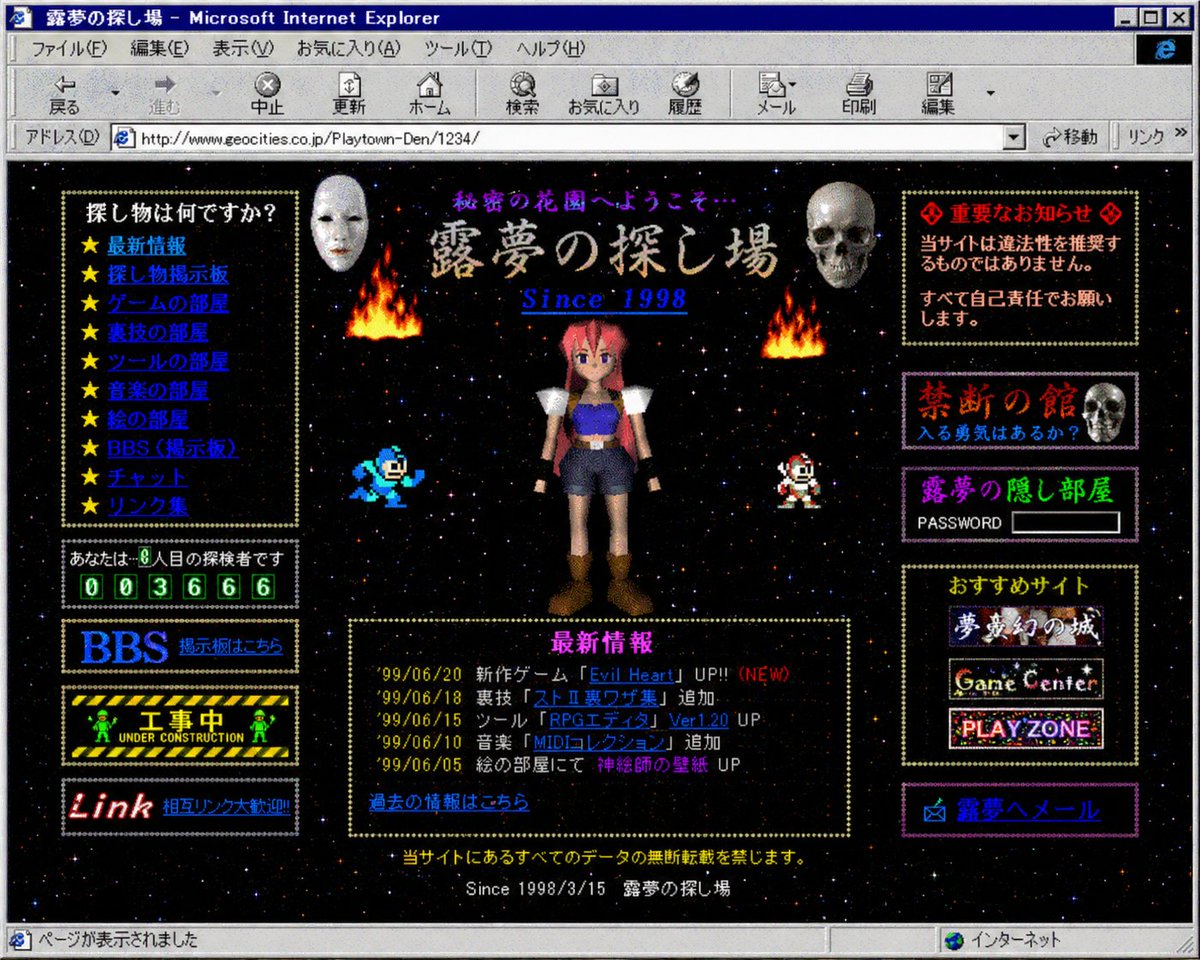
1998년 레트로 일본 지오시티 홈페이지
이 프로그램은 1990년대 후반 일본의 개인 웹사이트를 인터넷 익스플로러에서 본 듯한 매우 정교한 가짜 스크린샷을 생성합니다. 향수를 불러일으키는 올드웹, 베이퍼웨이브 또는 레트로 인터넷 아트 작품에 이상적입니다.
이것은 그래픽 및 포스터 에 대한 GPT Image 2 프롬프트 사례입니다. 아래의 복사 가능한 프롬프트를 사용하여 유사한 시각 자료를 생성하고, 재사용하기 전에 Awesome GPT Image 2 Prompts 의 저작자 표시 및 상업적 사용 권한을 검토하십시오.
전체 프롬프트 세트가 필요하신가요? 다음을 사용하세요. 그래픽 및 포스터 더 많은 관련 예시를 보려면 주제 허브를 열거나 다음을 열어보세요. GPT Image 2 프롬프트 카탈로그 전체 예제 색인, 재사용 가능한 구조 및 출처 표기는 다음을 참조하십시오.
Free 1K preview
Generate one preview image instantly, no sign-up required.
3089/4000
프롬프트
복사 준비 프롬프트
A retro late-1990s Japanese personal homepage displayed inside a Windows-era Microsoft Internet Explorer window, captured as a full browser screenshot. The page title bar reads "露夢の探し場 - Microsoft Internet Explorer" and the browser chrome is authentic to classic Internet Explorer, including menu bar, navigation icons, address bar, and status bar. The website itself has a black starfield space background with tiny colorful stars, framed by dotted gold borders and glowing pixel-style decorative boxes. The page header area shows purple Japanese text "秘密の花園へようこそ…" above a large ornate title "露夢の探し場" with the subtitle "Since 1998" in bright blue italic serif text. In the center is a low-polygon 3D anime girl with pink-red hair, blue crop top, dark shorts, white shoulder armor, brown boots, and a neutral front-facing pose. Count 4 game-like character or effect elements around her: 2 flames near the upper left and upper right of the center area, 1 blue pixel-art robot character on the lower left of the center area, and 1 small red-and-white pixel-art character on the lower right of the center area. Count 2 silver metallic hanging capsule ornaments near the upper center left and upper center right. Build the page in a dense old-web layout with 3 main columns. The left column contains 5 boxed sections: 1 navigation box titled "探し物は何ですか?" with exactly 10 star-bulleted blue links, labeled "最新情報", "怪し物掲示板", "ゲームの部屋", "教授の部屋", "ツールの部屋", "音楽の部屋", "絵の部屋", "BBS(掲示板)", "チャット", "リンク集"; 1 visitor counter box reading "あなたは、◯人目の探検者です" with green digital-style digits "003666"; 1 large blue "BBS" banner button with smaller text "掲示板はこちら"; 1 black-and-yellow caution-style "工事中 UNDER CONSTRUCTION" banner with tiny green worker figures; and 1 black banner with red script text "Link" plus blue text "相互リンク大歓迎!!". The center lower area contains 1 large news box with a gold dotted border and magenta heading "最新情報", listing exactly 5 dated update lines: "'99/06/20 新作ゲーム『Evil Heart』UP!! (NEW)", "'99/06/18 裏技『ストⅡ裏ワザ集』追加。", "'99/06/15 ツール『RPGエディタ Ver1.20』UP", "'99/06/10 音楽『MIDIコレクション』追加", "'99/06/05 絵の部屋にて『神秘師の巫女』UP"; below it add the blue link "過去の情報はこちら". The right column contains 5 boxed sections: 1 red warning box headed "◎ 重要なお知らせ ◎" with text "当サイトは違法性を推奨するものではありません。 すべて自己責任でお願いします。"; 1 dark purple box titled "禁断の館" with subtitle "入る勇気はあるか?" and a realistic skull image on the right; 1 purple box titled "露夢の隠し部屋" with the label "PASSWORD" and an empty white password field; 1 recommendations box titled "おすすめサイト" containing exactly 3 stacked banner buttons labeled "夢魔幻の城", "Game Center", and "PLAY ZONE"; and 1 bottom purple mail button labeled "✉ 露夢へメール". Add small footer text centered near the bottom: "※当サイトにあるすべてのデータの無断転載を禁じます。" and beneath it "Since 1998/3/15 露夢の探し場". Make the whole image feel like an authentic nostalgic Geocities-style Japanese web page from 1998–1999: garish colors, beveled buttons, bitmap fonts, glowing borders, amateur HTML layout, MIDI-homepage energy, slightly compressed screenshot quality, and uncanny period-accurate internet aesthetics.
Best for
- - 그래픽 및 포스터 visual exploration
- - Image generation and reference-image edits
- - Reusable briefs that keep source attribution visible
Change these parts
- - Subject, product, character, or scene
- - Aspect ratio, camera, lighting, and background
- - Brand, text, color, and output constraints
Recommended model and settings
- - Model: gpt-image-2
- - Input mode: 텍스트 to 이미지
- - Aspect ratio: source
- - Commercial status: review original source
How to use this prompt
- 1. Copy the prompt and preserve its structure for the first test.
- 2. Replace the subject, context, and publishing channel.
- 3. Change one camera, lighting, or style variable per iteration.
- 4. Inspect the output, source, text, and rights before reuse.
Limitations, source, and reuse cautions
- - Generated output is an editable draft, not factual, legal, or rights evidence.
- - Review the linked source, people, brands, logos, text, and third-party media before commercial use.
Awesome GPT Image 2 Prompts 에서 가져왔습니다. 출처 표기가 필요합니다. 상업적 이용 가능 여부는 allowed 입니다. 유료 사용 전에 원저작권 정보를 확인하세요.
이 범주에 속하는 더 많은 사례
범주, 입력 방식 호환성, 품질 및 위험도에 따라 우선순위가 정해집니다.






재사용 및 출처 참고 사항
사례를 미리 확인한 후 이 안내 메시지를 안전하게 사용하십시오.
- 1.프롬프트를 복사하거나 Dovoo의 생성 버튼을 사용하여 직접 엽니다.
- 2.사용 사례에 맞게 변수, 화면 비율 및 참조 이미지를 조정하십시오.
- 3.출판 또는 유료 사용 전에 저작권, 출처 표기 요건 및 브랜드 또는 초상권 관련 위험을 확인하십시오.