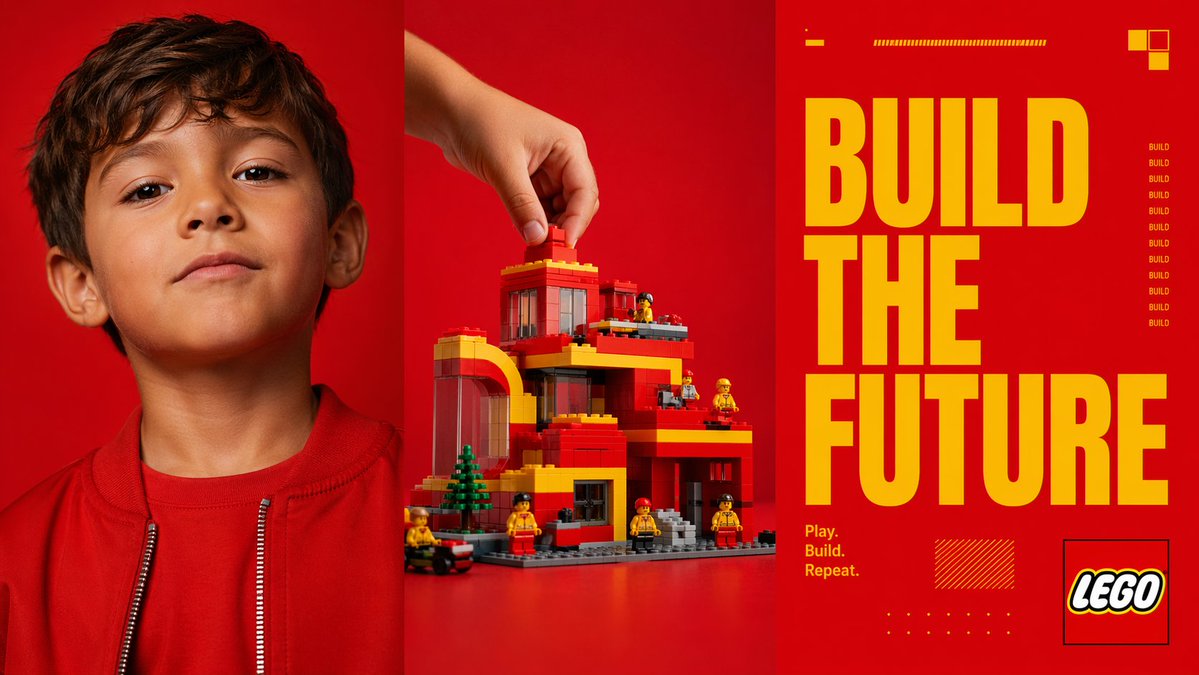
붉은색 삼면화, 미래를 건설하다 포스터
이 프롬프트는 캠페인 모형이나 편집 포스터에 사용할 수 있도록 어린이 초상화, 손으로 만든 블록 구조물, 그리고 커다란 슬로건 서체를 결합한 대담한 3단 패널 장난감 브랜드 스타일 광고를 생성합니다.
이것은 제품 및 상업 에 대한 GPT Image 2 프롬프트 사례입니다. 아래의 복사 가능한 프롬프트를 사용하여 유사한 시각 자료를 생성하고, 재사용하기 전에 Awesome GPT Image 2 Prompts 의 저작자 표시 및 상업적 사용 권한을 검토하십시오.
전체 프롬프트 세트가 필요하신가요? 다음을 사용하세요. 제품 및 상업 더 많은 관련 예시를 보려면 주제 허브를 열거나 다음을 열어보세요. GPT Image 2 프롬프트 카탈로그 전체 예제 색인, 재사용 가능한 구조 및 출처 표기는 다음을 참조하십시오.
Free 1K preview
Generate one preview image instantly, no sign-up required.
4000/4000
프롬프트
복사 준비 프롬프트
{
  "type": "triptych advertising poster",
  "style": "bold modern toy-brand campaign, high-contrast studio photography mixed with graphic editorial design",
  "format": "three equal vertical panels side by side",
  "color_palette": {
    "dominant_background": "vivid saturated red",
    "accent": "bright yellow",
    "secondary": "orange-red, black, white, gray"
  },
  "subject": {
    "theme": "creative building and imagination",
    "brand_style": "construction toy aesthetic",
    "headline": "{argument name=\"headline text\" default=\"BUILD THE FUTURE\"}",
    "tagline": "{argument name=\"tagline\" default=\"Play. Build. Repeat.\"}"
  },
  "layout": {
    "sections": [
      {
        "title": "left portrait panel",
        "position": "left third",
        "count": 1,
        "labels": [
          "child portrait"
        ]
      },
      {
        "title": "center build panel",
        "position": "middle third",
        "count": 1,
        "labels": [
          "hand placing brick on toy building"
        ]
      },
      {
        "title": "right typography panel",
        "position": "right third",
        "count": 1,
        "labels": [
          "headline and brand graphics"
        ]
      }
    ],
    "panel_dividers": "thin dark vertical separations between all 3 panels"
  },
  "left_panel": {
    "subject": "close-cropped portrait of a child from chest up",
    "counted_elements": {
      "people": 1,
      "garments": 2,
      "visible_facial_features": 2
    },
    "appearance": {
      "age": "young child",
      "hair": "short dark brown hair",
      "clothing": [
        "red crew-neck shirt",
        "red zip-front jacket with silver zipper teeth"
      ],
      "visible_features": [
        "left ear visible",
        "neck and lower face visible"
      ]
    },
    "framing": "top of head slightly cropped, centered in panel",
    "background": "solid vivid red seamless studio backdrop"
  },
  "center_panel": {
    "subject": "toy architecture scene being assembled",
    "counted_elements": {
      "hands": 1,
      "main_building": 1,
      "mini_figures": 6,
      "trees": 1,
      "vehicles": 1,
      "loose_bricks_being_placed": 1
    },
    "action": "a human hand enters from the upper left and places a single red brick on the roof",
    "building": {
      "style": "block-built modern multi-level house or civic building",
      "colors": [
        "red",
        "yellow",
        "gray",
        "transparent dark window panels"
      ],
      "features": [
        "arched left-side structure",
        "flat roof levels",
        "multiple balconies or terraces",
        "large windows",
        "gray baseplate",
        "front steps"
      ]
    },
    "surroundings": {
      "mini_figures": "6 small construction-worker-like toy figures in yellow and red distributed around the structure",
      "trees": "1 small green conifer-like tree near front left",
      "vehicle": "1 small black and red wheeled vehicle at the lower left edge"
    },
    "background": "solid vivid red seamless studio backdrop",
    "surface": "red tabletop continuous with backdrop"
  },
  "right_panel": {
    "subject": "graphic poster typography",
    "counted_elements": {
      "headline_words": 3,
      "small_repeated_word_instances": 9,
      "decorative_blocks_top_right": 3,
      "small_horizontal_bar_groups_top": 2,
      "tagline_lines": 3,
      "logo_boxes": 1,
      "decorative_hatched_boxes": 1,
      "decorative_dot_grids": 1
    },
    "typography": {
      "main_text": "{argument name=\"headline text\" default=\"BUILD THE FUTURE\"}",
      "arrangement": "three stacked lines, one word per line, very large condensed bold sans-serif in yellow occupying most of panel height",
      "tagline": "{argument name=\"tagline\" default=\"Play. Build. Repeat.\"}",
      "tagline_position": "lower left of right panel in small yellow text on 3 lines",
      "repeated_side_text": "the word BUILD repeated vertically 9 times in small yellow text along the mid-right side"
    },
    "graphics": {
      "top_details": [
        "1 short yellow dash near upper left",
        "1 long thin yellow striped bar near top center"
      ],
      "top_right": [
        "cluster of 3 small square blocks in yellow and orange"
      ],
      "bottom_details": [
        "1 yellow hatched rectangle near lower center-left",
        "1 small yellow dot grid near bottom center"
      ],
      "logo": "{argument name=\"brand name\" default=\"LEGO\"} logo inside a thin black outlined square at lower right"
    },
    "background": "solid vivid red"
  },
  "lighting": "clean commercial studio lighting, crisp and saturated, minimal shadow, polished ad-campaign finish",
  "composition": "striking triptych composition with photographic portrait on left, product build action in center, and oversized typographic slogan panel on right"
}
프롬프트 변수
프롬프트에 있는 편집 가능한 인수 자리 표시자와 해당 기본값입니다.
변하기 쉬운
headline text
기본
BUILD THE FUTURE
변하기 쉬운
tagline
기본
Play. Build. Repeat.
변하기 쉬운
brand name
기본
LEGO
Best for
- - 제품 및 상업 visual exploration
- - Image generation and reference-image edits
- - Reusable briefs that keep source attribution visible
Change these parts
- - Subject, product, character, or scene
- - Aspect ratio, camera, lighting, and background
- - Brand, text, color, and output constraints
Recommended model and settings
- - Model: gpt-image-2
- - Input mode: 텍스트 to 이미지
- - Aspect ratio: source
- - Commercial status: review original source
How to use this prompt
- 1. Copy the prompt and preserve its structure for the first test.
- 2. Replace the subject, context, and publishing channel.
- 3. Change one camera, lighting, or style variable per iteration.
- 4. Inspect the output, source, text, and rights before reuse.
Limitations, source, and reuse cautions
- - Generated output is an editable draft, not factual, legal, or rights evidence.
- - Review the linked source, people, brands, logos, text, and third-party media before commercial use.
Awesome GPT Image 2 Prompts 에서 가져왔습니다. 출처 표기가 필요합니다. 상업적 이용 가능 여부는 allowed 입니다. 유료 사용 전에 원저작권 정보를 확인하세요.
이 범주에 속하는 더 많은 사례
범주, 입력 방식 호환성, 품질 및 위험도에 따라 우선순위가 정해집니다.






재사용 및 출처 참고 사항
사례를 미리 확인한 후 이 안내 메시지를 안전하게 사용하십시오.
- 1.프롬프트를 복사하거나 Dovoo의 생성 버튼을 사용하여 직접 엽니다.
- 2.사용 사례에 맞게 변수, 화면 비율 및 참조 이미지를 조정하십시오.
- 3.출판 또는 유료 사용 전에 저작권, 출처 표기 요건 및 브랜드 또는 초상권 관련 위험을 확인하십시오.