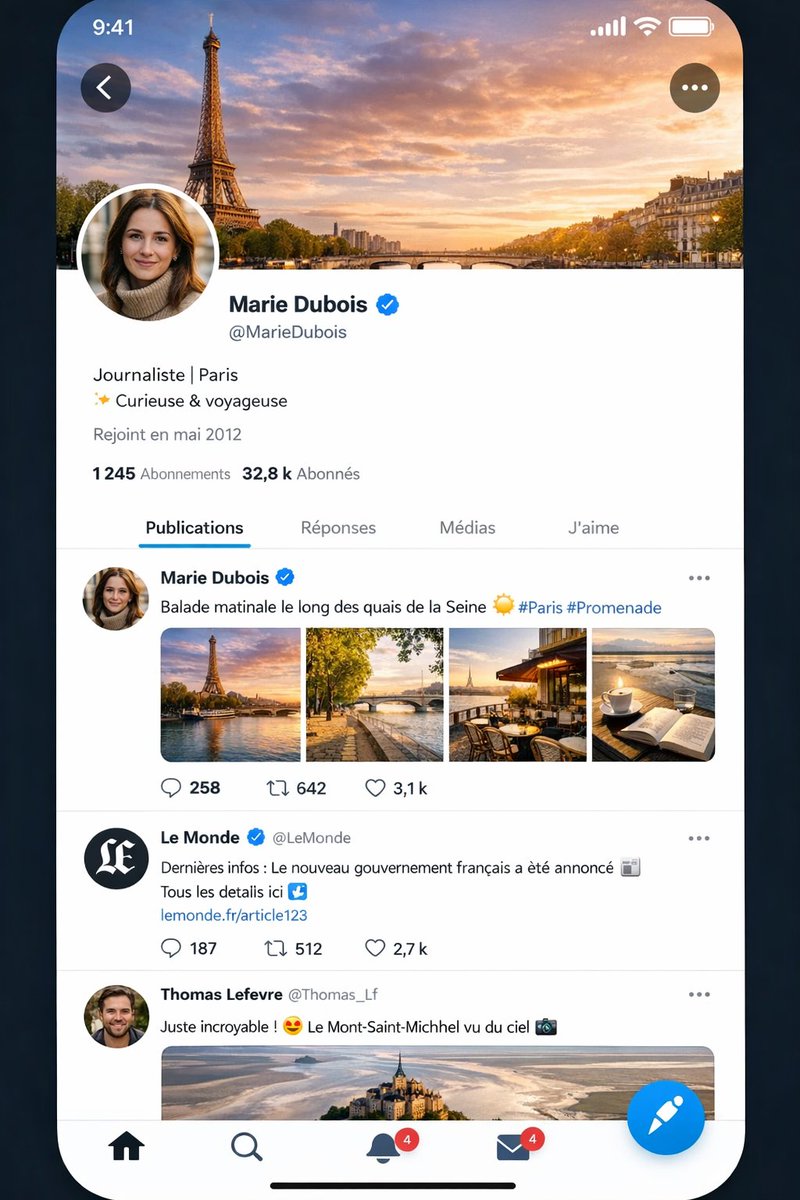
사실적인 X자형 프랑스식 프로필 스크린
이 프롬프트는 아이폰 스타일의 소셜 미디어 프로필 및 피드 화면을 프랑스어로 생성하여 UI 목업, 제품 데모 또는 AI 생성 앱 스크린샷 비교에 유용하게 사용할 수 있습니다.
이것은 다른 영감 에 대한 GPT Image 2 프롬프트 사례입니다. 아래의 복사 가능한 프롬프트를 사용하여 유사한 시각 자료를 생성하고, 재사용하기 전에 Awesome GPT Image 2 Prompts 의 저작자 표시 및 상업적 사용 권한을 검토하십시오.
전체 프롬프트 세트가 필요하신가요? 다음을 사용하세요. 다른 영감 더 많은 관련 예시를 보려면 주제 허브를 열거나 다음을 열어보세요. GPT Image 2 프롬프트 카탈로그 전체 예제 색인, 재사용 가능한 구조 및 출처 표기는 다음을 참조하십시오.
Free 1K preview
Generate one preview image instantly, no sign-up required.
2965/4000
프롬프트
복사 준비 프롬프트
A highly realistic smartphone app screenshot mockup of a social media interface almost identical to X/Twitter, shown on an iPhone-style full-screen display with rounded corners against a dark blue-black background. The status bar at the top shows the time 9:41 on the left and cellular, Wi‑Fi, and battery icons on the right. The screen displays a French-language profile page for {argument name="profile name" default="Marie Dubois"}, with a large cover photo of the Eiffel Tower and the Seine at sunset under a dramatic orange-blue sky. A circular profile photo overlaps the lower-left of the header, Show every face clearly with natural, detailed facial features. A back arrow button appears in a dark translucent circle at top left, and a three-dot menu button in a matching circle at top right. Below the header, show the verified profile name {argument name="profile name" default="Marie Dubois"} with a blue verification badge, the handle {argument name="handle" default="@MarieDubois"}, a short bio in French reading "Journaliste | Paris" on one line and "✨ Curieuse & voyageuse" on the next, then "Rejoint en mai 2012" beneath. Show follower stats in French: "1 245 Abonnements" and "32,8 k Abonnés". Add a tab bar with exactly 4 tabs labeled "Publications", "Réponses", "Médias", and "J'aime", with "Publications" selected and underlined in blue. In the feed, include exactly 3 visible posts. Post 1 is by {argument name="profile name" default="Marie Dubois"} with blue verified badge and the French caption {argument name="post caption" default="Balade matinale le long des quais de la Seine ☀️ #Paris #Promenade"}, followed by a 4-image collage in one row: 1) Eiffel Tower by the river at golden hour, 2) a Paris riverside walkway with a bridge and autumn trees, 3) a cozy terrace café with Eiffel Tower view, 4) a coffee cup beside an open notebook overlooking water. Below it, show engagement icons and counts: reply 258, repost 642, like 3,1 k. Post 2 is from verified news account "Le Monde" with handle "@LeMonde", black circular avatar with white monogram, and French text: "Dernières infos : Le nouveau gouvernement français a été annoncé 📰 Tous les details ici ↓" followed by a blue link "lemonde.fr/article123"; below it show counts 187, 512, and 2,7 k. Post 3 is from "Thomas Lefevre" with handle "@Thomas_Lf" and text "Juste incroyable ! 😍 Le Mont-Saint-Michel vu du ciel 📷", followed by a wide aerial photo of Mont-Saint-Michel. At the bottom, include an iOS-style navigation bar with exactly 5 elements: home icon, search icon, notifications bell with a red badge showing 4, messages envelope with a red badge showing 4, and a large floating blue compose button with a white quill/feather icon. Add the thin black iPhone home indicator centered at the very bottom. Use crisp modern UI typography, subtle gray dividers, realistic spacing, authentic X-like iconography, polished mobile app rendering, and near-photographic screenshot realism.프롬프트 변수
프롬프트에 있는 편집 가능한 인수 자리 표시자와 해당 기본값입니다.
변하기 쉬운
profile name
기본
Marie Dubois
변하기 쉬운
handle
기본
@MarieDubois
변하기 쉬운
post caption
기본
Balade matinale le long des quais de la Seine ☀️ #Paris #Promenade
Best for
- - 다른 영감 visual exploration
- - Image generation and reference-image edits
- - Reusable briefs that keep source attribution visible
Change these parts
- - Subject, product, character, or scene
- - Aspect ratio, camera, lighting, and background
- - Brand, text, color, and output constraints
Recommended model and settings
- - Model: gpt-image-2
- - Input mode: 텍스트 to 이미지
- - Aspect ratio: source
- - Commercial status: review original source
How to use this prompt
- 1. Copy the prompt and preserve its structure for the first test.
- 2. Replace the subject, context, and publishing channel.
- 3. Change one camera, lighting, or style variable per iteration.
- 4. Inspect the output, source, text, and rights before reuse.
Limitations, source, and reuse cautions
- - Generated output is an editable draft, not factual, legal, or rights evidence.
- - Review the linked source, people, brands, logos, text, and third-party media before commercial use.
Awesome GPT Image 2 Prompts 에서 가져왔습니다. 출처 표기가 필요합니다. 상업적 이용 가능 여부는 allowed 입니다. 유료 사용 전에 원저작권 정보를 확인하세요.
이 범주에 속하는 더 많은 사례
범주, 입력 방식 호환성, 품질 및 위험도에 따라 우선순위가 정해집니다.






재사용 및 출처 참고 사항
사례를 미리 확인한 후 이 안내 메시지를 안전하게 사용하십시오.
- 1.프롬프트를 복사하거나 Dovoo의 생성 버튼을 사용하여 직접 엽니다.
- 2.사용 사례에 맞게 변수, 화면 비율 및 참조 이미지를 조정하십시오.
- 3.출판 또는 유료 사용 전에 저작권, 출처 표기 요건 및 브랜드 또는 초상권 관련 위험을 확인하십시오.