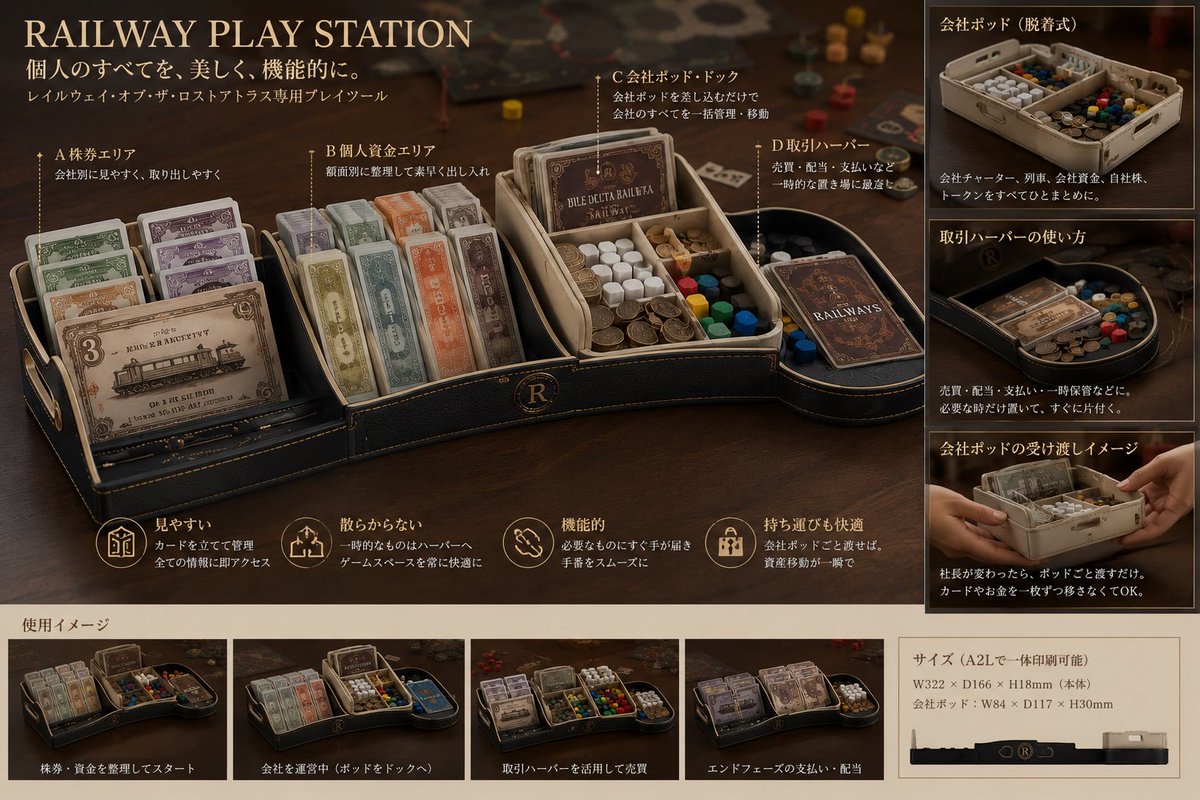
Luxury Railway Board Game Organizer Poster
Creates a premium product-presentation poster for a modular railway board-game organizer based on prototype reference photos.
이것은 제품 및 상업 에 대한 GPT Image 2 프롬프트 사례입니다. 아래의 복사 가능한 프롬프트를 사용하여 유사한 시각 자료를 생성하고, 재사용하기 전에 Awesome GPT Image 2 Prompts 의 저작자 표시 및 상업적 사용 권한을 검토하십시오.
전체 프롬프트 세트가 필요하신가요? 다음을 사용하세요. 제품 및 상업 더 많은 관련 예시를 보려면 주제 허브를 열거나 다음을 열어보세요. GPT Image 2 프롬프트 카탈로그 전체 예제 색인, 재사용 가능한 구조 및 출처 표기는 다음을 참조하십시오.
Free 1K preview
Generate one preview image instantly, no sign-up required.
Free text preview doesn’t preserve reference-image consistency.
2955/4000
프롬프트
복사 준비 프롬프트
Using REFERENCE_0 and REFERENCE_1 as the physical product reference, transform the modular white 3D-printed board-game organizer into a premium crowdfunding-style product presentation poster for {argument name="product name" default="RAILWAY PLAY STATION"}. Keep the same core concept: removable modular trays for separating personal money, company assets, cards, tokens, and train-related components, but redesign the visual style as a luxury dark leather-and-brass tabletop accessory rather than a plain white prototype.

Canvas and style: Create a horizontal 16:9 product board on a warm dark tabletop, cinematic shallow depth of field, antique railway / executive desk atmosphere, black leather texture, gold trim, sepia lighting, high-end catalog design. Use elegant serif English headline typography and small Japanese explanatory copy.

Main layout: Put a large hero render of the organizer across the left and center. Show it divided into exactly 4 labeled functional areas with thin callout lines:
1. A stock certificate area — cards standing upright and easy to see.
2. B personal funds area — neatly sorted paper money / securities.
3. C company pod dock — removable company tray holding company cards, money, colored cubes, and tokens.
4. D transaction harbor — a side holding area for temporary sales, distribution, payments, or transaction handling.

Right column: Add exactly 3 stacked explanatory image panels with Japanese headings:
1. Company pod, detachable style — show the removable pod full of cards, money, and tokens.
2. How to use the transaction harbor — show temporary components placed in the curved side tray.
3. Company pod handoff image — show hands passing the removable company pod.

Bottom strip: Add a section titled in Japanese as a usage image area, containing exactly 4 small scenario thumbnails with captions:
1. Start by organizing stocks and funds.
2. Operate a company by docking the pod.
3. Use the transaction harbor for sales.
4. End-phase payments and distribution.

Feature row: Beneath the hero product, include exactly 4 circular gold line icons with short Japanese benefits: easy to see, does not scatter, functional, comfortable to carry.

Size panel: Add a beige specification box at lower right showing printable size information for {argument name="printer size" default="A2L"}, including approximate dimensions {argument name="main body dimensions" default="W322 × D166 × H18mm"} and company pod dimensions {argument name="company pod dimensions" default="W84 × D117 × H30mm"}. Include a simple side-profile silhouette of the organizer.

Text: Use headline {argument name="headline text" default="RAILWAY PLAY STATION"}. Add Japanese subtitle copy meaning “Everything personal, beautifully and functionally,” and a small line indicating it is a dedicated tray tool for a railway board game. Keep the poster polished and realistic, with legible labels, no watermark, and no unrelated extra components.
프롬프트 변수
프롬프트에 있는 편집 가능한 인수 자리 표시자와 해당 기본값입니다.
변하기 쉬운
product name
기본
RAILWAY PLAY STATION
변하기 쉬운
printer size
기본
A2L
변하기 쉬운
main body dimensions
기본
W322 × D166 × H18mm
변하기 쉬운
company pod dimensions
기본
W84 × D117 × H30mm
변하기 쉬운
headline text
기본
RAILWAY PLAY STATION
Best for
- - 제품 및 상업 visual exploration
- - Image generation and reference-image edits
- - Reusable briefs that keep source attribution visible
Change these parts
- - Subject, product, character, or scene
- - Aspect ratio, camera, lighting, and background
- - Brand, text, color, and output constraints
Recommended model and settings
- - Model: gpt-image-2
- - Input mode: 이미지 to 이미지
- - Aspect ratio: source
- - Commercial status: review original source
How to use this prompt
- 1. Copy the prompt and preserve its structure for the first test.
- 2. Replace the subject, context, and publishing channel.
- 3. Change one camera, lighting, or style variable per iteration.
- 4. Inspect the output, source, text, and rights before reuse.
Limitations, source, and reuse cautions
- - Generated output is an editable draft, not factual, legal, or rights evidence.
- - Review the linked source, people, brands, logos, text, and third-party media before commercial use.
Awesome GPT Image 2 Prompts 에서 가져왔습니다. 출처 표기가 필요합니다. 상업적 이용 가능 여부는 allowed 입니다. 유료 사용 전에 원저작권 정보를 확인하세요.
이 범주에 속하는 더 많은 사례
범주, 입력 방식 호환성, 품질 및 위험도에 따라 우선순위가 정해집니다.






재사용 및 출처 참고 사항
사례를 미리 확인한 후 이 안내 메시지를 안전하게 사용하십시오.
- 1.프롬프트를 복사하거나 Dovoo의 생성 버튼을 사용하여 직접 엽니다.
- 2.사용 사례에 맞게 변수, 화면 비율 및 참조 이미지를 조정하십시오.
- 3.출판 또는 유료 사용 전에 저작권, 출처 표기 요건 및 브랜드 또는 초상권 관련 위험을 확인하십시오.