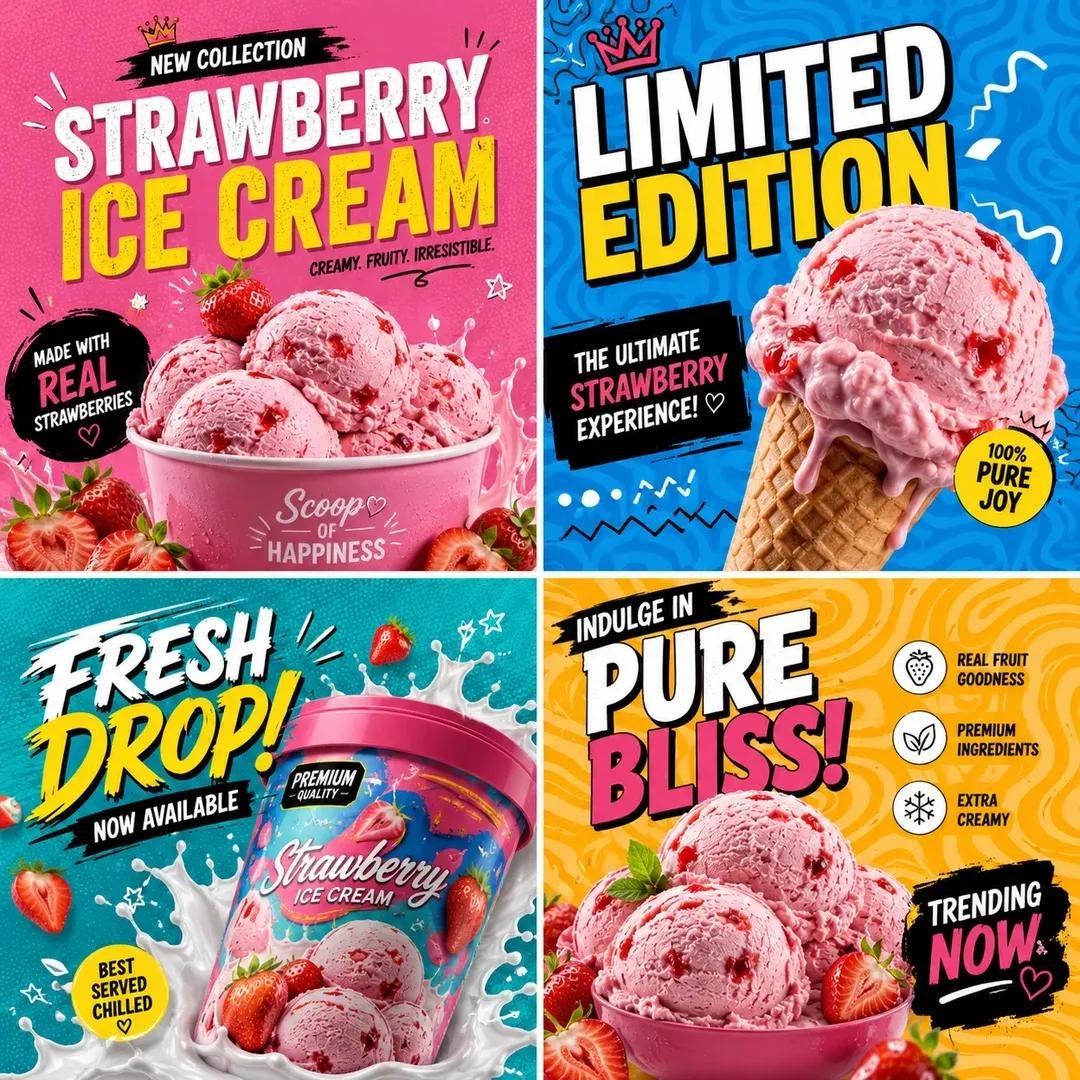
Pop Art Product Branding Grid
A comprehensive prompt to create energetic social media campaign grids with pop-art design, featuring neon accents, Memphis-style patterns, and bold commercial typography.
이것은 제품 및 상업 에 대한 GPT Image 2 프롬프트 사례입니다. 아래의 복사 가능한 프롬프트를 사용하여 유사한 시각 자료를 생성하고, 재사용하기 전에 Awesome GPT Image 2 Prompts 의 저작자 표시 및 상업적 사용 권한을 검토하십시오.
전체 프롬프트 세트가 필요하신가요? 다음을 사용하세요. 제품 및 상업 더 많은 관련 예시를 보려면 주제 허브를 열거나 다음을 열어보세요. GPT Image 2 프롬프트 카탈로그 전체 예제 색인, 재사용 가능한 구조 및 출처 표기는 다음을 참조하십시오.
Free 1K preview
Generate one preview image instantly, no sign-up required.
Free text preview doesn’t preserve reference-image consistency.
2777/4000
프롬프트
복사 준비 프롬프트
Create a bold, colorful 1:1 social media campaign grid for "{argument name="product name" default="PRODUCT NAME"}" using the uploaded reference image, or generate a premium, ultra-realistic version of {argument name="product name" default="PRODUCT NAME"}. Automatically adapt all colors, ingredients, textures, props, decorative elements, and the overall visual mood according to the product type or uploaded reference. Design a modern pop-art inspired promotional collage featuring multiple creative square sections.

Canvas Size:
1:1 Square Format — 1080 × 1080 px, optimized for Instagram posts and trendy social media branding.

Setting & Background:
Use vibrant pop-art backgrounds with energetic color blocking, abstract wave patterns, maze lines, retro squiggles, doodle outlines, neon accents, playful geometric shapes, and modern Memphis-style design elements. Divide the composition into four creative grid sections, each with a unique background style and dynamic visual rhythm.

Lighting:
Bright commercial studio lighting with glossy highlights, vibrant color reflections, soft realistic shadows, premium texture enhancement, and a playful modern advertising atmosphere.

Style:
Modern pop-art advertising aesthetic, Gen Z branding style, trendy Instagram campaign visuals, colorful street-style graphics, a minimal yet energetic layout, bold modern typography, premium commercial poster design, and ultra-realistic product rendering.

Typography Style:
Use oversized bold typography with playful layout placement.
Mix condensed modern fonts with handwritten accent text.
Keep typography energetic, youthful, and visually dynamic.

Color Direction:
Automatically adapt the color palette to the product:

Ice Cream → Pink, Cyan, Orange, Yellow

Sneakers → Neon Green, Purple, Black

Cosmetics → Pastel Pink, Lavender, Cream

Tech Products → Electric Blue, Black, Lime

Use high-contrast, trend-driven colors with strong visual impact.

Camera:
Centered hero product composition, close-up commercial photography, slightly tilted dynamic framing, shallow depth of field, ultra-sharp focus, cinematic advertising quality, and 4K modern campaign rendering.

Text Elements:
Include stylish promotional texts such as:

"New Collection"
"Limited Edition"
"Now Available"
"Fresh Drop"
"Premium Quality"
"Trending Now"

Important:

• Keep the design divided into creative square sections.
• Automatically adapt colors, graphics, and decorative elements to {argument name="product name" default="PRODUCT NAME"}.
• Maintain a playful pop-art branding style throughout.
• Use vibrant, modern color combinations.
• Keep typography large, bold, and visually engaging.
• Avoid empty spaces and dull tones.
• Ensure the final design looks like a trendy, premium Instagram campaign.
프롬프트 변수
프롬프트에 있는 편집 가능한 인수 자리 표시자와 해당 기본값입니다.
변하기 쉬운
product name
기본
PRODUCT NAME
Best for
- - 제품 및 상업 visual exploration
- - Image generation and reference-image edits
- - Reusable briefs that keep source attribution visible
Change these parts
- - Subject, product, character, or scene
- - Aspect ratio, camera, lighting, and background
- - Brand, text, color, and output constraints
Recommended model and settings
- - Model: gpt-image-2
- - Input mode: 이미지 to 이미지
- - Aspect ratio: source
- - Commercial status: review original source
How to use this prompt
- 1. Copy the prompt and preserve its structure for the first test.
- 2. Replace the subject, context, and publishing channel.
- 3. Change one camera, lighting, or style variable per iteration.
- 4. Inspect the output, source, text, and rights before reuse.
Limitations, source, and reuse cautions
- - Generated output is an editable draft, not factual, legal, or rights evidence.
- - Review the linked source, people, brands, logos, text, and third-party media before commercial use.
Awesome GPT Image 2 Prompts 에서 가져왔습니다. 출처 표기가 필요합니다. 상업적 이용 가능 여부는 allowed 입니다. 유료 사용 전에 원저작권 정보를 확인하세요.
이 범주에 속하는 더 많은 사례
범주, 입력 방식 호환성, 품질 및 위험도에 따라 우선순위가 정해집니다.






재사용 및 출처 참고 사항
사례를 미리 확인한 후 이 안내 메시지를 안전하게 사용하십시오.
- 1.프롬프트를 복사하거나 Dovoo의 생성 버튼을 사용하여 직접 엽니다.
- 2.사용 사례에 맞게 변수, 화면 비율 및 참조 이미지를 조정하십시오.
- 3.출판 또는 유료 사용 전에 저작권, 출처 표기 요건 및 브랜드 또는 초상권 관련 위험을 확인하십시오.