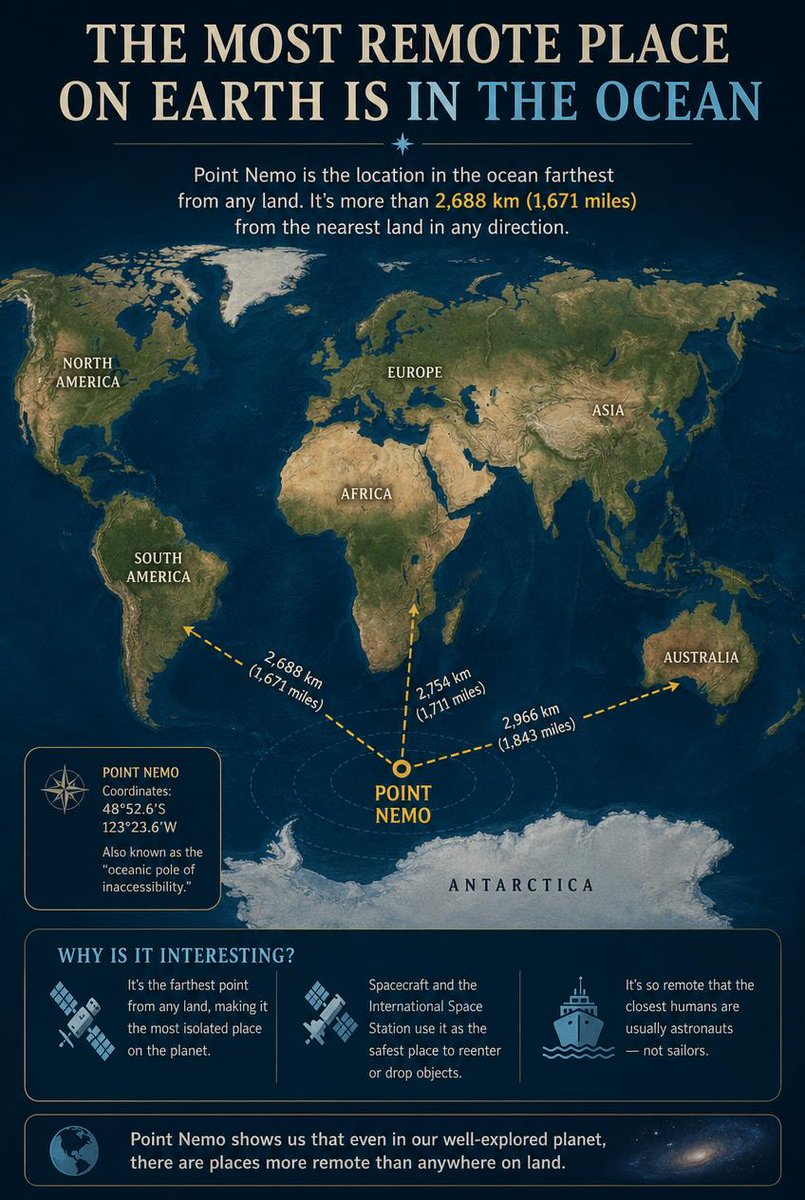
Point Nemo Infographic
An educational infographic detailing Point Nemo, the oceanic pole of inaccessibility, showing its location relative to continents and interesting facts about its remoteness.
이것은 그래픽 및 포스터 에 대한 GPT Image 2 프롬프트 사례입니다. 아래의 복사 가능한 프롬프트를 사용하여 유사한 시각 자료를 생성하고, 재사용하기 전에 Awesome GPT Image 2 Prompts 의 저작자 표시 및 상업적 사용 권한을 검토하십시오.
전체 프롬프트 세트가 필요하신가요? 다음을 사용하세요. 그래픽 및 포스터 더 많은 관련 예시를 보려면 주제 허브를 열거나 다음을 열어보세요. GPT Image 2 프롬프트 카탈로그 전체 예제 색인, 재사용 가능한 구조 및 출처 표기는 다음을 참조하십시오.
Free 1K preview
Generate one preview image instantly, no sign-up required.
2253/4000
프롬프트
복사 준비 프롬프트
Goal: Create an educational infographic explaining {argument name="topic" default="Point Nemo, the most remote place on Earth located in the ocean"}.

Canvas: Vertical portrait layout with a deep navy blue background and a subtle starry night sky texture at the top. The style is clean, modern, and informative, using gold and white text for high contrast.

Layout:
1. **Header:** Large serif title "THE MOST REMOTE PLACE ON EARTH IS IN THE OCEAN" (with "IN THE OCEAN" highlighted in light blue). Below it, a small introductory paragraph defining Point Nemo as the location farthest from land, mentioning the distance of 2,688 km (1,671 miles).
2. **Central Map:** A stylized world map centered on the South Pacific Ocean. Continents are rendered in muted earth tones (greens, browns) against dark blue oceans. Labels include NORTH AMERICA, SOUTH AMERICA, EUROPE, ASIA, AFRICA, AUSTRALIA, and ANTARCTICA.
3. **Data Visualization:** A bright yellow dot marks "POINT NEMO" in the ocean south of Easter Island. Three dashed yellow arrows radiate from this point to the nearest landmasses, labeled with distances: "2,688 km (1,671 miles)" to Antarctica, "2,754 km (1,711 miles)" to South America, and "2,966 km (1,843 miles)" to Australia.
4. **Info Box (Left):** A rectangular box with a compass icon containing the coordinates "48°52.6'S 123°23.6'W" and the nickname "oceanic pole of inaccessibility."
5. **Bottom Section:** A section titled "WHY IS IT INTERESTING?" with three columns featuring icons and text:
   - Icon: Satellite dish. Text: "It's the farthest point from any land, making it the most isolated place on the planet."
   - Icon: Space station/satellite. Text: "Spacecraft and the International Space Station use it as the safest place to reenter or drop objects."
   - Icon: Ship. Text: "It's so remote that the closest humans are usually astronauts — not sailors."
6. **Footer:** A concluding statement next to a globe icon: "Point Nemo shows us that even in our well-explored planet, there are places more remote than anywhere on land."

Visual Style: Professional infographic design. Use clear sans-serif fonts for body text and serif fonts for headings. Ensure the map projection clearly highlights the isolation of the central point.
프롬프트 변수
프롬프트에 있는 편집 가능한 인수 자리 표시자와 해당 기본값입니다.
변하기 쉬운
topic
기본
Point Nemo, the most remote place on Earth located in the ocean
Best for
- - 그래픽 및 포스터 visual exploration
- - Image generation and reference-image edits
- - Reusable briefs that keep source attribution visible
Change these parts
- - Subject, product, character, or scene
- - Aspect ratio, camera, lighting, and background
- - Brand, text, color, and output constraints
Recommended model and settings
- - Model: gpt-image-2
- - Input mode: 텍스트 to 이미지
- - Aspect ratio: source
- - Commercial status: review original source
How to use this prompt
- 1. Copy the prompt and preserve its structure for the first test.
- 2. Replace the subject, context, and publishing channel.
- 3. Change one camera, lighting, or style variable per iteration.
- 4. Inspect the output, source, text, and rights before reuse.
Limitations, source, and reuse cautions
- - Generated output is an editable draft, not factual, legal, or rights evidence.
- - Review the linked source, people, brands, logos, text, and third-party media before commercial use.
Awesome GPT Image 2 Prompts 에서 가져왔습니다. 출처 표기가 필요합니다. 상업적 이용 가능 여부는 allowed 입니다. 유료 사용 전에 원저작권 정보를 확인하세요.
이 범주에 속하는 더 많은 사례
범주, 입력 방식 호환성, 품질 및 위험도에 따라 우선순위가 정해집니다.


재사용 및 출처 참고 사항
사례를 미리 확인한 후 이 안내 메시지를 안전하게 사용하십시오.
- 1.프롬프트를 복사하거나 Dovoo의 생성 버튼을 사용하여 직접 엽니다.
- 2.사용 사례에 맞게 변수, 화면 비율 및 참조 이미지를 조정하십시오.
- 3.출판 또는 유료 사용 전에 저작권, 출처 표기 요건 및 브랜드 또는 초상권 관련 위험을 확인하십시오.