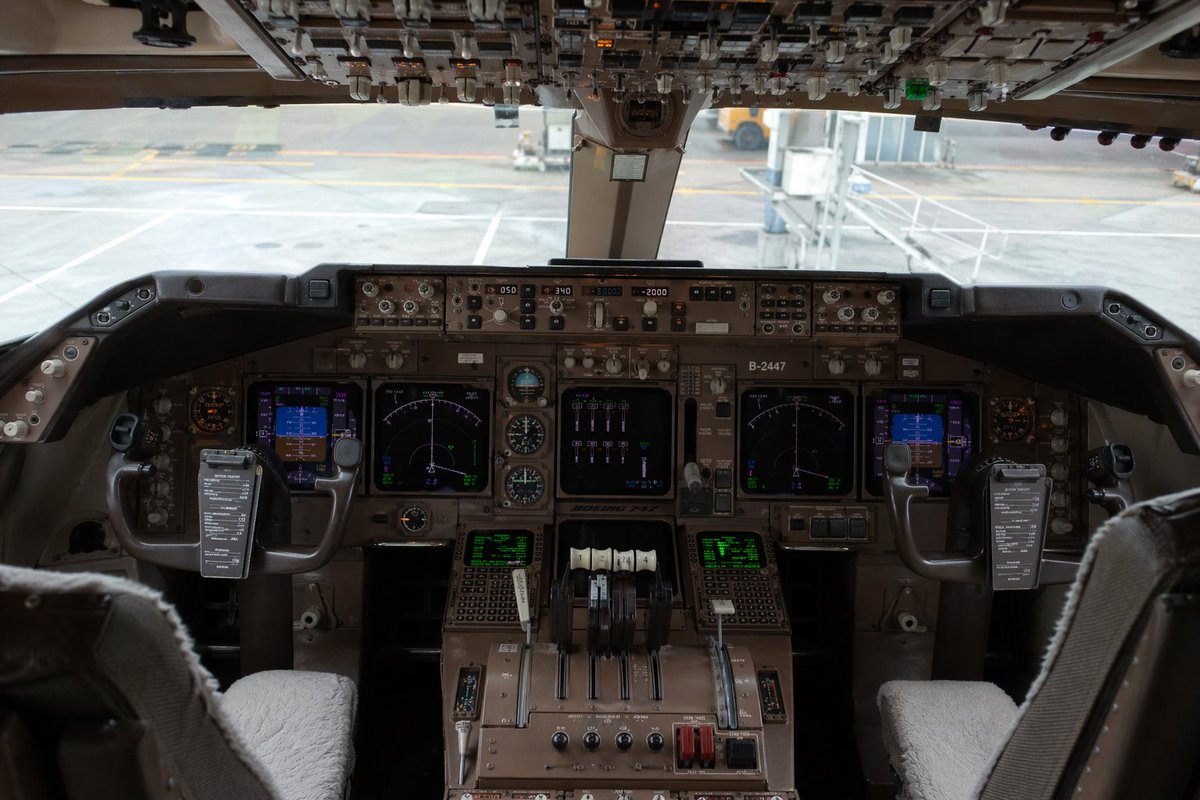
실사처럼 재현된 보잉 747 조종석
이 프롬프트는 항공 시각화, 시뮬레이션 아트 또는 편집 스타일의 항공기 이미지에 적합한 매우 사실적인 정면 여객기 조종석 내부 이미지를 생성합니다.
이것은 인테리어 및 건축 에 대한 GPT Image 2 프롬프트 사례입니다. 아래의 복사 가능한 프롬프트를 사용하여 유사한 시각 자료를 생성하고, 재사용하기 전에 Awesome GPT Image 2 Prompts 의 저작자 표시 및 상업적 사용 권한을 검토하십시오.
전체 프롬프트 세트가 필요하신가요? 다음을 사용하세요. 인테리어 및 건축 더 많은 관련 예시를 보려면 주제 허브를 열거나 다음을 열어보세요. GPT Image 2 프롬프트 카탈로그 전체 예제 색인, 재사용 가능한 구조 및 출처 표기는 다음을 참조하십시오.
Free 1K preview
Generate one preview image instantly, no sign-up required.
1934/4000
프롬프트
복사 준비 프롬프트
Ultra-realistic interior photograph of a {argument name="aircraft model" default="Boeing 747"} cockpit viewed from slightly behind and between the two pilot seats, centered and perfectly symmetrical, showing the full main instrument panel, center pedestal, dual control yokes, and the overhead switch panel across the top edge of the frame. The cockpit is unoccupied, with 2 pilot seats visible in the foreground, each with light gray or off-white sheepskin seat covers, and 2 control yokes each holding a dark rectangular checklist or electronic note board clipped to the center. The main panel is densely packed with authentic-looking avionics, analog dials, autopilot controls, radio panels, and 6 illuminated display screens total: 2 large central navigation displays, 2 smaller blue-toned flight displays near the left and right sides, and 2 green text/data screens on the lower center pedestal. Include 4 throttle levers in the center, plus additional flap and systems levers, rotary knobs, guarded switches, and weathered brown-gray metal surfaces typical of a widebody airliner cockpit. The overhead panel should be crowded with rows of switches, toggles, and indicator lights, partially shadowed but sharply detailed. Through the front cockpit windows, show an airport gate scene in soft focus with pale concrete tarmac, painted ground markings, and a passenger jet bridge connected or positioned near the aircraft. Lighting is natural daylight from outside, subdued inside the cockpit, with realistic shadows, mild reflections on glass screens, and documentary-style photographic color grading. Emphasize extreme detail, realism, authentic aviation engineering complexity, and a near indistinguishable-from-real photo quality. Shot with a full-frame camera, eye-level perspective, wide lens around 24–28mm, deep focus across the instrument panel, high dynamic range, no people, no dramatic stylization, no illustration look.프롬프트 변수
프롬프트에 있는 편집 가능한 인수 자리 표시자와 해당 기본값입니다.
변하기 쉬운
aircraft model
기본
Boeing 747
Best for
- - 인테리어 및 건축 visual exploration
- - Image generation and reference-image edits
- - Reusable briefs that keep source attribution visible
Change these parts
- - Subject, product, character, or scene
- - Aspect ratio, camera, lighting, and background
- - Brand, text, color, and output constraints
Recommended model and settings
- - Model: gpt-image-2
- - Input mode: 텍스트 to 이미지
- - Aspect ratio: source
- - Commercial status: review original source
How to use this prompt
- 1. Copy the prompt and preserve its structure for the first test.
- 2. Replace the subject, context, and publishing channel.
- 3. Change one camera, lighting, or style variable per iteration.
- 4. Inspect the output, source, text, and rights before reuse.
Limitations, source, and reuse cautions
- - Generated output is an editable draft, not factual, legal, or rights evidence.
- - Review the linked source, people, brands, logos, text, and third-party media before commercial use.
Awesome GPT Image 2 Prompts 에서 가져왔습니다. 출처 표기가 필요합니다. 상업적 이용 가능 여부는 allowed 입니다. 유료 사용 전에 원저작권 정보를 확인하세요.
이 범주에 속하는 더 많은 사례
범주, 입력 방식 호환성, 품질 및 위험도에 따라 우선순위가 정해집니다.






재사용 및 출처 참고 사항
사례를 미리 확인한 후 이 안내 메시지를 안전하게 사용하십시오.
- 1.프롬프트를 복사하거나 Dovoo의 생성 버튼을 사용하여 직접 엽니다.
- 2.사용 사례에 맞게 변수, 화면 비율 및 참조 이미지를 조정하십시오.
- 3.출판 또는 유료 사용 전에 저작권, 출처 표기 요건 및 브랜드 또는 초상권 관련 위험을 확인하십시오.