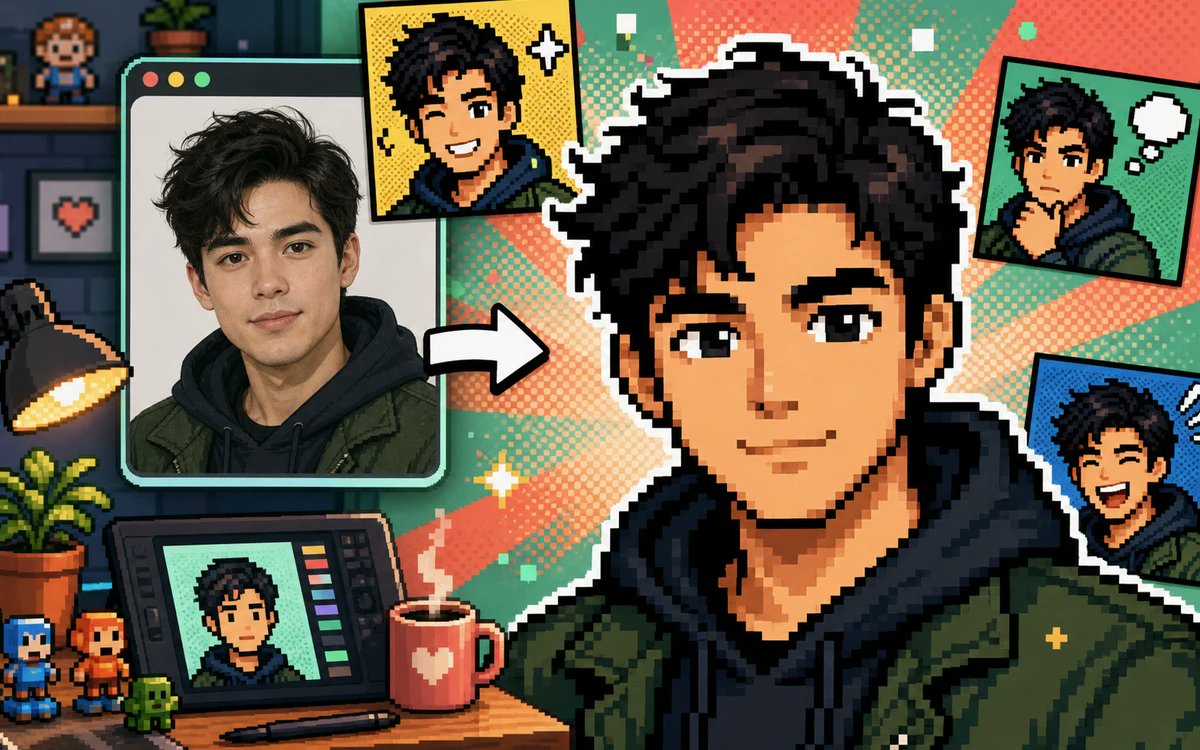
사진을 픽셀 아바타 콜라주로 만들기
사진을 아바타로 변환하는 도구를 위해 초상화가 여러 만화 스타일의 픽셀 아바타로 변환된 모습을 보여주는 다채로운 16비트 크리에이터 스튜디오 배너입니다.
이것은 제품 및 상업 에 대한 GPT Image 2 프롬프트 사례입니다. 아래의 복사 가능한 프롬프트를 사용하여 유사한 시각 자료를 생성하고, 재사용하기 전에 Awesome GPT Image 2 Prompts 의 저작자 표시 및 상업적 사용 권한을 검토하십시오.
전체 프롬프트 세트가 필요하신가요? 다음을 사용하세요. 제품 및 상업 더 많은 관련 예시를 보려면 주제 허브를 열거나 다음을 열어보세요. GPT Image 2 프롬프트 카탈로그 전체 예제 색인, 재사용 가능한 구조 및 출처 표기는 다음을 참조하십시오.
Free 1K preview
Generate one preview image instantly, no sign-up required.
Free text preview doesn’t preserve reference-image consistency.
2494/4000
프롬프트
복사 준비 프롬프트
Create a vibrant pixel-art promotional collage showing a real portrait being transformed into a gaming-style pixel avatar. Canvas: wide 16:9 landscape banner, approximately 1200×675. Visual style: crisp retro 16-bit pixel art mixed with one realistic photo panel, thick black outlines, white sticker borders, halftone comic dots, teal and coral radial burst background, playful creator-studio atmosphere. Main subject: a large central pixel-art bust of {argument name="character name" default="a young man"} with {argument name="hair color" default="messy black hair"}, wearing a dark navy hoodie under an olive green jacket, facing forward; Show every face clearly with natural, detailed facial features, not a detailed identity. Left side: one large rounded-corner computer/photo window with three small circular window buttons at the top left, containing a realistic portrait of the same person in the same hoodie and jacket, with a thick mint-green frame. Between the photo window and the central avatar, place one bold white arrow pointing right to show transformation. Count the visible generated avatar outputs exactly: 5 total — 1 large central pixel avatar, 1 yellow comic-style square portrait near the top center-left with sparkle icons, 1 green comic-style square portrait at the top right with a white thought bubble, 1 blue comic-style square portrait at the right middle with expressive motion marks, and 1 small portrait displayed on a drawing tablet at the bottom left. Desk and studio details: include exactly 10 notable props — 1 black desk lamp glowing warm yellow on the far left, 1 potted leafy plant on the desk, 1 drawing tablet with colored tool bars, 1 stylus lying in front of it, 1 red mug with a white heart and steam, 2 small pixel figurines at the bottom left, 1 tiny green pixel creature, 1 wall shelf with a small pixel character figure, and 1 framed pixel heart picture on the wall. Background: dark cozy room on the far left with shelves and brick wall, transitioning into bright comic halftone rays behind the central avatar. Palette: saturated teal, mint, coral, yellow, navy, olive green, and black. Composition: dynamic, busy but readable, with the central avatar dominating the right half and the source photo dominating the left. Constraints: no readable text or logos, no watermark, no extra panels beyond the five counted avatar outputs, maintain a cheerful before-and-after transformation theme suitable for a free photo-to-pixel-avatar generator ad.프롬프트 변수
프롬프트에 있는 편집 가능한 인수 자리 표시자와 해당 기본값입니다.
변하기 쉬운
character name
기본
a young man
변하기 쉬운
hair color
기본
messy black hair
Best for
- - 제품 및 상업 visual exploration
- - Image generation and reference-image edits
- - Reusable briefs that keep source attribution visible
Change these parts
- - Subject, product, character, or scene
- - Aspect ratio, camera, lighting, and background
- - Brand, text, color, and output constraints
Recommended model and settings
- - Model: gpt-image-2
- - Input mode: 이미지 to 이미지
- - Aspect ratio: source
- - Commercial status: review original source
How to use this prompt
- 1. Copy the prompt and preserve its structure for the first test.
- 2. Replace the subject, context, and publishing channel.
- 3. Change one camera, lighting, or style variable per iteration.
- 4. Inspect the output, source, text, and rights before reuse.
Limitations, source, and reuse cautions
- - Generated output is an editable draft, not factual, legal, or rights evidence.
- - Review the linked source, people, brands, logos, text, and third-party media before commercial use.
Awesome GPT Image 2 Prompts 에서 가져왔습니다. 출처 표기가 필요합니다. 상업적 이용 가능 여부는 allowed 입니다. 유료 사용 전에 원저작권 정보를 확인하세요.
이 범주에 속하는 더 많은 사례
범주, 입력 방식 호환성, 품질 및 위험도에 따라 우선순위가 정해집니다.






재사용 및 출처 참고 사항
사례를 미리 확인한 후 이 안내 메시지를 안전하게 사용하십시오.
- 1.프롬프트를 복사하거나 Dovoo의 생성 버튼을 사용하여 직접 엽니다.
- 2.사용 사례에 맞게 변수, 화면 비율 및 참조 이미지를 조정하십시오.
- 3.출판 또는 유료 사용 전에 저작권, 출처 표기 요건 및 브랜드 또는 초상권 관련 위험을 확인하십시오.