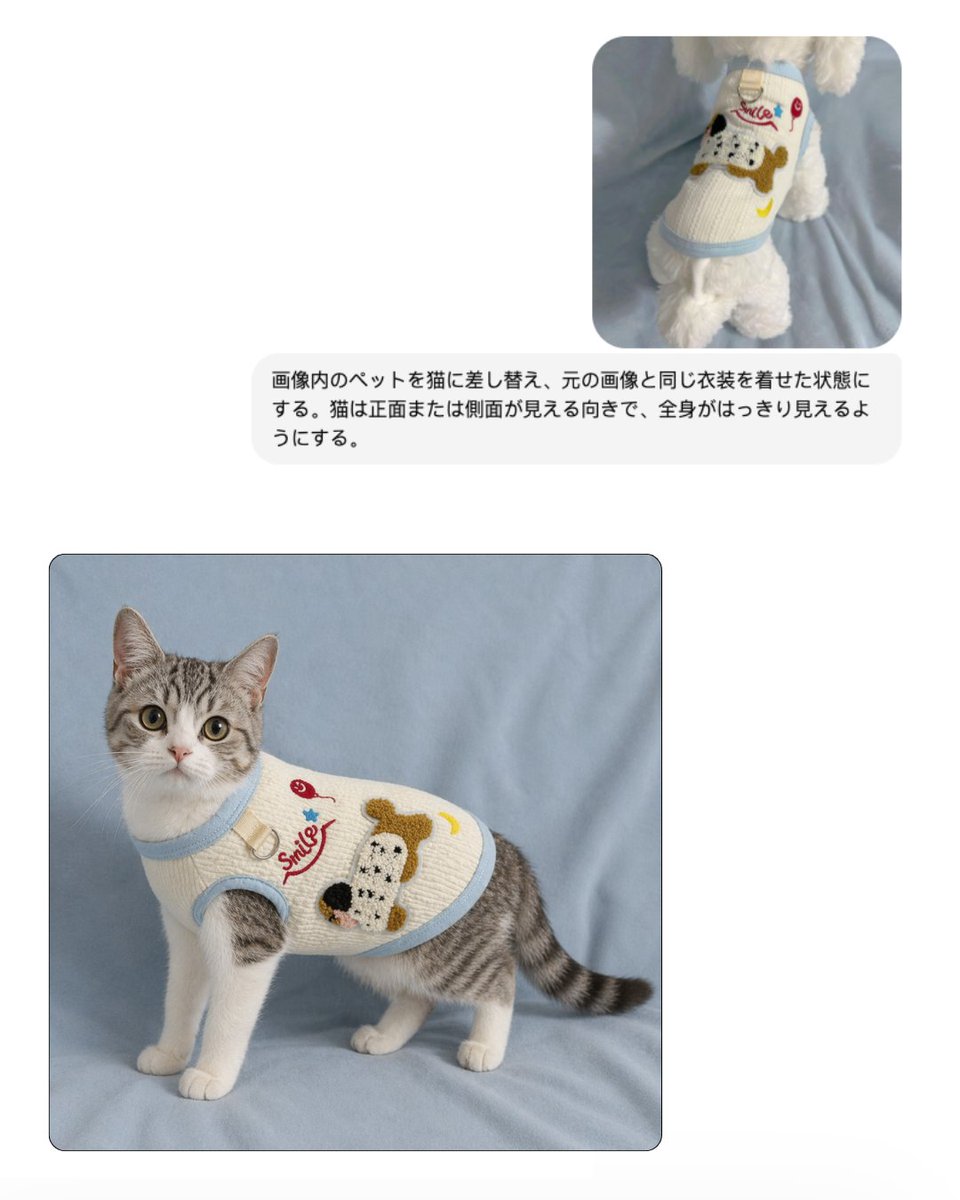
반려동물 의류 교체용 모형
이 기능을 사용하면 강아지 스웨터 참고 이미지와 동일한 옷을 입은 고양이의 최종 제품 사진을 보여주는 깔끔한 EC 스타일 비교 목업을 생성할 수 있으며, 반려동물 의류 상품 등록 및 홍보 이미지에 유용합니다.
이것은 제품 및 상업 에 대한 GPT Image 2 프롬프트 사례입니다. 아래의 복사 가능한 프롬프트를 사용하여 유사한 시각 자료를 생성하고, 재사용하기 전에 Awesome GPT Image 2 Prompts 의 저작자 표시 및 상업적 사용 권한을 검토하십시오.
전체 프롬프트 세트가 필요하신가요? 다음을 사용하세요. 제품 및 상업 더 많은 관련 예시를 보려면 주제 허브를 열거나 다음을 열어보세요. GPT Image 2 프롬프트 카탈로그 전체 예제 색인, 재사용 가능한 구조 및 출처 표기는 다음을 참조하십시오.
Free 1K preview
Generate one preview image instantly, no sign-up required.
Free text preview doesn’t preserve reference-image consistency.
849/4000
프롬프트
복사 준비 프롬프트
매우 밝은 회색 배경에 간단한 두 이미지 비교 레이아웃으로 깔끔한 전자상거래 목업을 만듭니다. 오른쪽 상단에 부드러운 연한 파란색 천 위에 서 있고 크림색 니트 반려동물 스웨터를 입은 흰색 솜털 강아지의 뒷모습을 보여주는 작고 둥근 모서리 참조 사진 1장을 배치합니다. 스웨터에는 갈색, 검은색, 흰색의 큰 만화 강아지 얼굴 패치, 빨간색 흘림체 단어 "Smile", 작은 빨간색 체리, 파란색 별, 노란색 초승달이 특징입니다. 해당 작은 참조 이미지 아래에 검은색 산세리프 글꼴의 일본어 지침 텍스트가 포함된 둥근 연한 회색 말풍선 1개를 배치합니다: 「画像内のペットを猫に差し替え、元の画像と同じ衣装を着せた状態にする。猫は正面または側面が見える向きで、全身がはっきり見えるようにする。」 왼쪽 하단에 미묘한 어두운 테두리가 있는 더 큰 둥근 모서리 최종 이미지를 1개 배치하여 동일한 부드러운 연한 파란색 천 배경에 서 있는 회색 줄무늬와 흰색 고양이의 전신을 보여줍니다. 고양이는 약간 왼쪽을 향하고 있지만 똑바로 카메라를 응시하고 있으며, 쫑긋한 귀, 크고 둥근 눈, 흰색 가슴과 다리, 회색 줄무늬 등과 꼬리, 차분하고 경계심 있는 표정을 하고 있습니다. 고양이는 목, 암홀, 밑단 주위에 연한 파란색 골지 트림이 있는 동일한 크림색 니트 반려동물 스웨터를 입고 몸통에 깔끔하게 맞습니다. 스웨터 아트는 참조와 일치합니다: 빨간색 흘림체 "Smile" 텍스트, 빨간색 체리 모티프, 파란색 별, 노란색 초승달, 측면에 큰 질감의 만화 강아지 얼굴 패치. 조명은 온라인 상점의 스튜디오 제품 사진과 같은 부드럽고 확산된 조명이며, 사실적인 천 질감, 최소한의 그림자, 세련된 반려동물 의류 카탈로그 미학을 가지고 있습니다.
Best for
- - 제품 및 상업 visual exploration
- - Image generation and reference-image edits
- - Reusable briefs that keep source attribution visible
Change these parts
- - Subject, product, character, or scene
- - Aspect ratio, camera, lighting, and background
- - Brand, text, color, and output constraints
Recommended model and settings
- - Model: gpt-image-2
- - Input mode: 이미지 to 이미지
- - Aspect ratio: source
- - Commercial status: review original source
How to use this prompt
- 1. Copy the prompt and preserve its structure for the first test.
- 2. Replace the subject, context, and publishing channel.
- 3. Change one camera, lighting, or style variable per iteration.
- 4. Inspect the output, source, text, and rights before reuse.
Limitations, source, and reuse cautions
- - Generated output is an editable draft, not factual, legal, or rights evidence.
- - Review the linked source, people, brands, logos, text, and third-party media before commercial use.
Awesome GPT Image 2 Prompts 에서 가져왔습니다. 출처 표기가 필요합니다. 상업적 이용 가능 여부는 allowed 입니다. 유료 사용 전에 원저작권 정보를 확인하세요.
이 범주에 속하는 더 많은 사례
범주, 입력 방식 호환성, 품질 및 위험도에 따라 우선순위가 정해집니다.
재사용 및 출처 참고 사항
사례를 미리 확인한 후 이 안내 메시지를 안전하게 사용하십시오.
- 1.프롬프트를 복사하거나 Dovoo의 생성 버튼을 사용하여 직접 엽니다.
- 2.사용 사례에 맞게 변수, 화면 비율 및 참조 이미지를 조정하십시오.
- 3.출판 또는 유료 사용 전에 저작권, 출처 표기 요건 및 브랜드 또는 초상권 관련 위험을 확인하십시오.