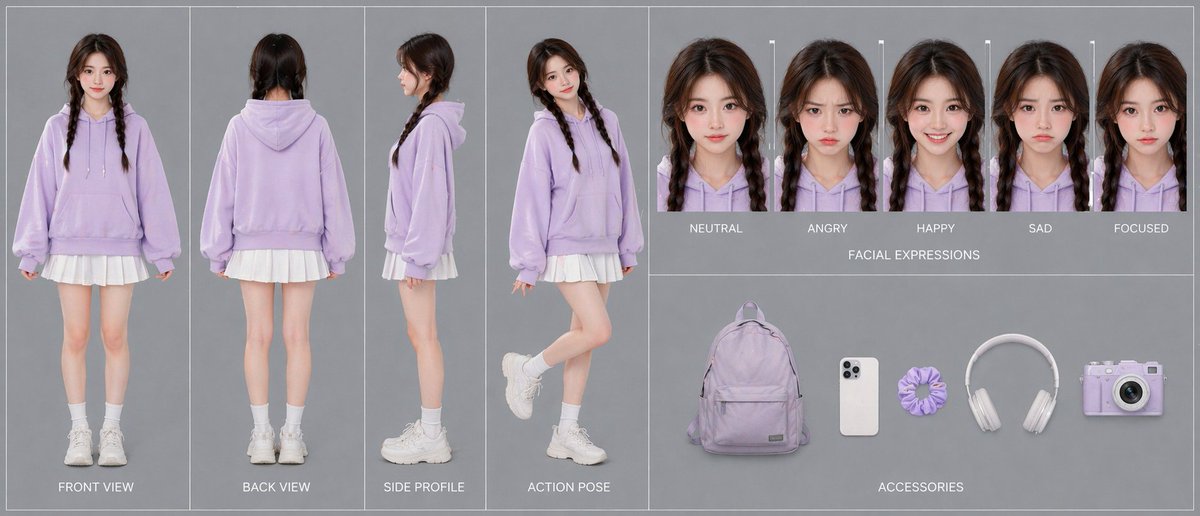
파스텔 톤의 십대 캐릭터 디자인 시트
이 프롬프트는 캐릭터 디자인 및 비디오 사전 제작을 위해 회전면, 표정, 액세서리 등을 포함한 사실적인 다중 패널 캐릭터 일관성 시트를 생성합니다.
이것은 인물과 캐릭터 에 대한 GPT Image 2 프롬프트 사례입니다. 아래의 복사 가능한 프롬프트를 사용하여 유사한 시각 자료를 생성하고, 재사용하기 전에 Awesome GPT Image 2 Prompts 의 저작자 표시 및 상업적 사용 권한을 검토하십시오.
전체 프롬프트 세트가 필요하신가요? 다음을 사용하세요. 인물과 캐릭터 더 많은 관련 예시를 보려면 주제 허브를 열거나 다음을 열어보세요. GPT Image 2 프롬프트 카탈로그 전체 예제 색인, 재사용 가능한 구조 및 출처 표기는 다음을 참조하십시오.
Free 1K preview
Generate one preview image instantly, no sign-up required.
3690/4000
프롬프트
복사 준비 프롬프트
{
  "color_palette": {
    "colors": [
      "pastel lavender",
      "white",
      "soft gray",
      "dark brown"
    ],
    "count": 4
  },
  "layout": {
    "centerpiece": "the 4-view full-body outfit turnaround dominates the composition",
    "sections": [
      {
        "count": 4,
        "details": "full-body character shown in four separate vertical panels; front standing straight with arms relaxed, back standing straight, side profile standing neutrally, and playful action pose with one leg bent backward and body turned slightly toward camera",
        "labels": [
          "FRONT VIEW",
          "BACK VIEW",
          "SIDE PROFILE",
          "ACTION POSE"
        ],
        "position": "left half",
        "title": "turnaround views"
      },
      {
        "count": 5,
        "details": "five tightly cropped head-and-shoulders portraits in a horizontal row, each with the same hairstyle and hoodie, subtle expression changes, face area softly blurred",
        "labels": [
          "NEUTRAL",
          "ANGRY",
          "HAPPY",
          "SAD",
          "FOCUSED"
        ],
        "position": "top right",
        "title": "FACIAL EXPRESSIONS"
      },
      {
        "count": 5,
        "details": "accessories evenly spaced on gray background like product cutouts",
        "labels": [
          "lavender backpack",
          "white smartphone",
          "lavender scrunchie",
          "white over-ear headphones",
          "lavender compact camera"
        ],
        "position": "bottom right",
        "title": "ACCESSORIES"
      }
    ]
  },
  "prompt": "Create a single-canvas advanced character card for {argument name=\"character name\" default=\"a teen girl\"} in a photorealistic studio fashion-sheet style. Show a consistent young girl with {argument name=\"hair color\" default=\"dark brown\"} hair in two braids, wearing an oversized {argument name=\"hoodie color\" default=\"pastel lavender\"} hoodie, a short white pleated skirt, white crew socks, and chunky white sneakers. Use a clean gray background with thin white dividers and neatly organized panels. On the left half, include 4 full-body turnaround panels labeled FRONT VIEW, BACK VIEW, SIDE PROFILE, and ACTION POSE. On the top right, include 5 headshot expression panels labeled NEUTRAL, ANGRY, HAPPY, SAD, and FOCUSED. On the bottom right, include 5 accessory items arranged horizontally: a lavender backpack, a white smartphone, a lavender scrunchie, white over-ear headphones, and a lavender compact camera. Keep lighting soft and even, composition symmetrical and professional, emphasizing 100% character consistency across all views. Preserve the minimal pastel aesthetic and use {argument name=\"background color\" default=\"soft gray\"} as the backdrop.",
  "style": "clean fashion character design sheet, photorealistic studio catalog aesthetic, soft even lighting, minimal shadows, muted gray background, thin white panel dividers, polished single-canvas layout",
  "subject": {
    "age_appearance": "young teenager",
    "gender_presentation": "teen girl",
    "hair": {
      "color": "dark brown",
      "style": "center-parted long hair in two braids"
    },
    "identity": "Show every face clearly with natural, detailed facial features",
    "outfit": {
      "count": 5,
      "pieces": [
        "oversized pastel lavender hoodie with drawstrings and kangaroo pocket",
        "short white pleated skirt visible below hoodie hem",
        "white crew socks",
        "chunky white sneakers",
        "no visible jewelry"
      ]
    },
    "overall_look": "cute casual pastel streetwear, soft youthful styling"
  },
  "type": "advanced character card"
}
프롬프트 변수
프롬프트에 있는 편집 가능한 인수 자리 표시자와 해당 기본값입니다.
변하기 쉬운
character name
기본
a teen girl
변하기 쉬운
hair color
기본
dark brown
변하기 쉬운
hoodie color
기본
pastel lavender
변하기 쉬운
background color
기본
soft gray
Best for
- - 인물과 캐릭터 visual exploration
- - Image generation and reference-image edits
- - Reusable briefs that keep source attribution visible
Change these parts
- - Subject, product, character, or scene
- - Aspect ratio, camera, lighting, and background
- - Brand, text, color, and output constraints
Recommended model and settings
- - Model: gpt-image-2
- - Input mode: 텍스트 to 이미지
- - Aspect ratio: source
- - Commercial status: review original source
How to use this prompt
- 1. Copy the prompt and preserve its structure for the first test.
- 2. Replace the subject, context, and publishing channel.
- 3. Change one camera, lighting, or style variable per iteration.
- 4. Inspect the output, source, text, and rights before reuse.
Limitations, source, and reuse cautions
- - Generated output is an editable draft, not factual, legal, or rights evidence.
- - Review the linked source, people, brands, logos, text, and third-party media before commercial use.
Awesome GPT Image 2 Prompts 에서 가져왔습니다. 출처 표기가 필요합니다. 상업적 이용 가능 여부는 allowed 입니다. 유료 사용 전에 원저작권 정보를 확인하세요.
이 범주에 속하는 더 많은 사례
범주, 입력 방식 호환성, 품질 및 위험도에 따라 우선순위가 정해집니다.






재사용 및 출처 참고 사항
사례를 미리 확인한 후 이 안내 메시지를 안전하게 사용하십시오.
- 1.프롬프트를 복사하거나 Dovoo의 생성 버튼을 사용하여 직접 엽니다.
- 2.사용 사례에 맞게 변수, 화면 비율 및 참조 이미지를 조정하십시오.
- 3.출판 또는 유료 사용 전에 저작권, 출처 표기 요건 및 브랜드 또는 초상권 관련 위험을 확인하십시오.