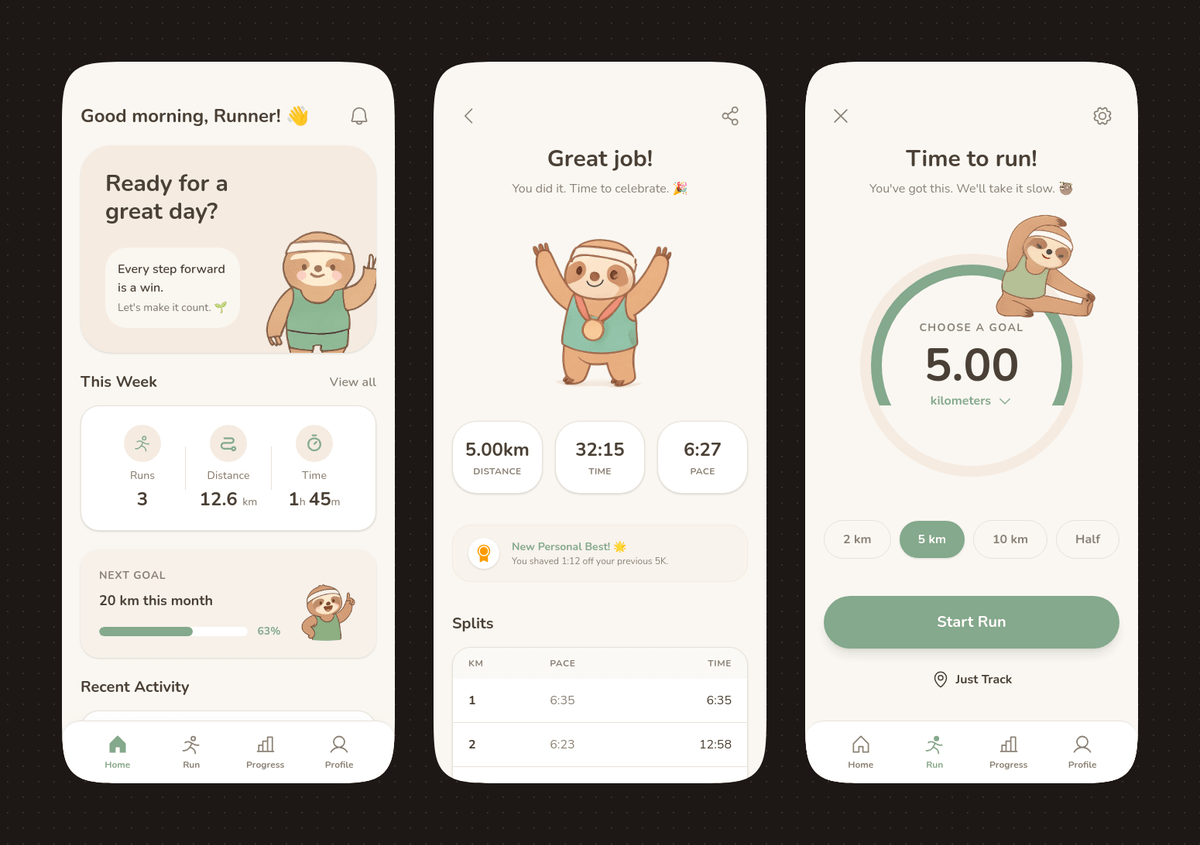
나무늘보 마스코트가 있는 파스텔톤 러닝 앱 UI
이 프롬프트는 부드러운 파스텔 색상과 귀여운 나무늘보 마스코트가 돋보이는 세련된 3개 화면 모바일 러닝 앱 콘셉트를 생성하며, 앱 디자인 쇼케이스 및 편집 가능한 UI 목업에 이상적입니다.
이것은 그래픽 및 포스터 에 대한 GPT Image 2 프롬프트 사례입니다. 아래의 복사 가능한 프롬프트를 사용하여 유사한 시각 자료를 생성하고, 재사용하기 전에 Awesome GPT Image 2 Prompts 의 저작자 표시 및 상업적 사용 권한을 검토하십시오.
전체 프롬프트 세트가 필요하신가요? 다음을 사용하세요. 그래픽 및 포스터 더 많은 관련 예시를 보려면 주제 허브를 열거나 다음을 열어보세요. GPT Image 2 프롬프트 카탈로그 전체 예제 색인, 재사용 가능한 구조 및 출처 표기는 다음을 참조하십시오.
Free 1K preview
Generate one preview image instantly, no sign-up required.
4000/4000
프롬프트
복사 준비 프롬프트
{
  "type": "mobile fitness app UI mockup",
  "style": "clean modern pastel app design, soft beige and warm white surfaces, muted sage green accents, rounded cards and buttons, subtle shadows, thin minimalist line icons, friendly playful branding with a sloth mascot, dribbble-style presentation on a dark brown dotted background",
  "theme": "running tracker app",
  "layout": {
    "device_count": 3,
    "arrangement": "three tall smartphone screens side by side, evenly spaced, front view",
    "background": "very dark brown with a faint evenly spaced dot grid",
    "screens": [
      {
        "position": "left",
        "screen_type": "home dashboard",
        "header": {
          "greeting": "Good morning, Runner! 👋",
          "left_icon": "none",
          "right_icon": "notification bell"
        },
        "hero_card": {
          "headline": "Ready for a great day?",
          "subcard_text_line_1": "Every step forward is a win.",
          "subcard_text_line_2": "Let's make it count. 🌱",
          "illustration": "cute sloth wearing a cream headband and mint-green workout outfit, standing and waving inside the card on the right"
        },
        "sections": [
          {
            "title": "This Week",
            "position": "upper middle",
            "count": 3,
            "labels": [
              "Runs",
              "Distance",
              "Time"
            ],
            "values": [
              "3",
              "12.6 km",
              "1h 45m"
            ],
            "presentation": "single rounded stats card with three equal columns and pale green circular icons"
          },
          {
            "title": "NEXT GOAL",
            "position": "middle lower",
            "count": 1,
            "labels": [
              "20 km this month"
            ],
            "values": [
              "63%"
            ],
            "presentation": "rounded progress card with green progress bar and small waving sloth illustration on the right"
          },
          {
            "title": "Recent Activity",
            "position": "lower",
            "count": 1,
            "labels": [
              "Recent Activity"
            ],
            "presentation": "top edge of another rounded card visible, cropped by the bottom navigation"
          }
        ],
        "bottom_nav": {
          "count": 4,
          "labels": [
            "Home",
            "Run",
            "Progress",
            "Profile"
          ],
          "active": "Home"
        }
      },
      {
        "position": "center",
        "screen_type": "run summary",
        "header": {
          "left_icon": "back chevron",
          "center_text": "Great job!",
          "subtext": "You did it. Time to celebrate. 🎉",
          "right_icon": "share"
        },
        "hero_illustration": "cute sloth wearing a headband, mint athletic outfit, and a gold medal, both arms raised in celebration",
        "stats_row": {
          "count": 3,
          "labels": [
            "Distance",
            "Time",
            "PACE"
          ],
          "values": [
            "5.00km",
            "32:15",
            "6:27"
          ],
          "presentation": "three rounded statistic pills"
        },
        "achievement_card": {
          "count": 1,
          "title": "New Personal Best! 🌟",
          "subtitle": "You shaved 1:12 off your previous 5K.",
          "icon": "small gold medal badge"
        },
        "table_section": {
          "title": "Splits",
          "count": 2,
          "columns": [
            "KM",
            "PACE",
            "Time"
          ],
          "rows": [
            [
              "1",
              "6:35",
              "6:35"
            ],
            [
              "2",
              "6:23",
              "12:58"
            ]
          ],
          "presentation": "rounded white table card with light dividers"
        }
      },
      {
        "position": "right",
        "screen_type": "run goal setup",
        "header": {
          "left_icon": "close x",
          "center_text": "Time to run!",
          "subtext": "You've got this. We'll take it slow. 🦥",
          "right_icon": "settings gear"
        },
        "goal_visual": {
          "type": "circular progress selector",
          "top_label": "CHOOSE A GOAL",
          "main_value": "5.00",
          "unit": "KM",
          "ring": "thick partial sage-green arc on a pale beige circle",
          "illustration": "small sloth stretching on the upper-right edge of the circle"
        },
        "goal_options": {
          "count": 4,
          "labels": [
            "2 km",
            "5 km",
            "10 km",
            "Half"
          ],
          "active": "5 km"
        },
        "primary_cta": {
          "label": "Start Run",
          "style": "large rounded sage-green button"
        },
        "secondary_action": {
          "label": "Just Track",
          "icon": "location pin"
        },
        "bottom_nav": {
          "count": 4,
          "labels": [
            "Home",
            "Run",
            "Progress",
            "Profile"
          ],
          "active": "Run"
        }
      }
    ]
  }
}
Best for
- - 그래픽 및 포스터 visual exploration
- - Image generation and reference-image edits
- - Reusable briefs that keep source attribution visible
Change these parts
- - Subject, product, character, or scene
- - Aspect ratio, camera, lighting, and background
- - Brand, text, color, and output constraints
Recommended model and settings
- - Model: gpt-image-2
- - Input mode: 텍스트 to 이미지
- - Aspect ratio: source
- - Commercial status: review original source
How to use this prompt
- 1. Copy the prompt and preserve its structure for the first test.
- 2. Replace the subject, context, and publishing channel.
- 3. Change one camera, lighting, or style variable per iteration.
- 4. Inspect the output, source, text, and rights before reuse.
Limitations, source, and reuse cautions
- - Generated output is an editable draft, not factual, legal, or rights evidence.
- - Review the linked source, people, brands, logos, text, and third-party media before commercial use.
Awesome GPT Image 2 Prompts 에서 가져왔습니다. 출처 표기가 필요합니다. 상업적 이용 가능 여부는 allowed 입니다. 유료 사용 전에 원저작권 정보를 확인하세요.
이 범주에 속하는 더 많은 사례
범주, 입력 방식 호환성, 품질 및 위험도에 따라 우선순위가 정해집니다.






재사용 및 출처 참고 사항
사례를 미리 확인한 후 이 안내 메시지를 안전하게 사용하십시오.
- 1.프롬프트를 복사하거나 Dovoo의 생성 버튼을 사용하여 직접 엽니다.
- 2.사용 사례에 맞게 변수, 화면 비율 및 참조 이미지를 조정하십시오.
- 3.출판 또는 유료 사용 전에 저작권, 출처 표기 요건 및 브랜드 또는 초상권 관련 위험을 확인하십시오.