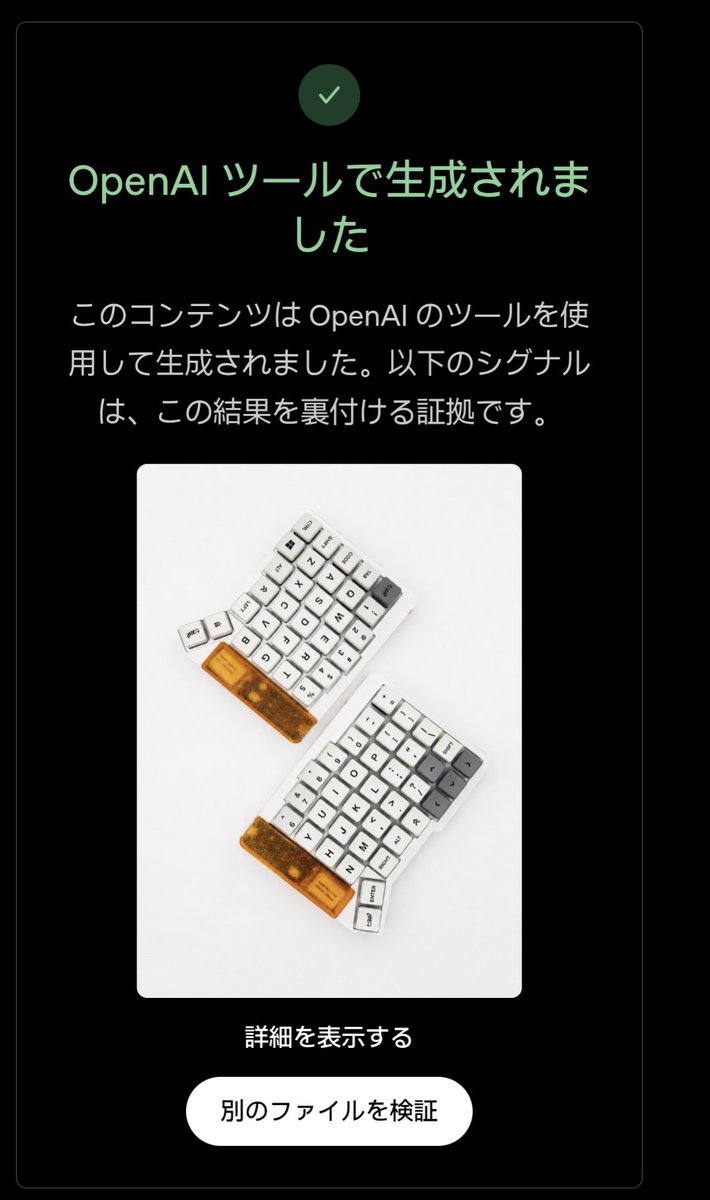
Positive OpenAI Provenance Screen
Transforms a negative OpenAI signal-check screenshot into a positive detected-result UI while preserving the original layout and embedded image.
이것은 다른 영감 에 대한 GPT Image 2 프롬프트 사례입니다. 아래의 복사 가능한 프롬프트를 사용하여 유사한 시각 자료를 생성하고, 재사용하기 전에 Awesome GPT Image 2 Prompts 의 저작자 표시 및 상업적 사용 권한을 검토하십시오.
전체 프롬프트 세트가 필요하신가요? 다음을 사용하세요. 다른 영감 더 많은 관련 예시를 보려면 주제 허브를 열거나 다음을 열어보세요. GPT Image 2 프롬프트 카탈로그 전체 예제 색인, 재사용 가능한 구조 및 출처 표기는 다음을 참조하십시오.
Free 1K preview
Generate one preview image instantly, no sign-up required.
Free text preview doesn’t preserve reference-image consistency.
874/4000
프롬프트
복사 준비 프롬프트
Using the provided reference image, edit the verification-result screen so it shows a positive OpenAI provenance detection result instead of a negative one. Keep the same dark rounded card layout, the embedded keyboard photo, the centered composition, the bottom link, and the white rounded button unchanged.

Change exactly 3 verification-status elements: 1) replace the pink circular X icon with a green circular checkmark icon, 2) change the headline to green and set it to 「OpenAI ツールで生成されました」, and 3) replace the explanatory body text with 「このコンテンツは OpenAI のツールを使用して生成されました。以下のシグナルは、この結果を裏付ける証拠です。」

Preserve exactly 2 lower text elements as in the reference: the link 「詳細を表示する」 and the button label 「別のファイルを検証」. Use a clean Japanese UI style, high contrast on black, rounded corners, and make the edit look like an authentic screenshot rather than a redesigned poster.
Best for
- - 다른 영감 visual exploration
- - Image generation and reference-image edits
- - Reusable briefs that keep source attribution visible
Change these parts
- - Subject, product, character, or scene
- - Aspect ratio, camera, lighting, and background
- - Brand, text, color, and output constraints
Recommended model and settings
- - Model: gpt-image-2
- - Input mode: 이미지 to 이미지
- - Aspect ratio: source
- - Commercial status: review original source
How to use this prompt
- 1. Copy the prompt and preserve its structure for the first test.
- 2. Replace the subject, context, and publishing channel.
- 3. Change one camera, lighting, or style variable per iteration.
- 4. Inspect the output, source, text, and rights before reuse.
Limitations, source, and reuse cautions
- - Generated output is an editable draft, not factual, legal, or rights evidence.
- - Review the linked source, people, brands, logos, text, and third-party media before commercial use.
Awesome GPT Image 2 Prompts 에서 가져왔습니다. 출처 표기가 필요합니다. 상업적 이용 가능 여부는 allowed 입니다. 유료 사용 전에 원저작권 정보를 확인하세요.
이 범주에 속하는 더 많은 사례
범주, 입력 방식 호환성, 품질 및 위험도에 따라 우선순위가 정해집니다.
재사용 및 출처 참고 사항
사례를 미리 확인한 후 이 안내 메시지를 안전하게 사용하십시오.
- 1.프롬프트를 복사하거나 Dovoo의 생성 버튼을 사용하여 직접 엽니다.
- 2.사용 사례에 맞게 변수, 화면 비율 및 참조 이미지를 조정하십시오.
- 3.출판 또는 유료 사용 전에 저작권, 출처 표기 요건 및 브랜드 또는 초상권 관련 위험을 확인하십시오.