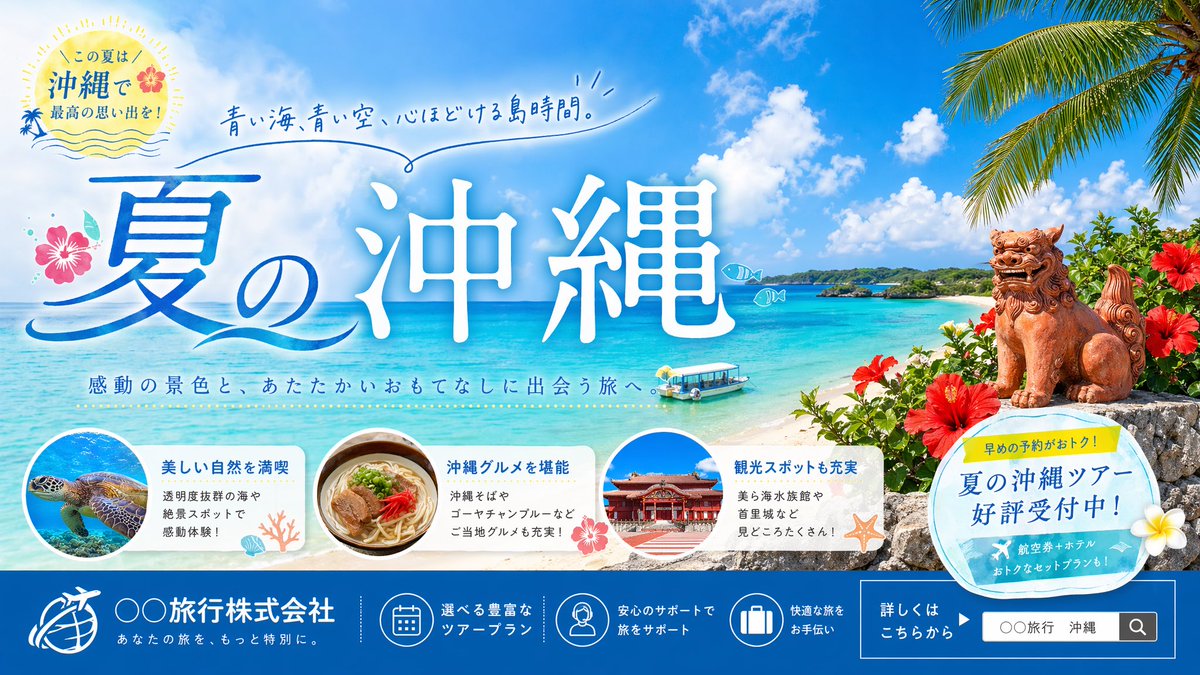
오키나와 여름 여행 배너
오키나와를 홍보하는 밝고 화려한 일본 여행사 배너입니다. 여름 여행 광고, 웹사이트 메인 이미지, 캠페인 마케팅 등에 적합합니다.
이것은 제품 및 상업 에 대한 GPT Image 2 프롬프트 사례입니다. 아래의 복사 가능한 프롬프트를 사용하여 유사한 시각 자료를 생성하고, 재사용하기 전에 Awesome GPT Image 2 Prompts 의 저작자 표시 및 상업적 사용 권한을 검토하십시오.
전체 프롬프트 세트가 필요하신가요? 다음을 사용하세요. 제품 및 상업 더 많은 관련 예시를 보려면 주제 허브를 열거나 다음을 열어보세요. GPT Image 2 프롬프트 카탈로그 전체 예제 색인, 재사용 가능한 구조 및 출처 표기는 다음을 참조하십시오.
Free 1K preview
Generate one preview image instantly, no sign-up required.
3306/4000
프롬프트
복사 준비 프롬프트
Create a polished Japanese travel agency summer banner ad for Okinawa in a bright, inviting commercial style. Use a wide horizontal layout with a vivid tropical beach scene as the full background: crystal-clear turquoise ocean, white sand shoreline, small green island in the mid distance, deep blue sky with large fluffy white clouds, and palm leaves hanging in from the upper right corner. On the right foreground, place 1 traditional Okinawan shisa lion-dog statue sitting on a stone wall, surrounded by red hibiscus flowers and lush tropical greenery. Near the water, include 1 small glass-bottom sightseeing boat floating close to shore. Add 2 small simple fish doodle icons over the sea.

Make the typography the hero element. Across the left-center to center, place very large Japanese calligraphic headline text reading {argument name="headline text" default="夏の沖縄"}, with a blue gradient and white glow or soft outline, highly legible and elegant. Above it, add a handwritten-style Japanese catchphrase in blue reading {argument name="catchphrase" default="青い海、青い空、心ほどける島時間。"} with a loose underline flourish. Under the main headline, add a smaller Japanese subheading reading {argument name="subheading" default="感動の景色と、あたたかいおもてなしに出会う旅へ。"}.

In the upper left, add a circular summer badge with a sunburst feel, soft cream background, tiny wave lines, a small hibiscus accent, and Japanese text reading "この夏は 沖縄で 最高の思い出を!". Decorate the headline area with 1 pink hibiscus flower on the left and subtle ocean-wave graphic strokes.

Along the lower middle, place 3 rounded white feature cards in a row, partially overlapping the beach scene. Count and depict all 3 cards clearly: the first card shows a sea turtle swimming underwater in a circular photo, with Japanese heading "美しい自然を満喫" and smaller body text about transparent waters and scenic spots; the second card shows a bowl of Okinawa soba in a circular photo, with heading "沖縄グルメを堪能" and smaller body text mentioning 沖縄そば and ゴーヤチャンプルー; the third card shows Shuri Castle in a circular photo, with heading "観光スポットも充実" and smaller body text mentioning 美ら海水族館 and 首里城. Add small coral, shell, hibiscus, and starfish decorations around these cards.

On the right lower-middle, overlap the beach with 1 tilted circular promotional sticker in pale blue and cream, with a small yellow tab on top. The yellow tab says "早めの予約がおトク!" and the main circle says "夏の沖縄ツアー 好評受付中!". Add a white plumeria flower accent near the sticker.

Create a full-width dark blue footer bar across the bottom. On the left side of the footer, place a white travel company logo icon and company name text {argument name="company name" default="〇〇 Travel Co., Ltd."}, with a smaller Japanese tagline below. Across the center of the footer, place exactly 3 circular line-icons with short Japanese captions: 1 calendar icon for tour plans, 1 support staff icon for travel assistance, and 1 suitcase icon for comfortable travel help. On the right side of the footer, add a boxed CTA area with Japanese text "詳しくはこちらから" and a mock search field containing {argument name="search text" default="〇〇 Travel Okinawa"} plus a search icon. Overall design should feel premium, cheerful, summery, and highly marketable, like a professional Japanese web banner or travel campaign visual.
프롬프트 변수
프롬프트에 있는 편집 가능한 인수 자리 표시자와 해당 기본값입니다.
변하기 쉬운
headline text
기본
夏の沖縄
변하기 쉬운
catchphrase
기본
青い海、青い空、心ほどける島時間。
변하기 쉬운
subheading
기본
感動の景色と、あたたかいおもてなしに出会う旅へ。
변하기 쉬운
company name
기본
〇〇 Travel Co., Ltd.
변하기 쉬운
search text
기본
〇〇 Travel Okinawa
Best for
- - 제품 및 상업 visual exploration
- - Image generation and reference-image edits
- - Reusable briefs that keep source attribution visible
Change these parts
- - Subject, product, character, or scene
- - Aspect ratio, camera, lighting, and background
- - Brand, text, color, and output constraints
Recommended model and settings
- - Model: gpt-image-2
- - Input mode: 텍스트 to 이미지
- - Aspect ratio: source
- - Commercial status: review original source
How to use this prompt
- 1. Copy the prompt and preserve its structure for the first test.
- 2. Replace the subject, context, and publishing channel.
- 3. Change one camera, lighting, or style variable per iteration.
- 4. Inspect the output, source, text, and rights before reuse.
Limitations, source, and reuse cautions
- - Generated output is an editable draft, not factual, legal, or rights evidence.
- - Review the linked source, people, brands, logos, text, and third-party media before commercial use.
Awesome GPT Image 2 Prompts 에서 가져왔습니다. 출처 표기가 필요합니다. 상업적 이용 가능 여부는 allowed 입니다. 유료 사용 전에 원저작권 정보를 확인하세요.
이 범주에 속하는 더 많은 사례
범주, 입력 방식 호환성, 품질 및 위험도에 따라 우선순위가 정해집니다.






재사용 및 출처 참고 사항
사례를 미리 확인한 후 이 안내 메시지를 안전하게 사용하십시오.
- 1.프롬프트를 복사하거나 Dovoo의 생성 버튼을 사용하여 직접 엽니다.
- 2.사용 사례에 맞게 변수, 화면 비율 및 참조 이미지를 조정하십시오.
- 3.출판 또는 유료 사용 전에 저작권, 출처 표기 요건 및 브랜드 또는 초상권 관련 위험을 확인하십시오.