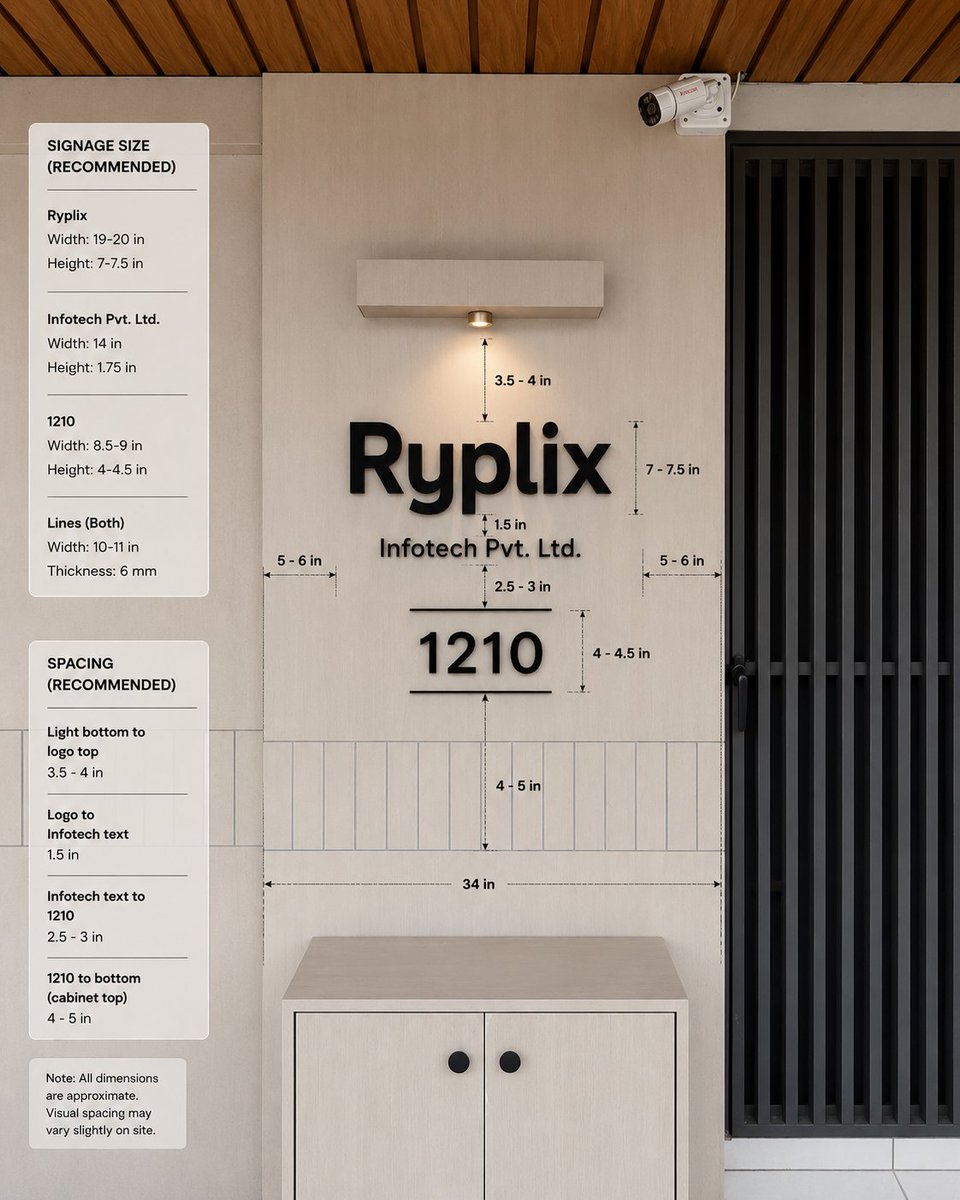
사무실 간판 크기 모형
고객 승인을 위해 치수 안내 및 권장 크기 참고 사항이 포함된 실사 같은 사무실 입구 간판 사양 목업입니다.
이것은 제품 및 상업 에 대한 GPT Image 2 프롬프트 사례입니다. 아래의 복사 가능한 프롬프트를 사용하여 유사한 시각 자료를 생성하고, 재사용하기 전에 Awesome GPT Image 2 Prompts 의 저작자 표시 및 상업적 사용 권한을 검토하십시오.
전체 프롬프트 세트가 필요하신가요? 다음을 사용하세요. 제품 및 상업 더 많은 관련 예시를 보려면 주제 허브를 열거나 다음을 열어보세요. GPT Image 2 프롬프트 카탈로그 전체 예제 색인, 재사용 가능한 구조 및 출처 표기는 다음을 참조하십시오.
Free 1K preview
Generate one preview image instantly, no sign-up required.
3653/4000
프롬프트
복사 준비 프롬프트
Goal: Create a realistic interior wall signage mockup with measurement annotations for a reception/office entrance, showing recommended dimensions and spacing for a company sign.

Canvas: Square 1:1 image, photorealistic architectural visualization, front-facing view with slight natural perspective. Use a warm modern palette: light beige wall panels, pale wood cabinet, black signage, black metal door grille, and wood slat ceiling.

Scene layout: Center the composition on a beige feature wall with a mounted sign. On the right, include a tall black vertical-slat door or gate occupying about one quarter of the image width. At the top right of the wall, add one small white CCTV security camera angled downward. At the top center, add one rectangular wall-mounted light fixture with a single warm downlight. At the bottom center, place one light-wood cabinet with two doors and exactly two round black knobs. Across the lower wall behind the sign, include a horizontal band of narrow vertical rectangular tiles. The ceiling at the very top should show warm brown wooden slats running diagonally.

Main sign content: Use raised matte-black 3D letters on the wall. The largest line reads {argument name="company logo text" default="Ryplix"}. Directly underneath, centered smaller text reads {argument name="company legal text" default="Infotech Pvt. Ltd."}. Below that, centered, display a large number {argument name="unit number" default="1210"}, with one thin horizontal line above it and one thin horizontal line below it. Keep all sign elements black with soft realistic shadows.

Measurement annotations: Add fine black dimension arrows, dashed guide lines, and small technical labels around the sign. Include exactly 10 visible measurement labels in the main wall area: “3.5 - 4 in” from the bottom of the light to the logo, “7 - 7.5 in” beside the logo height, “1.5 in” between the logo and legal text, “2.5 - 3 in” between legal text and the number, “4 - 4.5 in” beside the number height, “4 - 5 in” from the number to the cabinet-top tile area, “34 in” as a long horizontal width guide above the cabinet, plus two side gap labels “5 - 6 in” on the left and “5 - 6 in” on the right.

Left information panels: Add exactly three rounded white cards stacked vertically along the left side of the image. Card 1 title: “SIGNAGE SIZE (RECOMMENDED)”. It contains exactly three item groups separated by thin horizontal rules: “Ryplix” with “Width: 19-20 in” and “Height: 7-7.5 in”; “Infotech Pvt. Ltd.” with “Width: 14 in” and “Height: 1.75 in”; “1210” with “Width: 8.5-9 in” and “Height: 4-4.5 in”; then “Lines (Both)” with “Width: 10-11 in” and “Thickness: 6 mm”. Card 2 title: “SPACING (RECOMMENDED)”. It contains exactly four item groups separated by thin rules: “Light bottom to logo top” with “3.5 - 4 in”; “Logo to Infotech text” with “1.5 in”; “Infotech text to 1210” with “2.5 - 3 in”; “1210 to bottom (cabinet top)” with “4 - 5 in”. Card 3 is a small note card reading: “Note: All dimensions are approximate. Visual spacing may vary slightly on site.”

Visual style: Clean modern office design, natural lighting, realistic materials, subtle shadows, crisp legible typography, professional signage installation guide aesthetic. Use black sans-serif text for all labels and cards. The measurement lines should look like a design-spec overlay, not handwritten.

Constraints: Keep the image free of people and clutter. Do not add extra logos, extra cards, extra measurement labels, or additional decorative objects. Maintain accurate alignment: logo, legal text, unit number, light, and cabinet should all be centered on the same vertical axis.
프롬프트 변수
프롬프트에 있는 편집 가능한 인수 자리 표시자와 해당 기본값입니다.
변하기 쉬운
company logo text
기본
Ryplix
변하기 쉬운
company legal text
기본
Infotech Pvt. Ltd.
변하기 쉬운
unit number
기본
1210
Best for
- - 제품 및 상업 visual exploration
- - Image generation and reference-image edits
- - Reusable briefs that keep source attribution visible
Change these parts
- - Subject, product, character, or scene
- - Aspect ratio, camera, lighting, and background
- - Brand, text, color, and output constraints
Recommended model and settings
- - Model: gpt-image-2
- - Input mode: 텍스트 to 이미지
- - Aspect ratio: source
- - Commercial status: review original source
How to use this prompt
- 1. Copy the prompt and preserve its structure for the first test.
- 2. Replace the subject, context, and publishing channel.
- 3. Change one camera, lighting, or style variable per iteration.
- 4. Inspect the output, source, text, and rights before reuse.
Limitations, source, and reuse cautions
- - Generated output is an editable draft, not factual, legal, or rights evidence.
- - Review the linked source, people, brands, logos, text, and third-party media before commercial use.
Awesome GPT Image 2 Prompts 에서 가져왔습니다. 출처 표기가 필요합니다. 상업적 이용 가능 여부는 allowed 입니다. 유료 사용 전에 원저작권 정보를 확인하세요.
이 범주에 속하는 더 많은 사례
범주, 입력 방식 호환성, 품질 및 위험도에 따라 우선순위가 정해집니다.






재사용 및 출처 참고 사항
사례를 미리 확인한 후 이 안내 메시지를 안전하게 사용하십시오.
- 1.프롬프트를 복사하거나 Dovoo의 생성 버튼을 사용하여 직접 엽니다.
- 2.사용 사례에 맞게 변수, 화면 비율 및 참조 이미지를 조정하십시오.
- 3.출판 또는 유료 사용 전에 저작권, 출처 표기 요건 및 브랜드 또는 초상권 관련 위험을 확인하십시오.