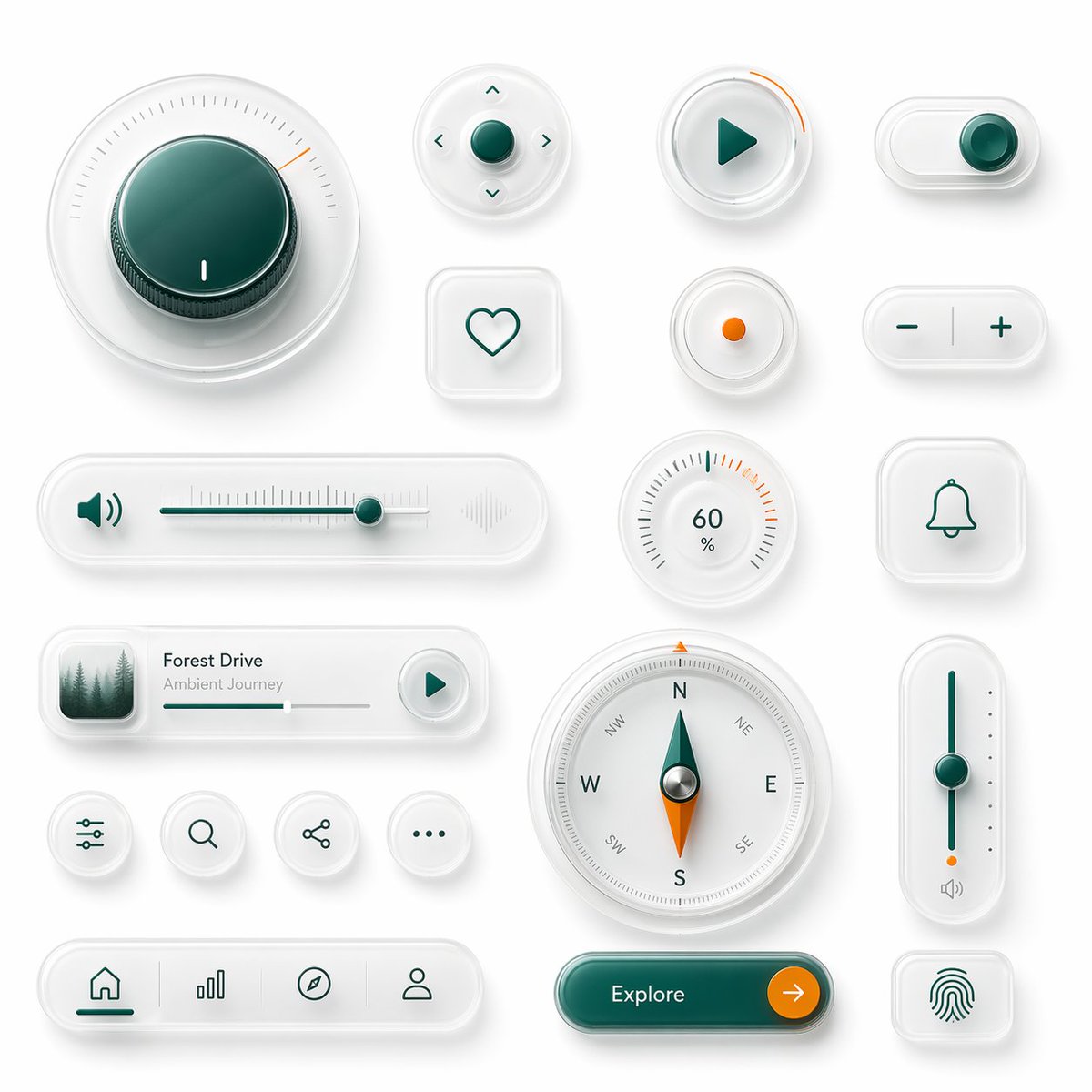
뉴모픽 글래스 UI 키트 보드
이 프롬프트는 미래지향적인 앱 UI 구성 요소 또는 스마트 기기 대시보드 컨셉을 선보이기에 이상적인 18개의 고급 뉴모픽 인터페이스 컨트롤로 구성된 세련된 보드를 생성합니다.
이것은 제품 및 상업 에 대한 GPT Image 2 프롬프트 사례입니다. 아래의 복사 가능한 프롬프트를 사용하여 유사한 시각 자료를 생성하고, 재사용하기 전에 Awesome GPT Image 2 Prompts 의 저작자 표시 및 상업적 사용 권한을 검토하십시오.
전체 프롬프트 세트가 필요하신가요? 다음을 사용하세요. 제품 및 상업 더 많은 관련 예시를 보려면 주제 허브를 열거나 다음을 열어보세요. GPT Image 2 프롬프트 카탈로그 전체 예제 색인, 재사용 가능한 구조 및 출처 표기는 다음을 참조하십시오.
Free 1K preview
Generate one preview image instantly, no sign-up required.
2804/4000
프롬프트
복사 준비 프롬프트
A clean neumorphic UI component showcase on a soft light gray background, arranged as a balanced design board of 18 separate interface elements with subtle shadows, frosted translucent white plastic surfaces, rounded corners, and glossy glass-like depth. Use a premium minimal product-design aesthetic with white-on-white layering, soft ambient occlusion, delicate inner shadows, and a restrained accent palette of deep teal green and vivid orange. Include 18 distinct components: 1 large circular rotary knob in the upper left with a dark teal glossy center, fine radial tick marks, and a small orange position indicator; 1 small circular directional control pad with a teal center button and four tiny arrow icons around it; 1 circular play button with a teal triangle icon and a short orange progress arc on the rim; 1 horizontal pill toggle switch at the top right with a teal knob positioned to the right; 1 rounded square heart button with a simple teal outline heart; 1 small circular indicator button with a single orange dot in the center; 1 pill-shaped plus-minus control with a teal minus on the left and teal plus on the right separated by a vertical divider; 1 long horizontal volume slider with a teal speaker icon on the left, fine slider ticks, a teal track, a teal knob near the right side, and a faint waveform icon on the far right; 1 circular percentage dial showing 60% with radial ticks and a few orange highlight marks near the upper right; 1 rounded square bell notification button with a teal outline bell icon; 1 compact music player card with a small square album image of misty evergreen trees on the left, the title {argument name="track title" default="Forest Drive"}, the subtitle {argument name="track subtitle" default="Ambient Journey"}, a thin progress bar, and a circular play button on the right; 4 small circular utility icon buttons in one row showing sliders/settings, search, share, and ellipsis; 1 large circular compass with cardinal letters N, E, S, W plus diagonal labels, a teal-and-orange needle, and metallic center; 1 tall vertical slider on the right with a teal track, teal knob around the middle, small side dots, an orange accent near the bottom, and a tiny speaker icon below; 1 bottom navigation bar in a long rounded pill containing 4 icons separated by subtle dividers: home, bar chart, compass, and user profile, with the home tab active in teal; 1 large rounded pill call-to-action button in glossy dark teal labeled {argument name="button text" default="Explore"} with a circular orange arrow button attached on the right; and 1 rounded square fingerprint button with a teal fingerprint icon. Keep spacing generous, alignment grid-based, and the overall render highly polished, tactile, and futuristic, like a luxury smart-device UI kit mockup.프롬프트 변수
프롬프트에 있는 편집 가능한 인수 자리 표시자와 해당 기본값입니다.
변하기 쉬운
track title
기본
Forest Drive
변하기 쉬운
track subtitle
기본
Ambient Journey
변하기 쉬운
button text
기본
Explore
Best for
- - 제품 및 상업 visual exploration
- - Image generation and reference-image edits
- - Reusable briefs that keep source attribution visible
Change these parts
- - Subject, product, character, or scene
- - Aspect ratio, camera, lighting, and background
- - Brand, text, color, and output constraints
Recommended model and settings
- - Model: gpt-image-2
- - Input mode: 텍스트 to 이미지
- - Aspect ratio: source
- - Commercial status: review original source
How to use this prompt
- 1. Copy the prompt and preserve its structure for the first test.
- 2. Replace the subject, context, and publishing channel.
- 3. Change one camera, lighting, or style variable per iteration.
- 4. Inspect the output, source, text, and rights before reuse.
Limitations, source, and reuse cautions
- - Generated output is an editable draft, not factual, legal, or rights evidence.
- - Review the linked source, people, brands, logos, text, and third-party media before commercial use.
Awesome GPT Image 2 Prompts 에서 가져왔습니다. 출처 표기가 필요합니다. 상업적 이용 가능 여부는 allowed 입니다. 유료 사용 전에 원저작권 정보를 확인하세요.
이 범주에 속하는 더 많은 사례
범주, 입력 방식 호환성, 품질 및 위험도에 따라 우선순위가 정해집니다.






재사용 및 출처 참고 사항
사례를 미리 확인한 후 이 안내 메시지를 안전하게 사용하십시오.
- 1.프롬프트를 복사하거나 Dovoo의 생성 버튼을 사용하여 직접 엽니다.
- 2.사용 사례에 맞게 변수, 화면 비율 및 참조 이미지를 조정하십시오.
- 3.출판 또는 유료 사용 전에 저작권, 출처 표기 요건 및 브랜드 또는 초상권 관련 위험을 확인하십시오.