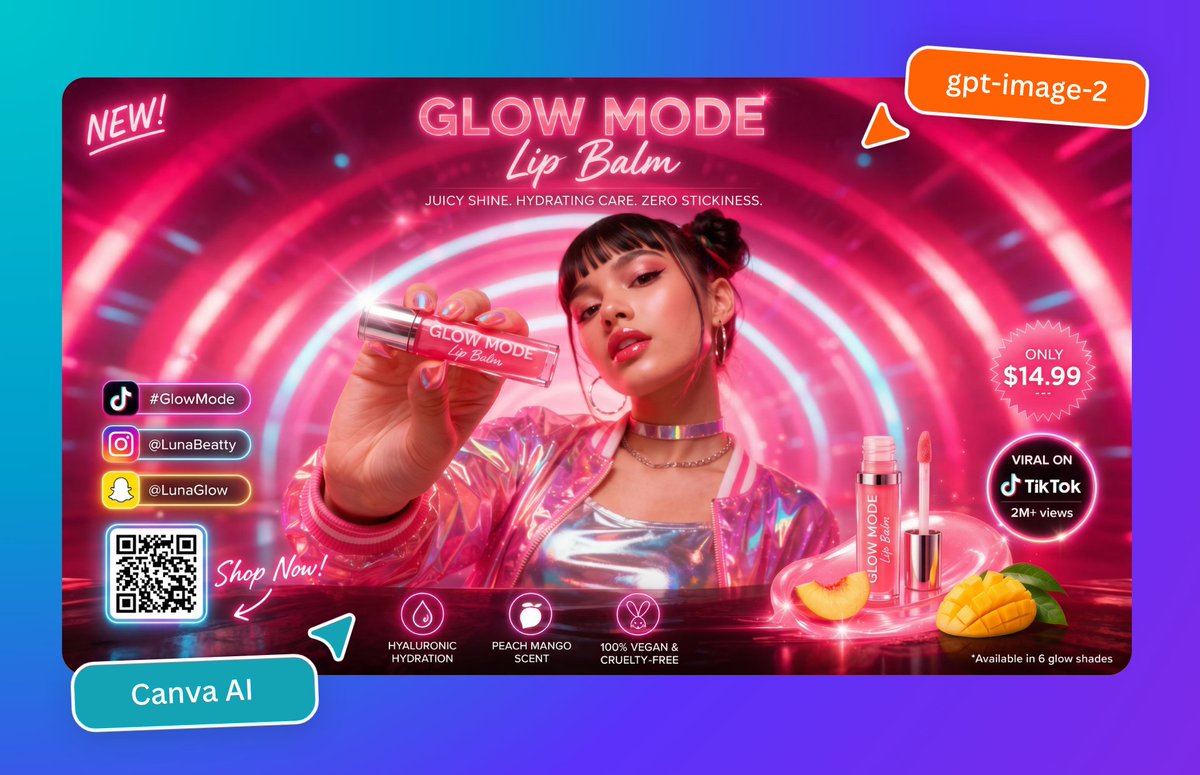
네온 립밤 출시 광고
생동감 넘치는 미래지향적 뷰티 광고 포스터로, 빛나는 립밤을 홍보하는 데 적합하며 소셜 미디어 캠페인, 제품 출시 및 Canva 스타일의 편집 가능한 프로모션 디자인에 활용할 수 있습니다.
이것은 제품 및 상업 에 대한 GPT Image 2 프롬프트 사례입니다. 아래의 복사 가능한 프롬프트를 사용하여 유사한 시각 자료를 생성하고, 재사용하기 전에 Awesome GPT Image 2 Prompts 의 저작자 표시 및 상업적 사용 권한을 검토하십시오.
전체 프롬프트 세트가 필요하신가요? 다음을 사용하세요. 제품 및 상업 더 많은 관련 예시를 보려면 주제 허브를 열거나 다음을 열어보세요. GPT Image 2 프롬프트 카탈로그 전체 예제 색인, 재사용 가능한 구조 및 출처 표기는 다음을 참조하십시오.
Free 1K preview
Generate one preview image instantly, no sign-up required.
2543/4000
프롬프트
복사 준비 프롬프트
Create a glossy, hyper-saturated social media ad poster for a futuristic beauty product launch, designed like a Canva marketing graphic. The composition is a single widescreen promotional banner centered on a cyan-to-purple gradient background, with rounded corners and a vivid neon pink color palette. Inside the banner, show a young woman from the chest up in a glowing sci-fi tunnel made of concentric pink and white light rings. Show every face clearly with natural, detailed facial features, but her hair is styled in two small buns, and she wears hoop earrings, layered chain necklaces, a metallic silver top, and an iridescent pink holographic jacket. She extends one hand toward the camera holding a clear lip balm tube close to the lens, creating strong foreground perspective. The tube label reads “GLOW MODE Lip Balm.” At the top center, large neon headline text reads “GLOW MODE” with a script subtitle “Lip Balm,” and below it a smaller line reads “JUICY SHINE. HYDRATING CARE. ZERO STICKINESS.” In the upper left corner, add a handwritten neon note reading “NEW!” In the upper right corner, place an orange rounded sticker with white text reading “gpt-image-2,” plus a small orange pointer tab beneath it. On the right side of the banner, include 2 circular callout badges: a pink starburst badge that says “ONLY $14.99” and a black glowing circular badge that says “VIRAL ON TikTok 2M+ views.” At the lower right, show 2 product display elements: one upright open lip balm tube with wand applicator beside it, and one whole sliced peach plus one cut mango half with green leaves, all sitting on a glossy reflective surface with pink light swirls. Along the lower center, add 3 feature icons with labels: a droplet icon labeled “HYALURONIC HYDRATION,” a fruit icon labeled “PEACH MANGO SCENT,” and a bunny icon labeled “100% VEGAN & CRUELTY-FREE.” In the lower left inside the banner, add a vertical stack of 3 social buttons with platform icons and handles: TikTok with “#GlowMode,” Instagram with “@LunaBeatty,” and Snapchat with “@LunaGlow.” Beneath them place 1 glowing QR code card, and next to it handwritten script text reading “Shop Now!” with an arrow pointing toward the QR code. Outside the banner at the bottom left, place a tilted teal rounded label reading “Canva AI,” with a small teal paper-plane style accent nearby. Add glossy reflections, lens flares, bloom, neon rim lighting, sparkles, and polished ad-design styling throughout, with crisp commercial product photography mixed with futuristic graphic design.
Best for
- - 제품 및 상업 visual exploration
- - Image generation and reference-image edits
- - Reusable briefs that keep source attribution visible
Change these parts
- - Subject, product, character, or scene
- - Aspect ratio, camera, lighting, and background
- - Brand, text, color, and output constraints
Recommended model and settings
- - Model: gpt-image-2
- - Input mode: 텍스트 to 이미지
- - Aspect ratio: source
- - Commercial status: review original source
How to use this prompt
- 1. Copy the prompt and preserve its structure for the first test.
- 2. Replace the subject, context, and publishing channel.
- 3. Change one camera, lighting, or style variable per iteration.
- 4. Inspect the output, source, text, and rights before reuse.
Limitations, source, and reuse cautions
- - Generated output is an editable draft, not factual, legal, or rights evidence.
- - Review the linked source, people, brands, logos, text, and third-party media before commercial use.
Awesome GPT Image 2 Prompts 에서 가져왔습니다. 출처 표기가 필요합니다. 상업적 이용 가능 여부는 allowed 입니다. 유료 사용 전에 원저작권 정보를 확인하세요.
이 범주에 속하는 더 많은 사례
범주, 입력 방식 호환성, 품질 및 위험도에 따라 우선순위가 정해집니다.






재사용 및 출처 참고 사항
사례를 미리 확인한 후 이 안내 메시지를 안전하게 사용하십시오.
- 1.프롬프트를 복사하거나 Dovoo의 생성 버튼을 사용하여 직접 엽니다.
- 2.사용 사례에 맞게 변수, 화면 비율 및 참조 이미지를 조정하십시오.
- 3.출판 또는 유료 사용 전에 저작권, 출처 표기 요건 및 브랜드 또는 초상권 관련 위험을 확인하십시오.