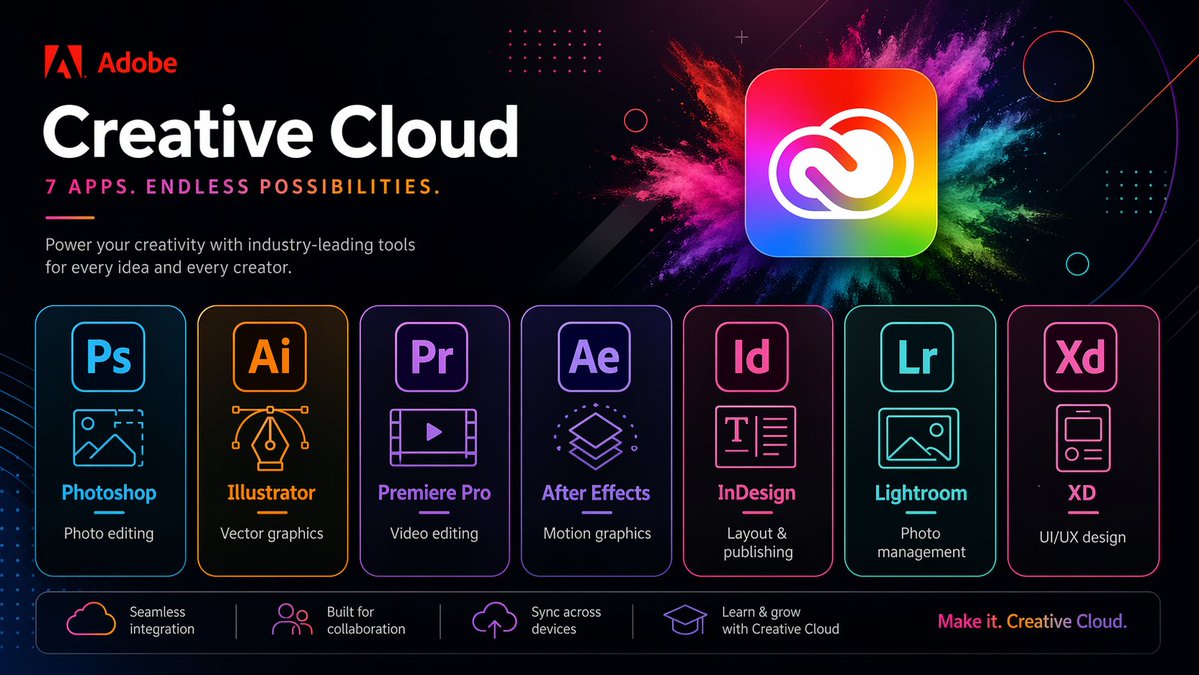
네온 크리에이티브 클라우드 프로모션 포스터
세련된 어도비 스타일의 마케팅 포스터로, 미래적인 네온 레이아웃을 통해 7가지 크리에이티브 클라우드 앱을 선보입니다. 브랜드 기술 광고나 앱 제품군 프로모션을 제작하는 데 이상적입니다.
이것은 제품 및 상업 에 대한 GPT Image 2 프롬프트 사례입니다. 아래의 복사 가능한 프롬프트를 사용하여 유사한 시각 자료를 생성하고, 재사용하기 전에 Awesome GPT Image 2 Prompts 의 저작자 표시 및 상업적 사용 권한을 검토하십시오.
전체 프롬프트 세트가 필요하신가요? 다음을 사용하세요. 제품 및 상업 더 많은 관련 예시를 보려면 주제 허브를 열거나 다음을 열어보세요. GPT Image 2 프롬프트 카탈로그 전체 예제 색인, 재사용 가능한 구조 및 출처 표기는 다음을 참조하십시오.
Free 1K preview
Generate one preview image instantly, no sign-up required.
Free text preview doesn’t preserve reference-image consistency.
4000/4000
프롬프트
복사 준비 프롬프트
{
  "type": "neon promotional tech poster",
  "brand": {
    "name": "Adobe",
    "logoPosition": "top left"
  },
  "scene": {
    "style": "Fashionable futuristic tech ad, dark mode, glossy neon UI, high contrast, high-end marketing visuals",
    "background": "Deep black to deep navy blue gradient, with subtle diagonals, subtle glows, dot matrix grid embellishments, thin circular outlines, tiny spark particles and abstract geometric overlays",
    "accentEffect": "Large multi-colored powder explosion effect behind the main app icon, blending magenta, pink, purple, blue, cyan, green and yellow"
  },
  "text": {
    "headline": "Creative Cloud",
    "subheadline": "Premiere Pro",
    "body": "Empower every idea and creator with industry-leading tools.",
    "footerTagline": "Create endlessly. Creative Cloud."
  },
  "layout": {
    "sections": [
      {
        "title": "app cards",
        "position": "top left",
        "count": 3,
        "labels": [
          "Photoshop",
          "Creative Cloud",
          "Premiere Pro"
        ]
      },
      {
        "title": "feature strip",
        "position": "bottom bar",
        "count": 1,
        "labels": [
          "Seamless integration"
        ]
      },
      {
        "title": "Application card",
        "position": "Middle row",
        "count": 7,
        "labels": [
          "Photoshop",
          "Illustrator",
          "Premiere Pro",
          "After Effects",
          "InDesign",
          "Lightroom",
          "XD"
        ]
      },
      {
        "title": "Function bar",
        "position": "Bottom",
        "count": 4,
        "labels": [
          "Seamless integration",
          "Built for collaboration",
          "Cross-device sync",
          "Learn and grow with Creative Cloud"
        ]
      }
    ],
    "appCardArrangement": "Seven evenly distributed rounded rectangle cards, arranged horizontally in the lower center",
    "footerTaglinePosition": "Bottom right corner"
  },
  "objects": {
    "mainIcon": {
      "shape": "Rounded square app icon",
      "colors": "Rainbow gradient fill with a white Creative Cloud logo",
      "position": "Top right corner",
      "glow": "Soft outer glow"
    },
    "appCards": [
      {
        "code": "Ps",
        "name": "Photoshop",
        "borderColor": "Electric blue",
        "icon": "Image frame with mountains and dashed crop corners",
        "description": "Photo editing"
      },
      {
        "code": "Ai",
        "name": "Illustrator",
        "borderColor": "orange",
        "icon": "Vector pen tip with Bezier curve handles",
        "description": "Vector graphics"
      },
      {
        "code": "Pr",
        "name": "Premiere Pro",
        "borderColor": "Violet",
        "icon": "Video frame with a play button",
        "description": "Video editing"
      },
      {
        "code": "Ae",
        "name": "After Effects",
        "borderColor": "Purple",
        "icon": "Stacked motion graphics layers",
        "description": "Motion graphics"
      },
      {
        "code": "Id",
        "name": "InDesign",
        "borderColor": "Bright pink",
        "icon": "Text layout page",
        "description": "Typesetting and Publishing"
      },
      {
        "code": "Lr",
        "name": "Lightroom",
        "borderColor": "Cyan",
        "icon": "Photo Landscape Frames",
        "description": "Photo Management"
      },
      {
        "code": "Xd",
        "name": "XD",
        "borderColor": "Pink",
        "icon": "Mobile App Wireframe Cards",
        "description": "UI/UX Design"
      }
    ],
    "featureBar": [
      {
        "icon": "Cloud outline",
        "text": "Seamless integration"
      },
      {
        "icon": "People icon",
        "text": "Built for collaboration"
      },
      {
        "icon": "Upload to the cloud",
        "text": "Cross-device sync"
      },
      {
        "icon": "Graduation cap",
        "text": "Learn and grow with Creative Cloud"
      }
    ]
  },
  "rendering": {
    "camera": "Front view of a poster",
    "composition": "Concise and centered business layout",
    "lighting": "Neon edge lighting and soft glow",
    "finish": "Clear vector text blending effects, exquisite advertising aesthetics, ultra-sharp typography"
  }
}
Best for
- - 제품 및 상업 visual exploration
- - Image generation and reference-image edits
- - Reusable briefs that keep source attribution visible
Change these parts
- - Subject, product, character, or scene
- - Aspect ratio, camera, lighting, and background
- - Brand, text, color, and output constraints
Recommended model and settings
- - Model: gpt-image-2
- - Input mode: 이미지 to 이미지
- - Aspect ratio: source
- - Commercial status: review original source
How to use this prompt
- 1. Copy the prompt and preserve its structure for the first test.
- 2. Replace the subject, context, and publishing channel.
- 3. Change one camera, lighting, or style variable per iteration.
- 4. Inspect the output, source, text, and rights before reuse.
Limitations, source, and reuse cautions
- - Generated output is an editable draft, not factual, legal, or rights evidence.
- - Review the linked source, people, brands, logos, text, and third-party media before commercial use.
Awesome GPT Image 2 Prompts 에서 가져왔습니다. 출처 표기가 필요합니다. 상업적 이용 가능 여부는 allowed 입니다. 유료 사용 전에 원저작권 정보를 확인하세요.
이 범주에 속하는 더 많은 사례
범주, 입력 방식 호환성, 품질 및 위험도에 따라 우선순위가 정해집니다.






재사용 및 출처 참고 사항
사례를 미리 확인한 후 이 안내 메시지를 안전하게 사용하십시오.
- 1.프롬프트를 복사하거나 Dovoo의 생성 버튼을 사용하여 직접 엽니다.
- 2.사용 사례에 맞게 변수, 화면 비율 및 참조 이미지를 조정하십시오.
- 3.출판 또는 유료 사용 전에 저작권, 출처 표기 요건 및 브랜드 또는 초상권 관련 위험을 확인하십시오.