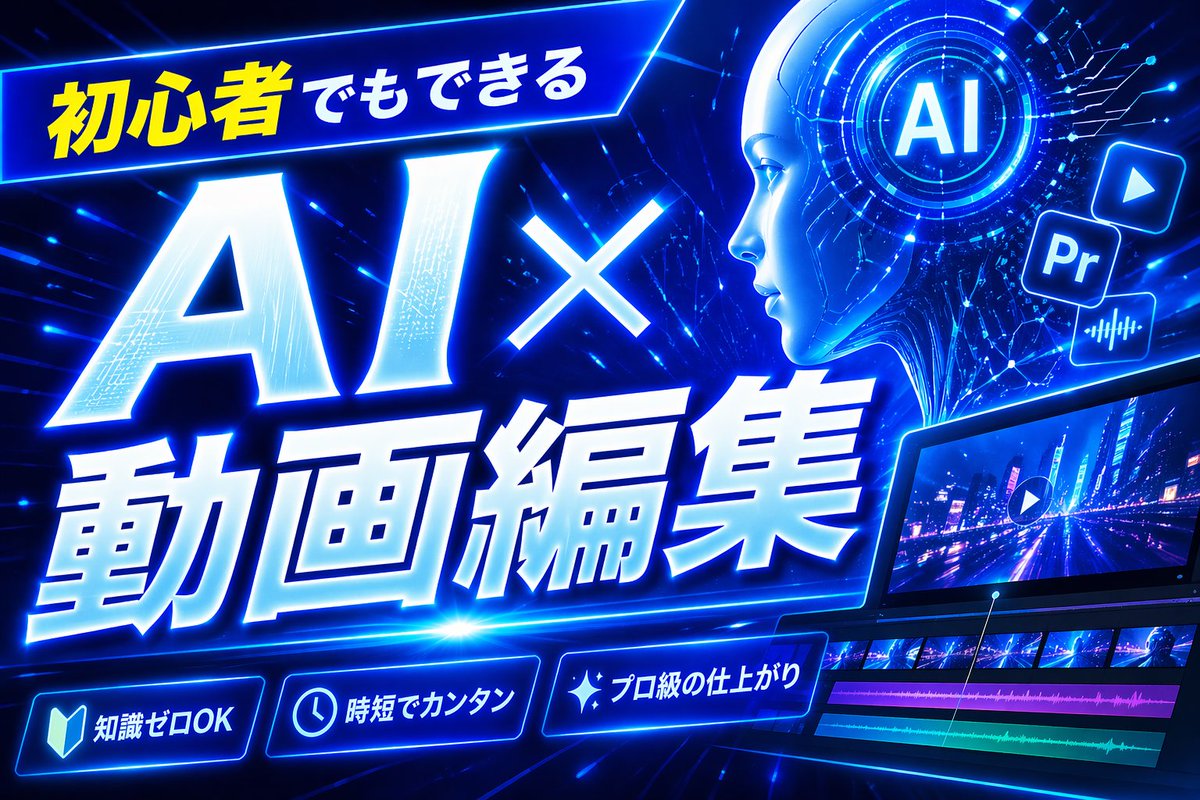
네온 블루 AI 비디오 편집 썸네일
인공지능 기반 영상 편집 튜토리얼에 적합한, 시선을 사로잡는 미래지향적인 일본풍 유튜브 썸네일입니다. 초보자를 위한 기술 콘텐츠 및 크리에이터 콘텐츠에 이상적입니다.
이것은 그래픽 및 포스터 에 대한 GPT Image 2 프롬프트 사례입니다. 아래의 복사 가능한 프롬프트를 사용하여 유사한 시각 자료를 생성하고, 재사용하기 전에 Awesome GPT Image 2 Prompts 의 저작자 표시 및 상업적 사용 권한을 검토하십시오.
전체 프롬프트 세트가 필요하신가요? 다음을 사용하세요. 그래픽 및 포스터 더 많은 관련 예시를 보려면 주제 허브를 열거나 다음을 열어보세요. GPT Image 2 프롬프트 카탈로그 전체 예제 색인, 재사용 가능한 구조 및 출처 표기는 다음을 참조하십시오.
Free 1K preview
Generate one preview image instantly, no sign-up required.
Free text preview doesn’t preserve reference-image consistency.
1795/4000
프롬프트
복사 준비 프롬프트
Create a bold Japanese YouTube thumbnail for the theme {argument name="headline text" default="初心者でもできる AI×動画編集"}, in a futuristic neon-blue cyberpunk style. Use a wide 16:9 composition with a dark electric-blue background filled with glowing circuit lines, digital streaks, lens flares, and high-energy motion. Place a slanted glowing banner in the upper left containing the Japanese text {argument name="top banner text" default="初心者でもできる"}, with the first part in bright yellow and the rest in white. Make the main headline dominate the left and center: gigantic white glowing text “AI×” above even larger white glowing text “動画編集”, with thick blue neon outer glow, slight italic forward motion, beveled 3D shading, and dramatic perspective. In the upper right, add a circular holographic interface with the letters {argument name="ai badge text" default="AI"} in the center, surrounded by concentric rings and tiny HUD marks. Near it, include exactly 3 floating app-style icons: a play button icon, a square “Pr” icon, and an audio waveform icon, all glowing blue. Across the lower right, show a sleek angled video editing monitor displaying a neon city night road scene with a play symbol overlay; beneath the preview, include a timeline with exactly 4 visible tracks: 2 rows of video thumbnails and 2 colored audio bars, one magenta and one cyan-green. Along the bottom, add exactly 3 glowing rounded feature badges with icons and Japanese text: a book icon with “知識ゼロOK”, a clock icon with “時短でカンタン”, and a sparkle icon with “プロ級の仕上がり”. Add a tall solid blue vertical rectangle near the top center-right as a placeholder block. Overall design should feel dynamic, high-contrast, polished, techy, and optimized for maximum click-through as a modern AI and video-editing tutorial thumbnail.프롬프트 변수
프롬프트에 있는 편집 가능한 인수 자리 표시자와 해당 기본값입니다.
변하기 쉬운
headline text
기본
初心者でもできる AI×動画編集
변하기 쉬운
top banner text
기본
初心者でもできる
변하기 쉬운
ai badge text
기본
AI
Best for
- - 그래픽 및 포스터 visual exploration
- - Image generation and reference-image edits
- - Reusable briefs that keep source attribution visible
Change these parts
- - Subject, product, character, or scene
- - Aspect ratio, camera, lighting, and background
- - Brand, text, color, and output constraints
Recommended model and settings
- - Model: gpt-image-2
- - Input mode: 이미지 to 이미지
- - Aspect ratio: source
- - Commercial status: review original source
How to use this prompt
- 1. Copy the prompt and preserve its structure for the first test.
- 2. Replace the subject, context, and publishing channel.
- 3. Change one camera, lighting, or style variable per iteration.
- 4. Inspect the output, source, text, and rights before reuse.
Limitations, source, and reuse cautions
- - Generated output is an editable draft, not factual, legal, or rights evidence.
- - Review the linked source, people, brands, logos, text, and third-party media before commercial use.
Awesome GPT Image 2 Prompts 에서 가져왔습니다. 출처 표기가 필요합니다. 상업적 이용 가능 여부는 allowed 입니다. 유료 사용 전에 원저작권 정보를 확인하세요.
이 범주에 속하는 더 많은 사례
범주, 입력 방식 호환성, 품질 및 위험도에 따라 우선순위가 정해집니다.






재사용 및 출처 참고 사항
사례를 미리 확인한 후 이 안내 메시지를 안전하게 사용하십시오.
- 1.프롬프트를 복사하거나 Dovoo의 생성 버튼을 사용하여 직접 엽니다.
- 2.사용 사례에 맞게 변수, 화면 비율 및 참조 이미지를 조정하십시오.
- 3.출판 또는 유료 사용 전에 저작권, 출처 표기 요건 및 브랜드 또는 초상권 관련 위험을 확인하십시오.